Dell Inspiron 20 3059 Quick User Guide - Windows 10
Summary
This technical documentation provides comprehensive documentation for the Product support and manuals Dell.com/support 1 Set up the stand. The document covers safety instructions and precautions, setup instructions, regulatory compliance information. Regulatory compliance and safety information are also provided. This documentation is intended for network engineers and administrators. The manual provides detailed guidance to ensure proper operation and maintenance of the Product support and manuals Dell.com/support 1 Set up the stand. Users will find step-by-step instructions and technical details necessary for effective utilization of the product.
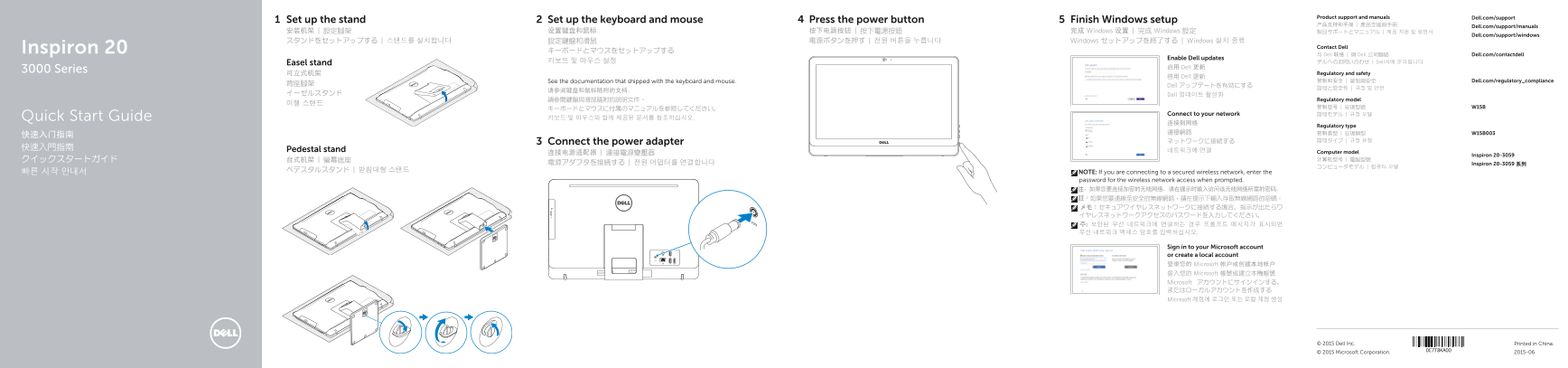
Page 1 Text Content
Product support and manuals Dell.com/support
2Set up the stand Set up the keyboard and mouse Press the power button Finish Windows setup
Dell.com/support/manuals
安装机架 | 設定腳架 设置键盘和鼠标 按下电源按钮 | 按下電源按鈕 完成 Windows 设置 | 完成 Windows 設定 製品サポートとマニュアル | 제품 지원 및 설명서
Dell.com/support/windows
スタンドをセットアップする | 스탠드를 설치합니다 設定鍵盤和滑鼠 電源ボタンを押す | 전원 버튼을 누릅니다 Windows セットアップを終了する | Windows 설치 종료
Inspiron 20 Contact Dell
与 Dell 联络 | 與 Dell 公司聯絡 Dell.com/contactdell
Enable Dell updates
키보드 및 마우스 설정 デルへのお問い合わせ | Dell사에 문의합니다
Easel stand
启用 Dell 更新
3000 Series
可立式机架 Regulatory and safety
啟用 Dell 更新
See the documentation that shipped with the keyboard and mouse. 管制和安全 | 管制與安全 Dell.com/regulatory_compliance
Dell アップデートを有効にする
イーゼルスタンド Dell 업데이트 활성화
請參閱鍵盤與滑鼠隨附的說明文件。 Regulatory model
Connect to your network 認可モデル | 규정 모델
Quick Start Guide 키보드 및 마우스와 함께 제공된 문서를 참조하십시오.
Regulatory type
Connect the power adapter ネットワークに接続する 認可タイプ | 규정 유형
Pedestal stand 네트워크에 연결
连接电源适配器 | 連接電源變壓器 Computer model
Inspiron 20-3059
電源アダプタを接続する | 전원 어댑터를 연결합니다 Inspiron 20-3059 系列
빠른 시작 안내서 NOTE: If you are connecting to a secured wireless network, enter the password for the wireless network access when prompted. 注:如果您要连接加密的无线网络,请在提示时输入访问该无线网络所需的密码。 註:如果您要連線至安全的無線網路,請在提示下輸入存取無線網路的密碼。 メモ:セキュアワイヤレスネットワークに接続する場合、指示が出たらワ イヤレスネットワークアクセスのパスワードを入力してください。 주: 보안된 무선 네트워크에 연결하는 경우 프롬프트 메시지가 표시되면 무선 네트워크 액세스 암호를 입력하십시오.
Sign in to your Microsoft account or create a local account 登录您的 Microsoft 帐户或创建本地帐户 登入您的 Microsoft 帳號或建立本機帳號 Microsoft アカウントにサインインする、 またはローカルアカウントを作成する Microsoft 계정에 로그인 또는 로컬 계정 생성
© 2015 Dell Inc. Printed in China.
© 2015 Microsoft Corporation. 2015-06
Page Summary Contents For Dell Inspiron 20 3059 Quick User Guide - Windows 10
Manual Details
| Brand | Dell |
|---|---|
| Pages | 2 |
| File Size | 782.76 KB |
| Published | June 17, 2026 |
Enter the captcha to get the download link:

Frequently Asked Questions
How do I connect to a secured wireless network?
Enter the password for wireless network access when prompted.
How do I create recovery media?
In Windows search, type Recovery, click Create a recovery media, and follow on-screen instructions.
What is the tilt range of the stand?
The stand tilts between 5° and 40°.
What are the ports on the back of the device?
It has Network, HDMI-in, Audio-out, USB 2.0, USB 3.0, Headset, Optical drive (optional), and Power-adapter port.