Dell Inspiron 20 3052 Quick User Guide - Windows 7
Summary
Dell Inspiron 20 3000 Series all-in-one Quick Start Guide with dual stand options (easel/pedestal), multilingual setup covering keyboard/mouse, power cable, Windows setup, password configuration, Dell Help Documentation access, network connection, and features including microphone, camera, optical drive, USB ports, and tilt adjustment.
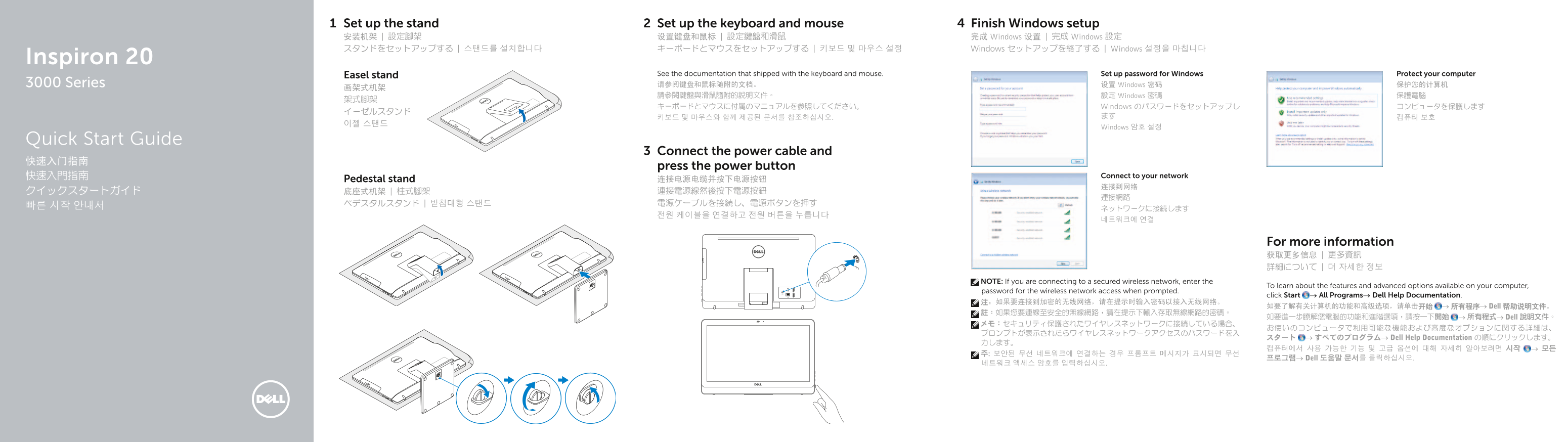
Page 1 Text Content
Set up the stand Set up the keyboard and mouse Finish Windows setup 安装机架 | 設定腳架 设置键盘和鼠标 | 設定鍵盤和滑鼠 完成 Windows 设置 | 完成 Windows 設定 スタンドをセットアップする | 스탠드를 설치합니다 キーボードとマウスをセットアップする | 키보드 및 마우스 설정 Windows セットアップを終了する | Windows 설정을 마칩니다
Inspiron 20
Easel stand See the documentation that shipped with the keyboard and mouse. Set up password for Windows Protect your computer 3000 Series 请参阅键盘和鼠标随附的文档。 设置 Windows 密码 保护您的计算机
請參閱鍵盤與滑鼠隨附的說明文件。 設定 Windows 密碼 保護電腦
キーボードとマウスに付属のマニュアルを参照してください。 Windows のパスワードをセットアップし コンピュータを保護します
Windows 암호 설정
Quick Start Guide
Connect the power cable and
press the power button
快速入門指南 Connect to your network
Pedestal stand 连接电源电缆并按下电源按钮
For more information 获取更多信息 | 更多資訊 詳細について | 더 자세한 정보
NOTE: If you are connecting to a secured wireless network, enter the
To learn about the features and advanced options available on your computer,
password for the wireless network access when prompted.
click Start → All Programs→ Dell Help Documentation.
如要了解有关计算机的功能和高级选项,请单击开始 → 所有程序→ Dell 帮助说明文件。
如要進一步瞭解您電腦的功能和進階選項,請按一下開始 → 所有程式→ Dell 說明文件。
スタート → すべてのプログラム→ Dell Help Documentation の順にクリックします。
프로그램→ Dell 도움말 문서를 클릭하십시오.
Page Summary Contents For Dell Inspiron 20 3052 Quick User Guide - Windows 7
Manual Details
| Brand | Dell |
|---|---|
| Pages | 2 |
| File Size | 397.04 KB |
| Published | July 03, 2026 |
Enter the captcha to get the download link:

Frequently Asked Questions
How do I start up the computer and connect it to the internet?
You must connect the power cable, press the power button, and then proceed to connect your device to the network.
What should I do if I am connecting to a secured wireless network?
When prompted during setup, you must enter the specific password required for the wireless network access.
Which dedicated ports are available for audio and various peripherals?
The unit includes two USB 3.0 ports, two USB 2.0 ports, a Headset port, an Audio-out port, and a Media card reader.