Dell Vostro 20-3052 Quick User Guide
Summary
This comprehensive guide is essential for new owners of your Dell computer. It provides step-by-step instructions covering initial setup, including connecting power, peripherals (keyboard/mouse), and networking. The manual details how to utilize all hardware features—from camera status lights and USB ports to speakers and optical drives—and guides users on critical tasks like establishing security passwords, signing into Microsoft accounts, backing up data, and recovering the system. Use this resource for effortless setup, feature mastery, and dedicated product support.
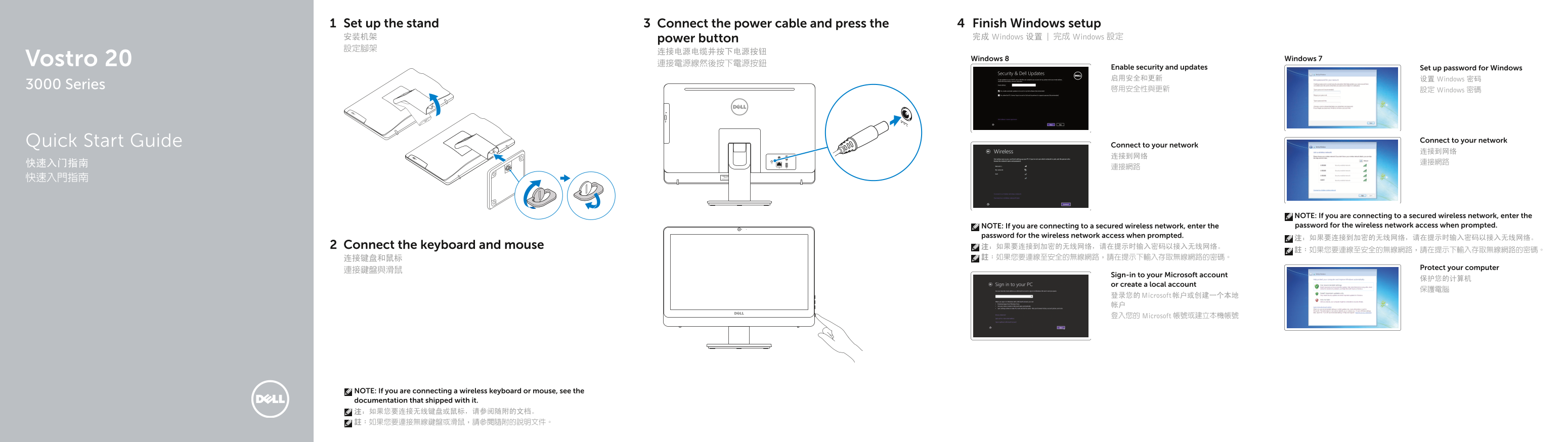
Page 1 Text Content
Set up the stand Connect the power cable and press the Finish Windows setup 安装机架 power button 完成 Windows 设置 | 完成 Windows 設定 設定腳架
Vostro 20 Windows 8 Windows 7
Enable security and updates Set up password for Windows 启用安全和更新 设置 Windows 密码
3000 Series
啟用安全性與更新 設定 Windows 密碼
Quick Start Guide Connect to your network
Connect to your network
NOTE: If you are connecting to a secured wireless network, enter the NOTE: If you are connecting to a secured wireless network, enter the password for the wireless network access when prompted.
password for the wireless network access when prompted.
Connect the keyboard and mouse 注:如果要连接到加密的无线网络,请在提示时输入密码以接入无线网络。
Protect your computer
Sign-in to your Microsoft account
or create a local account
登录您的 Microsoft 帐户或创建一个本地 帐户 登入您的 Microsoft 帳號或建立本機帳號
NOTE: If you are connecting a wireless keyboard or mouse, see the documentation that shipped with it. 注:如果您要连接无线键盘或鼠标,请参阅随附的文档。 註:如果您要連接無線鍵盤或滑鼠,請參閱隨附的說明文件。
Page Summary Contents For Dell Vostro 20-3052 Quick User Guide
Manual Details
| Brand | Dell |
|---|---|
| Pages | 2 |
| File Size | 1.12 MB |
| Published | June 23, 2026 |
Enter the captcha to get the download link:

Frequently Asked Questions
How do I connect the power?
Connect the power cable and press the power button.
What should I do if connecting to a secure Wi-Fi network?
Enter the password for the wireless network access when prompted.
Where can I find support or manuals?
Visit dell.com/support, or search your product features at dell.com/support/manuals.
How can I save my data if the computer needs recovery?
Use methods such as Dell Backup, recover, repair, or restore.