Dell Vostro 20-3055 Quick User Guide
Summary
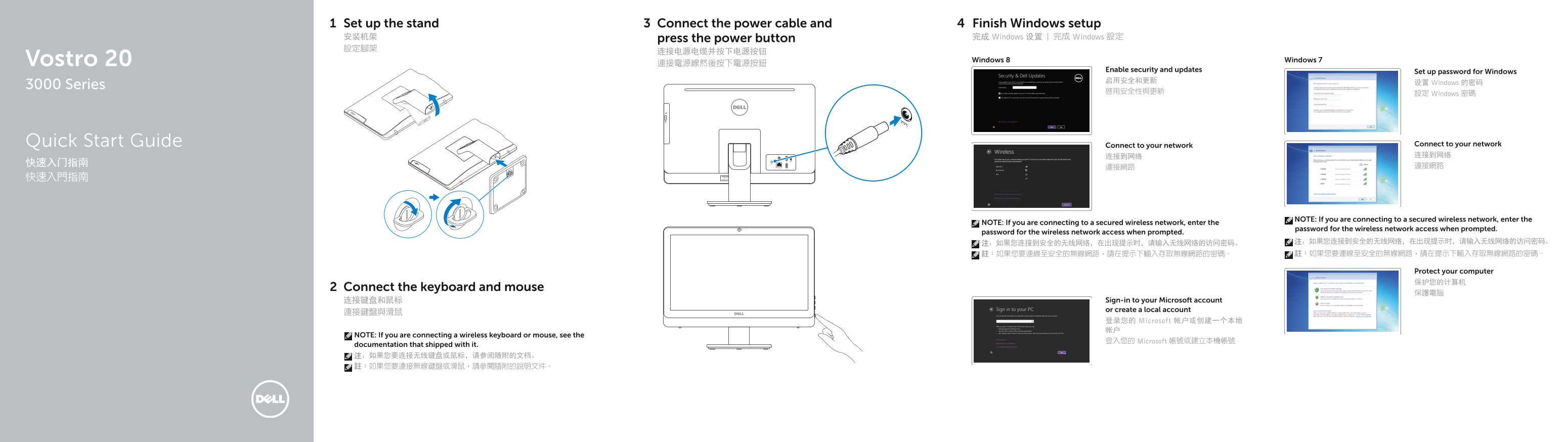
Dell Vostro 20 3000 Series Quick Start Guide. This multilingual all-in-one desktop setup guide covers stand installation, keyboard/mouse connection, power cable connection, Windows 8/7 setup including security and password configuration, and network connectivity. Features diagram showing camera, status light, microphone, optical drive, OSD buttons, speakers, HDMI, USB ports, and headset connector. Includes Dell support links and regulatory compliance references.
Page 1 Text Content
Set up the stand Connect the power cable and Finish Windows setup 安装机架 press the power button 完成 Windows 设置 | 完成 Windows 設定 設定腳架
Vostro 20 Windows 8 Windows 7
Enable security and updates Set up password for Windows 启用安全和更新 设置 Windows 的密码
3000 Series
啟用安全性與更新 設定 Windows 密碼
Quick Start Guide Connect to your network Connect to your network 连接到网络 连接到网络
NOTE: If you are connecting to a secured wireless network, enter the
NOTE: If you are connecting to a secured wireless network, enter the
password for the wireless network access when prompted.
password for the wireless network access when prompted.
Protect your computer 保护您的计算机
Connect the keyboard and mouse
连接键盘和鼠标 Sign-in to your Microsoft account or create a local account
登录您的 Microsoft 帐户或创建一个本地 帐户
NOTE: If you are connecting a wireless keyboard or mouse, see the
登入您的 Microsoft 帳號或建立本機帳號
documentation that shipped with it. 注:如果您要连接无线键盘或鼠标,请参阅随附的文档。 註:如果您要連接無線鍵盤或滑鼠,請參閱隨附的說明文件。
Page Summary Contents For Dell Vostro 20-3055 Quick User Guide
Manual Details
| Brand | Dell |
|---|---|
| Pages | 2 |
| File Size | 1.14 MB |
| Published | July 02, 2026 |
Enter the captcha to get the download link:

Frequently Asked Questions
How do I connect to a secured wireless network?
When prompted, enter the password for the wireless network access.
Where can I find further operation manuals and support features?
Visit dell.com/support or check specific guides like dell.com/support/manuals.
What is needed when setting up a wireless keyboard or mouse?
Refer to the documentation that came with the wireless peripherals for setup instructions.
What are the physical connection points available on the device?
It includes USB 3.0, USB 2.0, HDMI-out, Line-out, headset connector, and network/power connectors.