Dell Inspiron 20 3048 Quick User Guide - Windows 7
Summary
This Quick Start Guide for the Dell Inspiron 20 Model 3048 all-in-one desktop computer provides setup instructions covering stand installation with tilt adjustment (5 to 30 degrees), keyboard and mouse configuration, power adapter connection, and Windows setup. It includes a detailed hardware features diagram identifying 21 components including camera with cover latch, microphones, media-card reader, USB 2.0 and 3.0 ports, HDMI port, optical drive, and display controls. Designed for home users seeking a compact touchscreen desktop.
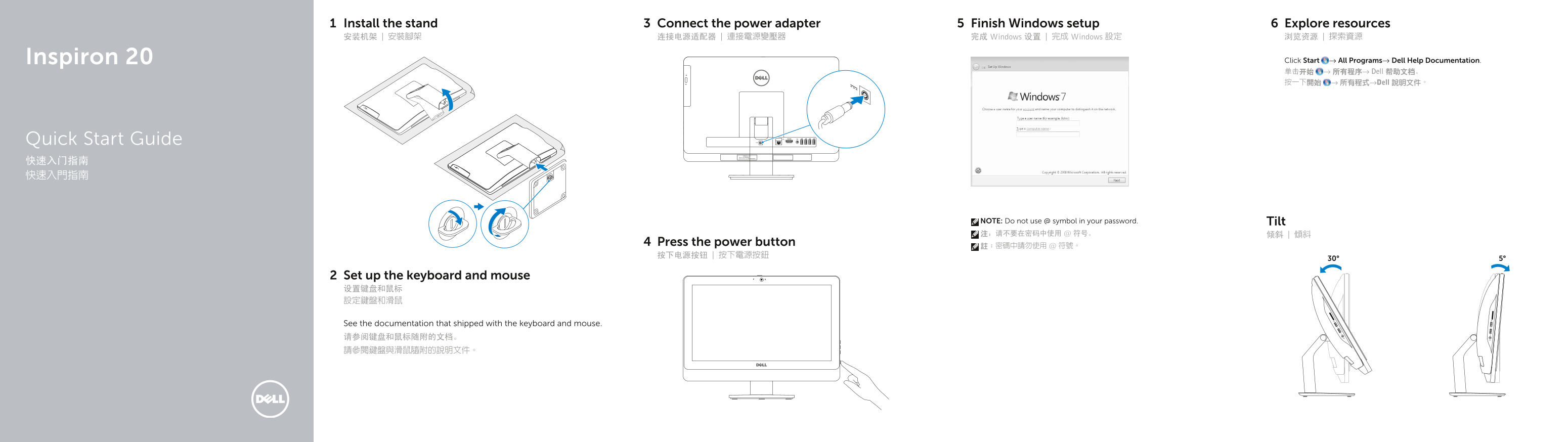
Page 1 Text Content
Install the stand Connect the power adapter Finish Windows setup Explore resources 安装机架 | 安裝腳架 连接电源适配器 | 連接電源變壓器 完成 Windows 设置 | 完成 Windows 設定 浏览资源 | 探索資源
Inspiron 20 Click Start → All Programs→ Dell Help Documentation. 单击开始 → 所有程序→ Dell 帮助文档。 按一下開始 → 所有程式→Dell 說明文件。
Quick Start Guide
Express Service Code:
NOTE: Do not use @ symbol in your password. Tilt 注:请不要在密码中使用 @ 符号。 倾斜 | 傾斜
Press the power button
Set up the keyboard and mouse 设置键盘和鼠标 設定鍵盤和滑鼠
See the documentation that shipped with the keyboard and mouse. 请参阅键盘和鼠标随附的文档。 請參閱鍵盤與滑鼠隨附的說明文件。
Page Summary Contents For Dell Inspiron 20 3048 Quick User Guide - Windows 7
Manual Details
| Brand | Dell |
|---|---|
| Pages | 2 |
| File Size | 260.60 KB |
| Published | July 01, 2026 |
Enter the captcha to get the download link:

Frequently Asked Questions
How do I get help or documentation for this device?
You can find support and manuals at dell.com/support, or use the 'Dell Help Documentation' found in Start → All Programs.
What should I do if I forget my password?
The manual provides an Express Service Code (9) for quick setup, but does not detail a recovery process for forgotten passwords.
Which ports are available on the system?
Available ports include Camera/Microphone inputs, USB 2.0 and USB 3.0 ports, HDMI port, Audio-out port, Headset port, Power-adapter port, and Network port.