Dell Inspiron 20 3043 Quick Start Guide
Summary
Dell Inspiron 20 Model 3043 all-in-one Quick Start Guide with multilingual setup covering stand lifting, keyboard/mouse setup, power adapter connection, Windows setup, security updates, My Dell, network connection, tilt adjustment (15°-80°), and features including camera, HDMI input, and media card reader.
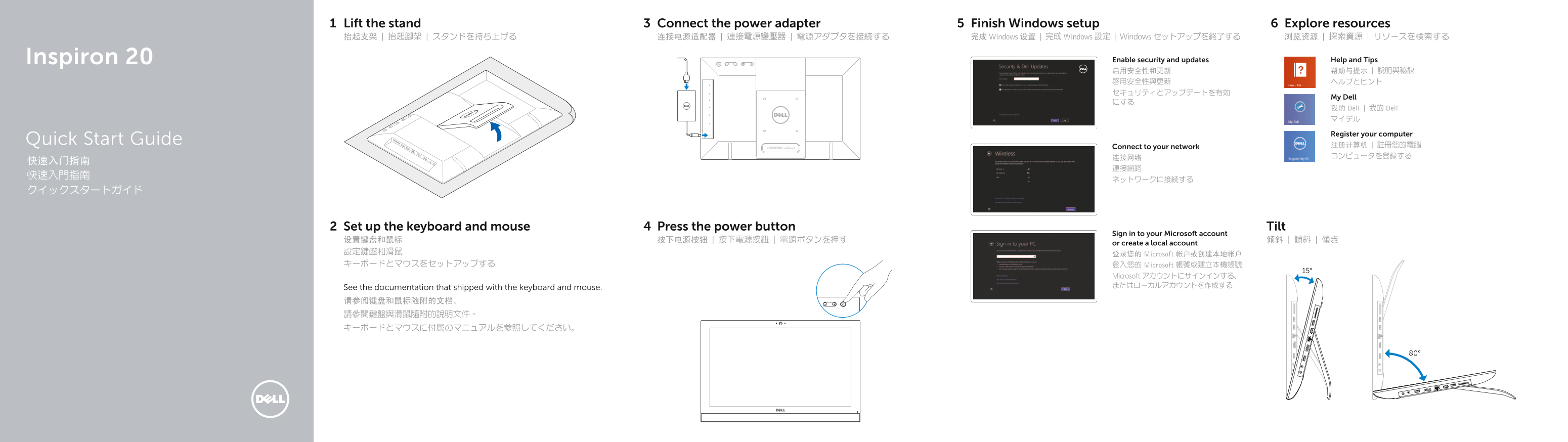
Page 1 Text Content
Lift the stand Connect the power adapter Finish Windows setup Explore resources
抬起支架 | 抬起腳架 | スタンドを持ち上げる 连接电源适配器 | 連接電源變壓器 | 電源アダプタを接続する 完成 Windows 设置 | 完成 Windows 設定 | Windows セットアップを終了する 浏览资源 | 探索資源 | リソースを検索する
Inspiron 20 Enable security and updates Help and Tips 启用安全性和更新 帮助与提示 | 說明與秘訣 啟用安全性與更新 ヘルプとヒント
My Dell
我的 Dell | 我的 Dell マイデル
Register your computer
Quick Start Guide
Connect to your network 注册计算机 | 註冊您的電腦 连接网络 コンピュータを登録する
Set up the keyboard and mouse Press the power button Tilt
Sign in to your Microsoft account
or create a local account
設定鍵盤和滑鼠 登录您的 Microsoft 帐户或创建本地帐户 キーボードとマウスをセットアップする 登入您的 Microsoft 帳號或建立本機帳號
Microsoft アカウントにサインインする、 またはローカルアカウントを作成する
See the documentation that shipped with the keyboard and mouse. 请参阅键盘和鼠标随附的文档。 請參閱鍵盤與滑鼠隨附的說明文件。 キーボードとマウスに付属のマニュアルを参照してください。
Page Summary Contents For Dell Inspiron 20 3043 Quick Start Guide
Manual Details
| Brand | Dell |
|---|---|
| Pages | 2 |
| File Size | 259.26 KB |
| Published | July 03, 2026 |
Enter the captcha to get the download link:

Frequently Asked Questions
How do I connect the computer?
Connect the power adapter to port 10 and lift the stand (1).
What ports are available on the device?
The device has HDMI input (13), headphone/microphone jacks (11), a network port (14), media reader (16), and multiple USB 2.0 ports (12, 15).
Where can I find manuals or support?
Visit dell.com/support or del.com/support/manuals for product support, manuals, and details.