Dell Dimension 9200 Installation Guide User's Manual
Summary
This setup guide provides instructions for configuring Dell desktop computers. It covers monitor connection (DVI/VGA), keyboard and mouse setup, network and modem connections, power configuration, system features overview, and optional wireless network setup. Designed for home and office end users, the guide enables quick desktop deployment and basic system familiarization.
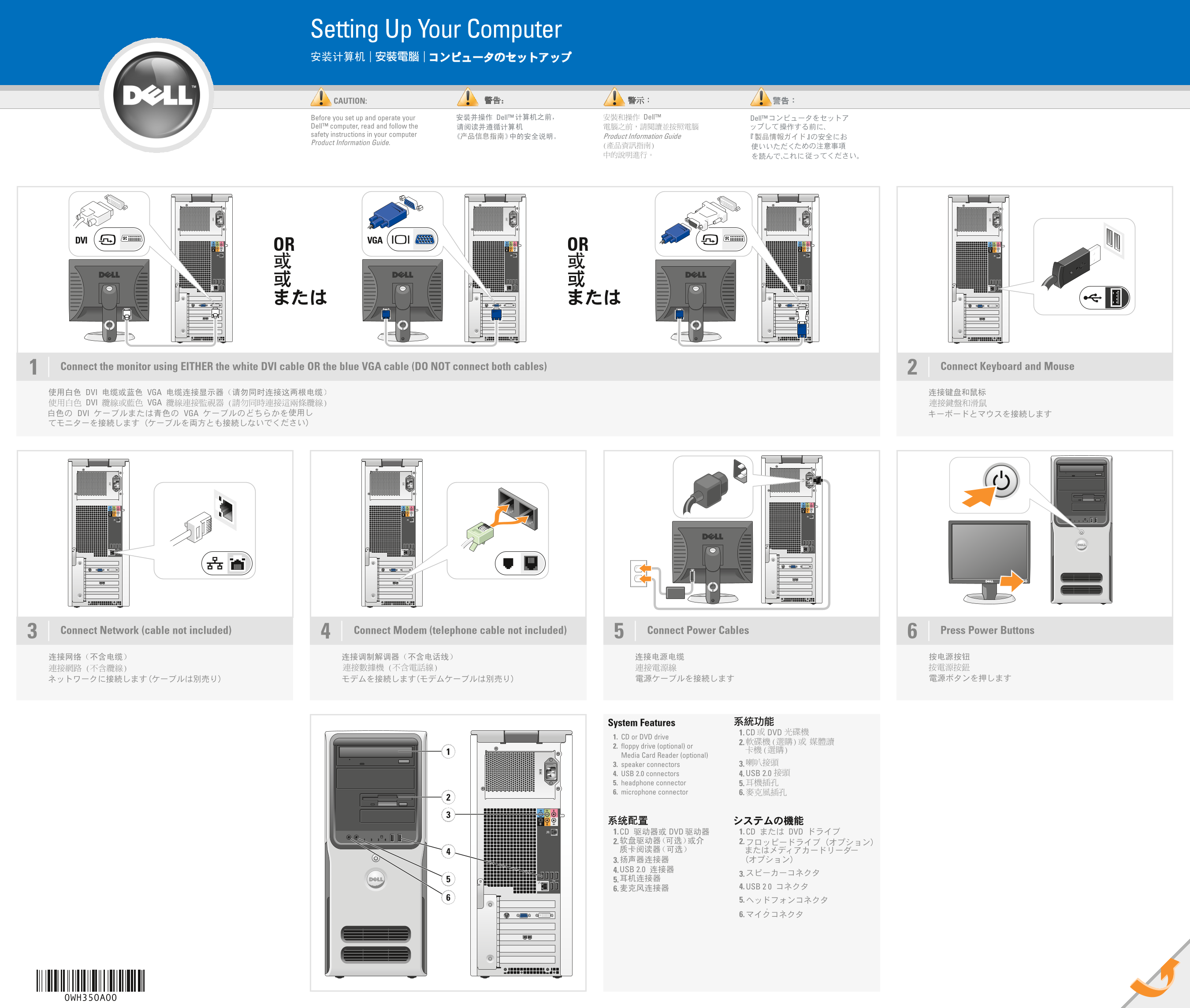
Page 1 Text Content
WH350cc0.qxd 26/06/2006 10:13 Page 1
Setting Up Your Computer
CAUTION:
Before you set up and operate your Dell™ computer, read and follow the safety instructions in your computer Product Information Guide.
DVI VGAOR
Connect the monitor using EITHER the white DVI cable OR the blue VGA cable (DO NOT connect both cables)1 Connect Keyboard and Mouse
Connect Network (cable not included) Connect Modem (telephone cable not included) Connect Power Cables Press Power Buttons3
System Features
1. CD or DVD drive
2. floppy drive (optional) or Media Card Reader (optional)
3. speaker connectors 3.
4. USB 2.0 connectors 4. 5. headphone connector 5. 6. microphone connector 6.
0WH350A00
Page Summary Contents For Dell Dimension 9200 Installation Guide User's Manual
Manual Details
| Brand | Dell |
|---|---|
| Pages | 2 |
| File Size | 3.77 MB |
| Published | June 29, 2026 |
Enter the captcha to get the download link:

Frequently Asked Questions
How should I connect my monitor?
Connect using either the white DVI cable or the blue VGA cable; do not use both cables simultaneously.
What accessories are needed for a wireless network setup?
You need an Internet service, a modem (cable or DSL), and a wireless router.
Where can I find more information about setup instructions?
Check your Owner’s Manual. For other help, click Start, then Help and Support, or visit support.dell.com.
What cables are necessary for basic connectivity?
You need power cables, a network cable, and separate connections for the monitor (DVI OR VGA).