Danfoss Installation Guide ERC 213 - A4
Summary
The ERC 213 Digital Regulator is a smart, multipurpose controller designed for advanced temperature and defrost management in commercial refrigeration and heating systems. This integrated unit features three relays and sophisticated software to ensure optimal energy efficiency and operational protection. This comprehensive guide provides professional installers with step-by-step instructions on setup, wiring diagrams, quick configuration, and detailed menu programming. It is the essential resource for maintaining accurate climate control across various industrial refrigeration settings.
Page 1 Text Content
Installation guide
ERC 213 Digital regulator for refrigeration and defrosting, 3 relays.
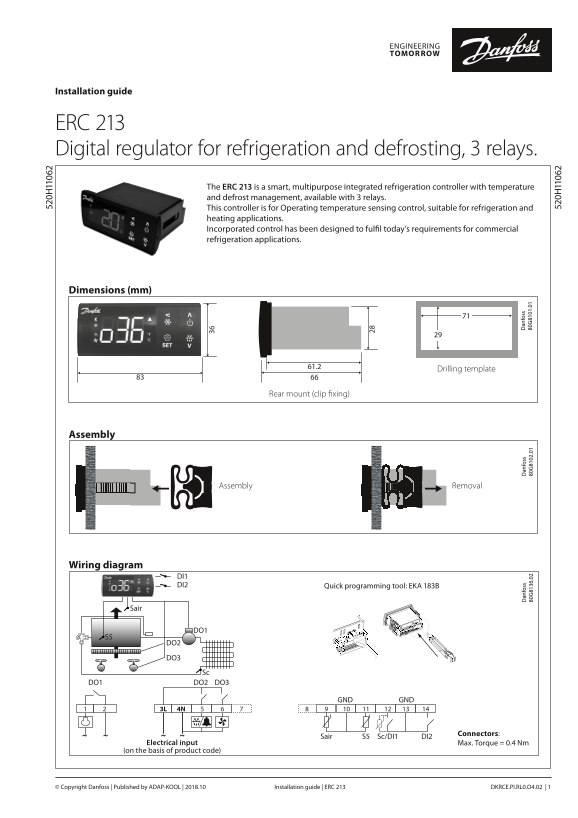
The ERC 213 is a smart, multipurpose integrated refrigeration controller with temperature and defrost management, available with 3 relays. This controller is for Operating temperature sensing control, suitable for refrigeration and heating applications. Incorporated control has been designed to fulfil today’s requirements for commercial refrigeration applications.
Dimensions (mm)
Drilling template
Rear mount (clip fixing)
Assembly
Assembly Removal
an fo ss an fo ss an fo ss .0 .0 .0
Wiring diagram
DI1 DI2 Quick programming tool: EKA 183B
DO2 DO3
DO1 DO2 DO3
GND GND
Connectors:
Sair S5 Sc/DI1 DI2
Electrical input Max. Torque = 0.4 Nm (on the basis of product code)
Installation guide | ERC 213 DKRCE.PI.RL0.O4.02 | 1© Copyright Danfoss | Published by ADAP-KOOL | 2018.10
Page Summary Contents For Danfoss Installation Guide ERC 213 - A4
Manual Details
| Brand | Danfoss |
|---|---|
| Pages | 9 |
| File Size | 1.42 MB |
| Published | June 03, 2026 |
Enter the captcha to get the download link:

Frequently Asked Questions
What types of sensor sensors are compatible with the ERC 213 regulator?
Compatible types include NTC 5 K, NTC 10 K, PTC, and Pt1 sensors. All connected sensors must be of the same type.
How is energy efficiency maximized using this controller?
Energy efficiency is maintained through features like defrosting on request, day/night mode selection, and intelligent evaporator fan management.
What are key safety warnings regarding installation?
Do not expose the regulator to water or damp areas, and always verify that the input voltage is correct before connecting it.
Which button must I press for factory settings cleanup?
To reset the device to factory settings, simultaneously press and hold the 'RESET' button until 'FAC' is displayed.