ASUS Server Workstation Universal Server RS720A-E11-RS12E 1.5U Height Full Extension Ball Bearing Type Rail Kit Instruction
Summary
Master the assembly of modular display fixtures with this comprehensive guide to professional sliding rail systems. This manual covers detailed installation and maintenance procedures for attaching inner rails and brackets to various chassis, ensuring compatibility with different rack configurations (including square and round hole types). Designed for trade show exhibitors, retail professionals, and specialized fit-out technicians, it provides step-by-step instructions for reliable setup and dismantling of modular display hardware.
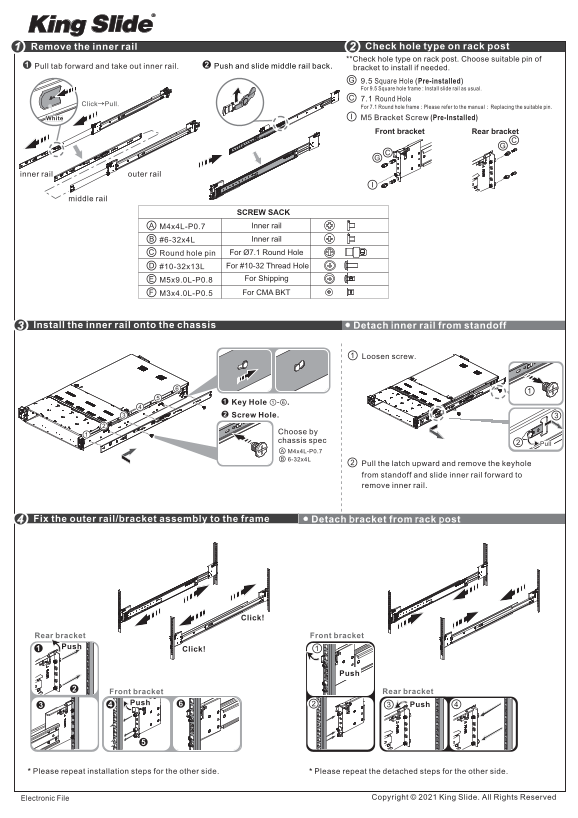
Page 1 Text Content
Remove the inner rail Check hole type on rack post **Check hole type on rack post. Choose suitable pin of
Pull tab forward and take out inner rail. Push and slide middle rail back. bracket to install if needed.
9.5 Square Hole Pre-installed For 9.5 Square hole frame Install slide rail as usual. 7.1 Round Hole
→Click Pull.
For 7.1 Round hole frame Please refer to the manual Replacing the suitable pin.:
White Bracket Screw (Pre-Installed)
bracket Rear bracket
inner rail outer rail
middle rail
SCREW SACK M4x4L-P0.7 Inner rail #6-32x4L Inner rail Round hole pin For Ø7.1 Round Hole #10-32x13L For #10-32 Thread Hole M5x9.0L-P0.8 For Shipping
M3x4.0L-P0.5 For CMA BKT
Install the inner rail onto the chassis i Detach nner rail from standoff
Loosen screw.
Key Hole .①-⑥ Screw Hole.
Choose by chassis spec
Pull the latch upward and remove the keyhole from standoff and lide inner rail forward to remove inner rail.
Fix the outer rail/bracket assembly to the frame racket from ack p Detach ost
Click!
Rear bracket bracket Push
Click!
bracket Rear bracket
Push Push➌
Please repeat installation steps for the other side. Please repeat the detached steps for the other side.
Electronic File Copyright King Slide. All Rights Reserved
Page Summary Contents For ASUS Server Workstation Universal Server RS720A-E11-RS12E 1.5U Height Full Extension Ball Bearing Type Rail Kit Instruction
Manual Details
| Brand | Server |
|---|---|
| Pages | 2 |
| File Size | 3.17 MB |
| Published | June 05, 2026 |
Enter the captcha to get the download link:

Frequently Asked Questions
How do I attach the inner rail to the chassis?
Detach it from the standoff by loosening screws, pulling the latch up, removing the keyhole, and sliding the inner rail forward.
What types of holes are supported for rack installation?
The system supports 9.5 Square Hole frames, 7.1 Round Holes (using pins), and #10-32 Thread Holes.
What steps are needed to remove the chassis from the outer rails?
First, loosen the shipping screws to pull out the chassis, then ensure the disconnect tab is pulled forward at full extension.
Can I skip using an accessory when setting up a CMA bracket?
Yes, it is stated that it is okay not to use the accessory if there are no specific CMA requirements.