Page 1
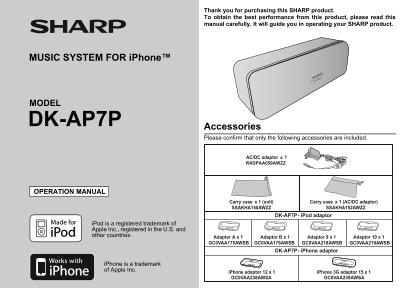
Thank you for purchasing this SHARP product. To obtain the best performance from this product, please read this manual carefully. It will guide you in operating your SHARP product. MUSIC SYSTEM FOR i ...
Page 2
DK-AP7P SPECIAL NOTES Im po rt an t I ns tr uc tio CAUTION: TO REDUCE THE RISK OF ELECTRIC SHOCK, This equipment has been tested and found to comply with the DO NOT REMOVE COVER (OR BACK). limits for ...
Page 3
DIMPORTANT SAFETY INSTRUCTIONS K-AP7P Electricity is used to perform many useful functions, but it can 12) Use only with the cart, stand, tripod, bracket, also cause personal injuries and property dam...
Page 4
DK-AP7P IMPORTANT SAFETY INSTRUCTIONS (continued) Im po rt an t I ns tr uc tio 18) Damage Requiring Service - Unplug this product from the 22) Power Lines - An outside antenna system should not be wal...
Page 5
DK-AP7P Contents General Information ENERGY STAR® Program Information Precautions . . . . . . . . . . . . . . . . . . . . . . . . . . . . . . . 6 Controls and indicators . . . . . . . . . . . . . . . ...
Page 6
DK-AP7P Precautions en er al In fo rm at io General Hold the AC/DC adaptor by the Please ensure that the equipment is head when removing it from the positioned in a well-ventilated area 4" (10 cm...
Page 7
DK-AP7P Controls and indicators Front View Reference page 1. i Pod Dock . . . . . . . . . . . . . . . . . . . . . . . . . . . . . . . . . 2. ESOUND/TV Out Button. . . . . . . . . . . . . . . . . . . ....
Page 8
DK-AP7P System connections Pr ep ar at io fo r U se Please make sure to set i Pod or i Phone unit to either NTSC Make sure to unplug the AC/DC adaptor before making or PAL to match your TV signal. Ple...
Page 9
DK-AP7P Using with the batteries Battery life: Use 4 “AA” size batteries (UM/SUM-3, R6, HP-7 or similar). Battery type ALKALINE (AA) (1.5V) Batteries are not included. Usage time Approx. 8 hrs. Output...
Page 10
K-AP7P General control as ic pe ra tio Volume control Press the VOL (+ or –) button to increase or decrease the volume. POWER indicator will be blinking when the volume reaches 2.1 STEREO SPEAKER BUIL...
Page 11
DK-AP7P Listening to the i Pod or i Phone Supported i Pod models: i Pod or i Phone adaptor connection i Pod nano (software 1.2 above) Choose adaptor that fits your i Pod or i Phone. Your i Pod or i Ph...
Page 12
K-AP7P Listening to the i Pod or i Phone (continued) i P od nd i P ho ne To insert i Pod or i Phone adaptor i Pod or i Phone playback 1. Insert the adaptor into unit and connect your i Pod or i Phone....
Page 13
DK-AP7P Enhancing your system The audio cable is not included. Purchase a separate audio Listening to the audio/video sounds from por- cable as shown below. table audio player, computer, etc. Portable...
Page 14
DK-AP7P Troubleshooting chart ef er en ce Many potential problems can be resolved by the owner without Condensation calling a service technician. Sudden temperature changes, storage or operation in an...
Page 15
DK-AP7P Maintenance Cleaning the unit Periodically wipe the unit with a clean soft cloth. Speaker 2.1-way type speaker system Front speaker: 1-1/8" (3.0 cm) Caution: Subwoofer: 1-3/4" (4.6 c...
Page 16
CONSUMER LIMITED WARRANTY SHARP ELECTRONICS CORPORATION warrants to the first consumer purchaser that this Sharp brand product (the “Product”), when shipped in its original con- tainer, will be free f...