Setting Up Your Dell XPS M1330
Summary
Multilingual quick-start guide for Dell XPS 1330 ultraportable laptop setup. Covers connecting AC adapter, network cable, powering on, enabling wireless, and port location diagrams. For consumers setting up their new XPS 1330 laptop.
Page 1 Text Content
RW506ap2.qxd 2/21/2008 3:22 PM Page 1
Setting Up Your Computer | |
CAUTION:
Before you set up and operate your Dell™ Dell™ Dell™ Dell™
Dell™ computer, see the safety instructions in the Product Information Guide. See your Owner's Manual for a complete list of features. NOTE: Because the battery may not be fully charged, use the AC adapter to
connect your new computer to an AC
electrical outlet the first time you use the computer.
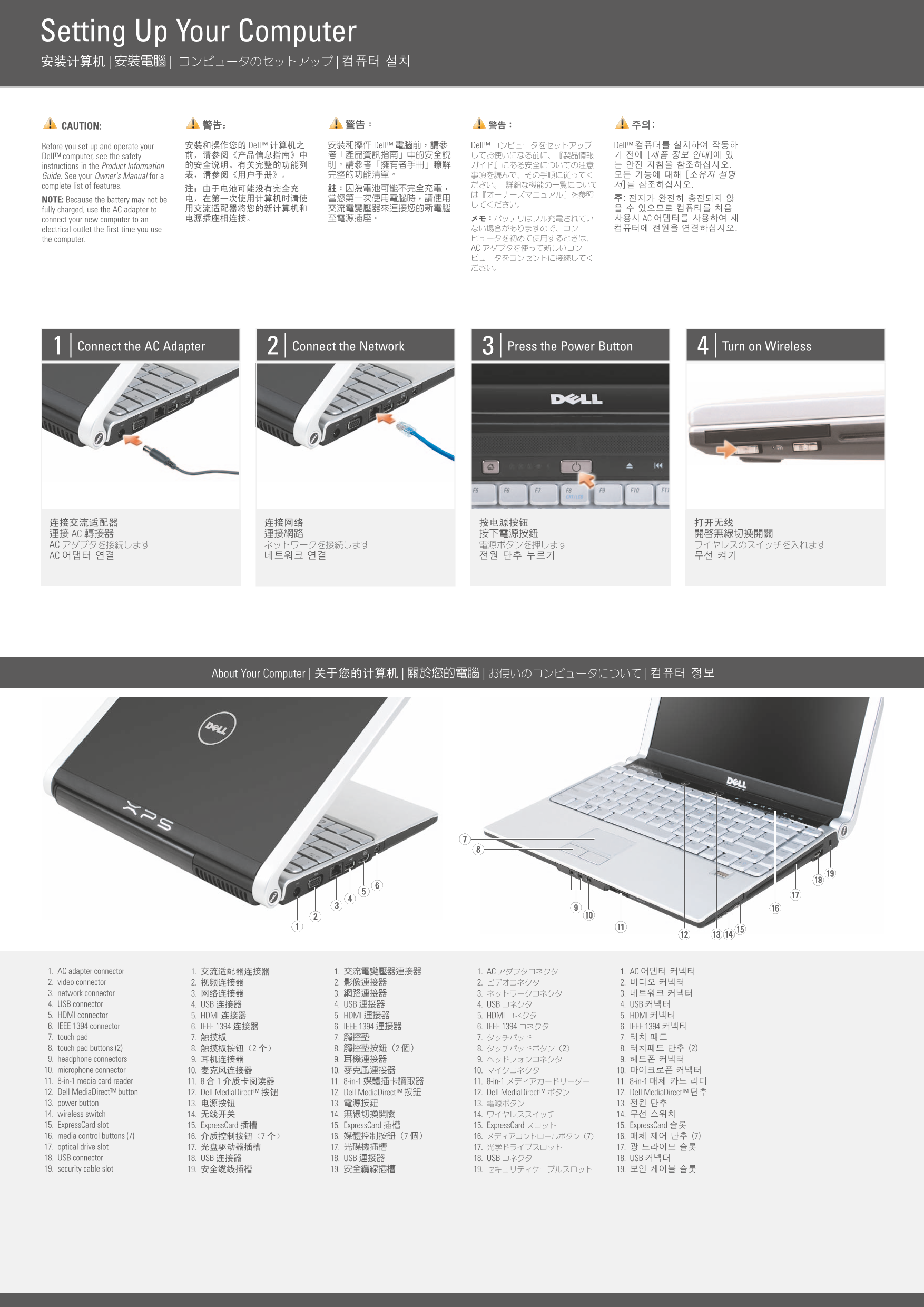
Connect the AC Adapter Connect the Network Press the Power Button Turn on Wireless
AC AC AC
| | | | About Your Computer
1. AC adapter connector 1. 1. 1. AC 1. AC 2. video connector 2. 2. 2. 2. 3. network connector 3. 3. 3. 3. 4. USB connector 4. USB 4. USB 4. USB 4. USB 5. HDMI connector 5. HDMI 5. HDMI 5. HDMI 5. HDMI 6. IEEE 1394 connector 6. IEEE 1394 6. IEEE 1394 6. IEEE 1394 6. IEEE 1394 7. touch pad 7. 7. 7. 7. 8. touch pad buttons (2) 8. 2 8. 2 8. 2 8. 2 9. headphone connectors 9. 9. 9. 9. 10. microphone connector 10. 10. 10. 10. 11. 8-in-1 media card reader 11. 8 1 11. 8-in-1 11. 8-in-1 11. 8-in-1 12. Dell Media Direct™ button 12. Dell Media Direct™ 12. Dell Media Direct™ 12. Dell Media Direct™ 12. Dell Media Direct™ 13. power button 13. 13. 13. 13. 14. wireless switch 14. 14. 14. 14. 15. Express Card slot 15. Express Card 15. Express Card 15. Express Card 15. Express Card 16. media control buttons (7) 16. 7 16. 7 16. 7 16. 7 17. optical drive slot 17. 17. 17. 17. 18. USB connector 18. USB 18. USB 18. USB 18. USB 19. security cable slot 19. 19. 19. 19.
Page Summary Contents For Setting Up Your Dell XPS M1330
Manual Details
| Brand | Dell |
|---|---|
| Pages | 2 |
| File Size | 413.25 KB |
| Published | June 27, 2026 |
Enter the captcha to get the download link:

Frequently Asked Questions
How do I properly connect and power on the device initially?
Due to potential battery charge levels, first use the AC adapter to connect, then follow the sequence: Connect AC Adapter, Connect Network, Press Power Button, and finally Turn on Wireless.
What types of services can be used to set up a wireless network?
You can establish a connection using an Internet service line, connecting through a cable or DSL modem, or by linking to an existing wireless router.
Where do I find the detailed list of product features?
For a comprehensive and complete list of all device features, please refer to the Owner's Manual.
What various connectors are on the computer for peripherals?
The unit features multiple ports including video, network, USB, HDMI, IEEE 1394 connectors, plus slots for media cards, headphone/microphone jacks.