Setting up your Dell EMC NX3240 and NX3340 Systems
Summary
Initial setup guide for Dell EMC NX3240 and NX3340 NAS storage systems, covering package verification, rack installation procedures, system identification using Service Tags, and default configuration including initial password and system naming conventions. Provides documentation references and Dell EMC support resources. Intended for storage administrators and IT personnel responsible for physical deployment and initial configuration of NX series NAS appliances in enterprise environments.
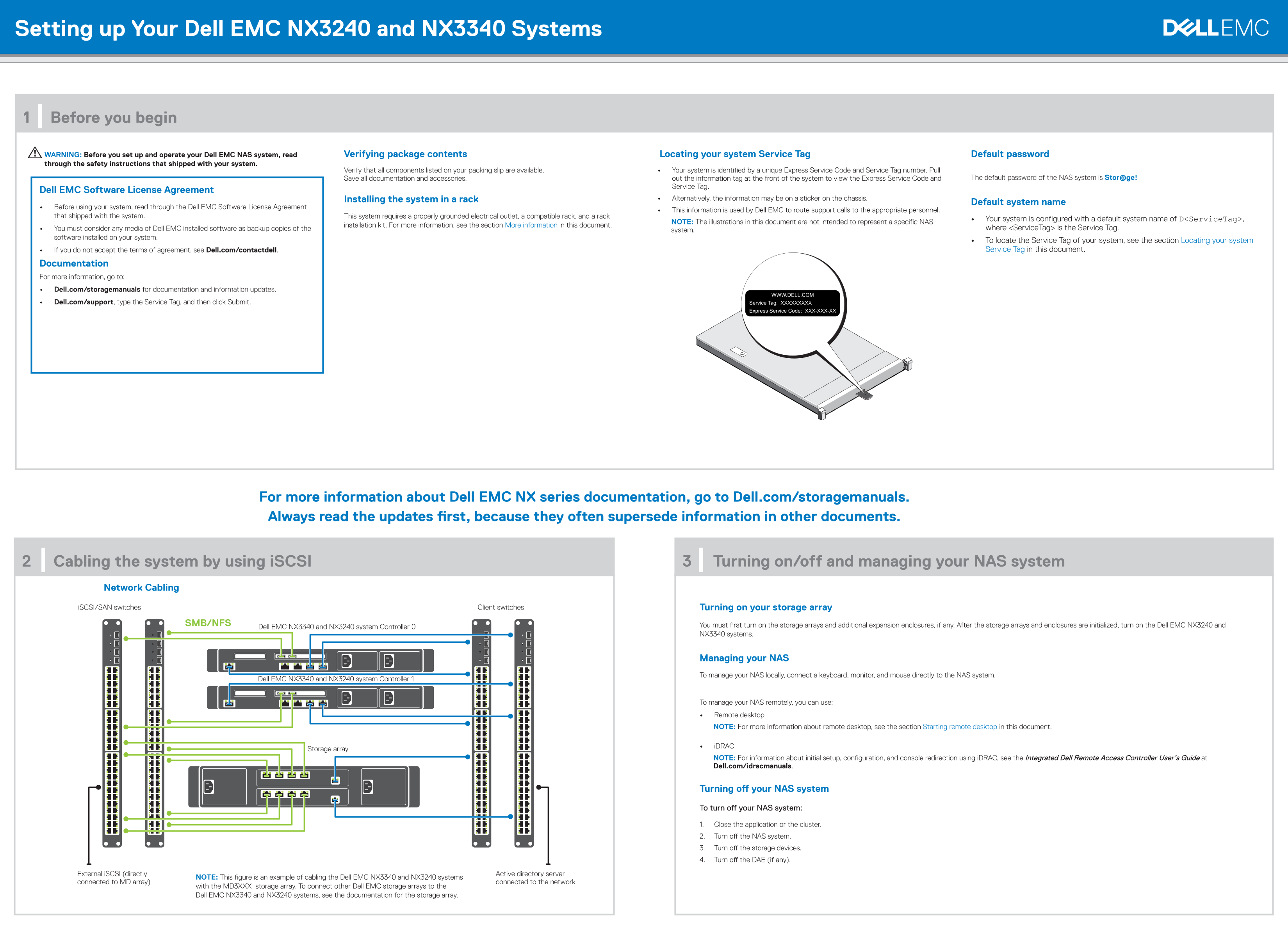
Page 1 Text Content
Setting up Your Dell EMC NX3240 and NX3340 Systems
1 | Before you begin
WARNING: Before you set up and operate your Dell EMC NAS system, read Verifying package contents Locating your system Service Tag Default password through the safety instructions that shipped with your system.
Verify that all components listed on your packing slip are available. • Your system is identified by a unique Express Service Code and Service Tag number. Pull
Save all documentation and accessories. out the information tag at the front of the system to view the Express Service Code and The default password of the NAS system is Stor@ge!
Service Tag.
Dell EMC Software License Agreement
Installing the system in a rack • Alternatively, the information may be on a sticker on the chassis.
Default system name
• Before using your system, read through the Dell EMC Software License Agreement
• This information is used by Dell EMC to route support calls to the appropriate personnel.
that shipped with the system. This system requires a properly grounded electrical outlet, a compatible rack, and a rack
• Your system is configured with a default system name of D<Service Tag>,
NOTE: The illustrations in this document are not intended to represent a specific NAS
installation kit. For more information, see the section More information in this document.
• You must consider any media of Dell EMC installed software as backup copies of the where <Service Tag> is the Service Tag.
system.
software installed on your system.
• To locate the Service Tag of your system, see the section Locating your system • If you do not accept the terms of agreement, see Dell.com/contactdell. Service Tag in this document.
Documentation For more information, go to: • Dell.com/storagemanuals for documentation and information updates. • Dell.com/support, type the Service Tag, and then click Submit.
For more information about Dell EMC NX series documentation, go to Dell.com/storagemanuals. Always read the updates first, because they often supersede information in other documents.
2 | Cabling the system by using i SCSI 3 | Turning on/off and managing your NAS system
Network Cabling i SCSI/SAN switches Client switches Turning on your storage array
SMB/NFS You must first turn on the storage arrays and additional expansion enclosures, if any. After the storage arrays and enclosures are initialized, turn on the Dell EMC NX3240 and
Dell EMC NX3340 and NX3240 system Controller 0
NX3340 systems.
Managing your NAS To manage your NAS locally, connect a keyboard, monitor, and mouse directly to the NAS system.
Dell EMC NX3340 and NX3240 system Controller 1
To manage your NAS remotely, you can use: • Remote desktop NOTE: For more information about remote desktop, see the section Starting remote desktop in this document.
• i DRAC
Storage array
NOTE: For information about initial setup, configuration, and console redirection using i DRAC, see the Integrated Dell Remote Access Controller User’s Guide at Dell.com/idracmanuals.
Turning off your NAS system To turn off your NAS system: 1. Close the application or the cluster. 2. Turn off the NAS system. 3. Turn off the storage devices. 4. Turn off the DAE (if any).
External i SCSI (directly Active directory server
NOTE: This figure is an example of cabling the Dell EMC NX3340 and NX3240 systems
connected to MD array) connected to the network
with the MD3XXX storage array. To connect other Dell EMC storage arrays to the Dell EMC NX3340 and NX3240 systems, see the documentation for the storage array.
Page Summary Contents For Setting up your Dell EMC NX3240 and NX3340 Systems
Manual Details
| Brand | Dell |
|---|---|
| Pages | 2 |
| File Size | 707.44 KB |
| Published | June 26, 2026 |
Enter the captcha to get the download link:

Frequently Asked Questions
What is the default password for the NAS system?
The default password of the NAS system is Stor@ge!
How do I remotely manage this NAS system?
You can use Remote desktop or iDRAC to manage it remotely. You must ensure Initial Configuration tasks are completed first.
What is required before setting up and operating the Dell EMC NAS system?
Before setup, you must read the Dell EMC Software License Agreement and verify that all components listed on your packing slip are available.
How should I turn off the NAS system safely?
To turn it off, first close any applications or clusters, then turn off the NAS system, followed by storage devices and DAE (if applicable).
Where can I find detailed documentation for further setup steps?
You can find more information on Dell.com/storagemanuals or use Dell.com/support with your Service Tag.