Setting Up Your Dell PowerVault Storage Enclosure User Guide
Summary
This setup guide covers Dell PowerVault MD1200 and MD1220 storage enclosures. It includes package contents verification, rack installation, front-panel features, and cabling for unified or split mode operation. Instructions cover SAS and power cable connections and optional RAID controller configuration. Intended for system administrators deploying Dell PowerVault storage solutions.
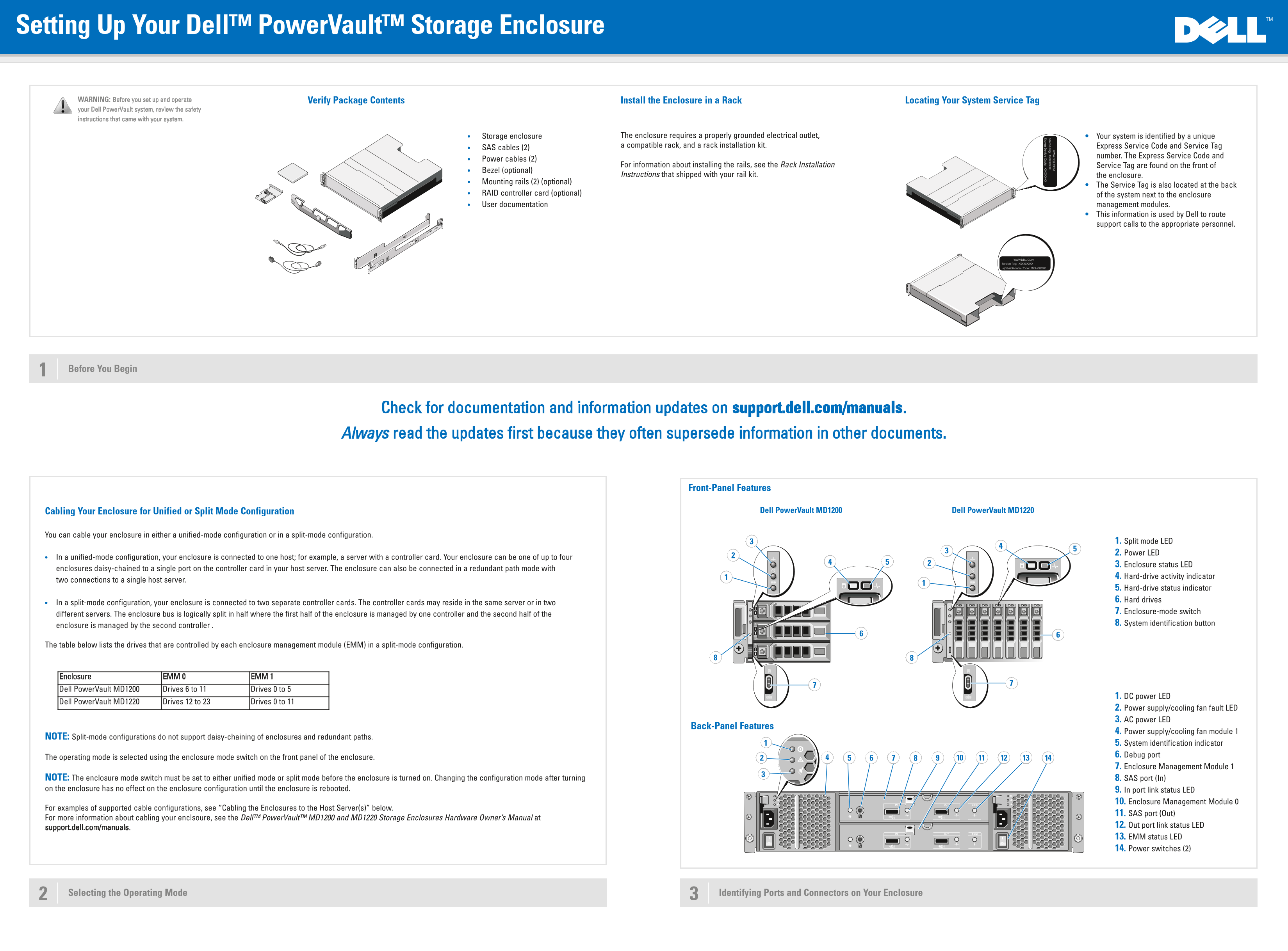
Page 1 Text Content
Setting Up Your Dell™ Power Vault™ Storage Enclosure
WARNING: Before you set up and operate Install the Enclosure in a Rack Locating Your System Service Tag Verify Package Contents
your Dell Power Vault system, review the safety instructions that came with your system.
Storage enclosure The enclosure requires a properly grounded electrical outlet, Your system is identified by a unique compatible rack, and a rack installation kit. Express Service Code and Service Tag
SAS cables (2)
number. The Express Service Code and
Power cables (2)
For information about installing the rails, see the Rack Installation Service Tag are found on the front of
Bezel (optional)
Instructions that shipped with your rail kit. the enclosure.
Mounting rails (2) (optional)
The Service Tag is also located at the back
RAID controller card (optional) of the system next to the enclosure User documentation management modules.
This information is used by Dell to route support calls to the appropriate personnel.
Before You Begin
Check for documentation and information updates on support.dell.com/manuals. Always read the updates first because they often supersede information in other documents.
Front-Panel Features
Cabling Your Enclosure for Unified or Split Mode Configuration Dell Power Vault MD1200 Dell Power Vault MD1220
You can cable your enclosure in either a unified-mode configuration or in a split-mode configuration.
1. Split mode LED 2. Power LED
In a unified-mode configuration, your enclosure is connected to one host; for example, a server with a controller card. Your enclosure can be one of up to four
3. Enclosure status LED
enclosures daisy-chained to a single port on the controller card in your host server. The enclosure can also be connected in a redundant path mode with
4. Hard-drive activity indicator
two connections to a single host server.
5. Hard-drive status indicator 6. Hard drives
In a split-mode configuration, your enclosure is connected to two separate controller cards. The controller cards may reside in the same server or in two
7. Enclosure-mode switch
different servers. The enclosure bus is logically split in half where the first half of the enclosure is managed by one controller and the second half of the
8. System identification button
enclosure is managed by the second controller .
The table below lists the drives that are controlled by each enclosure management module (EMM) in a split-mode configuration.
Enclosure EMM 0 EMM 1 Dell Power Vault MD1200 Drives 6 to 11 Drives 0 to 5
1. DC power LED
Dell Power Vault MD1220 Drives 12 to 23 Drives 0 to 11
2. Power supply/cooling fan fault LED 3. AC power LED
Back-Panel Features
4. Power supply/cooling fan module 1
NOTE: Split-mode configurations do not support daisy-chaining of enclosures and redundant paths.
5. System identification indicator 6. Debug port
The operating mode is selected using the enclosure mode switch on the front panel of the enclosure.
7. Enclosure Management Module 1
NOTE: The enclosure mode switch must be set to either unified mode or split mode before the enclosure is turned on. Changing the configuration mode after turning 8. SAS port (In) on the enclosure has no effect on the enclosure configuration until the enclosure is rebooted. 9. In port link status LED
10. Enclosure Management Module 0
For examples of supported cable configurations, see “Cabling the Enclosures to the Host Server(s)” below.
11. SAS port (Out)
For more information about cabling your enclsoure, see the Dell™ Power Vault™ MD1200 and MD1220 Storage Enclosures Hardware Owner’s Manual at
12. Out port link status LED
support.dell.com/manuals.
13. EMM status LED 14. Power switches (2)
Selecting the Operating Mode Identifying Ports and Connectors on Your Enclosure
Page Summary Contents For Setting Up Your Dell PowerVault Storage Enclosure User Guide
Manual Details
| Brand | Dell |
|---|---|
| Pages | 2 |
| File Size | 690.81 KB |
| Published | June 29, 2026 |
Enter the captcha to get the download link:

Frequently Asked Questions
What is the correct order to power on the components?
You must turn on the Storage enclosure(s) first, followed by the Host server(s).
How should I determine if I need unified or split mode?
Unified mode connects to one host server; Split mode expands the bus using two separate controller cards. The mode is set via the front-panel switch.
Where can I find the most up-to-date technical information?
Always check dell.com/manuals first, as updates often supersede previous documentation in this guide.