Set Up Your Expansion Base with Dell
Summary
Dell Latitude Docking Station setup guide (Regulatory Model K04M, September 2011). Multi-language document with docking station views showing AC adapter connector, three USB connectors, network connector, HDMI, audio jack, power LED, and docking connector. Covers AC adapter specifications (45W/65W, 2.31A/3.34A input current, 19.50V DC), safety warnings, and power connection procedures with printed circuit features overview.
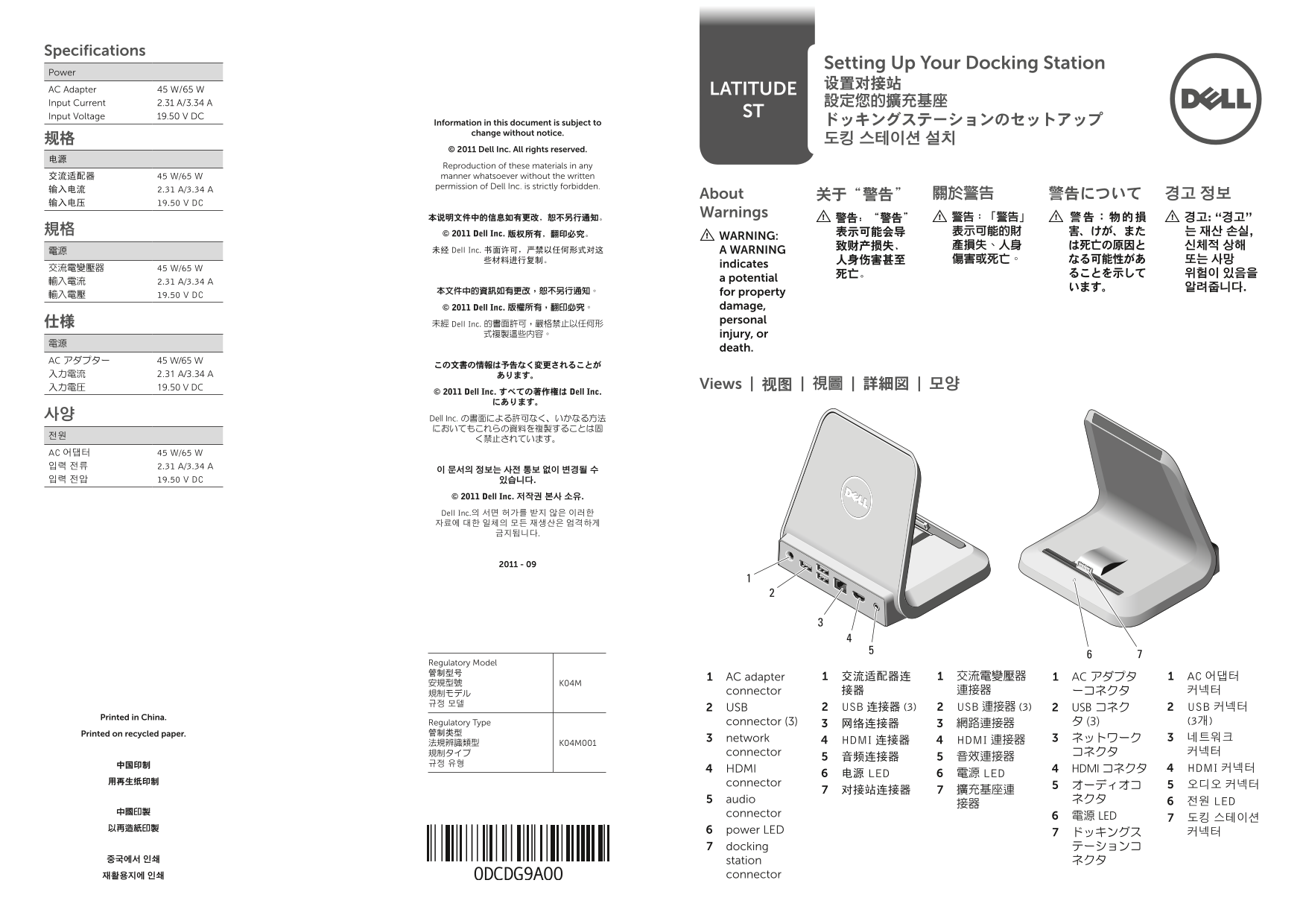
Page 1 Text Content
Specifications
Setting up Your docking Station
Power
AC Adapter 45 W/65 W Latitude Input Current 2.31 A/3.34 A 設定您的擴充基座
Input Voltage 19.50 V DC St
information in this document is subject to ドッキングステーションのセットアップ
change without notice.
© 2011 dell inc. all rights reserved.
Reproduction of these materials in any 交流适配器 45 W/65 W manner whatsoever without the written permission of Dell Inc. is strictly forbidden.
about 关于“警告” 關於警告 警告について 경고 정보
输入电压 19.50 V DC
本说明文件中的信息如有更改,恕不另行通知。 Warnings
規格 © 2011 Dell Inc. 版权所有,翻印必究。 表示可能会导 表示可能的財 害、けが、また 는 재산 손실,
Wa RNi NG:
電源 未经 Dell Inc. 书面许可,严禁以任何形式对这 a Wa RNi NG
indicates
輸入電流 2.31 A/3.34 A a potential
輸入電壓 19.50 V DC for property © 2011 Dell Inc. 版權所有,翻印必究。 damage, 仕様 personal
未經 Dell Inc. 的書面許可,嚴格禁止以任何形
式複製這些內容。 injury, or
death.
AC アダプター 45 W/65 W
入力電圧 19.50 V DC Views | 视图 | 視圖 | 詳細図 | 모양
© 2011 Dell Inc. すべての著作権は Dell Inc.
사양 Dell Inc. の書面による許可なく、いかなる方法
전원 く禁止されています。 AC 어댑터 45 W/65 W 입력 전류 2.31 A/3.34 A
입력 전압 19.50 V DC 있습니다.
© 2011 Dell Inc. 저작권 본사 소유.
Dell Inc.의 서면 허가를 받지 않은 이러한 자료에 대한 일체의 모든 재생산은 엄격하게
Regulatory Model 管制型号
AC adapter 1 交流适配器连1 交流電變壓器1 AC アダプタ1 AC 어댑터 1
規制モデル connector 接器 連接器 ーコネクタ 커넥터
USB 2 USB 连接器 (3)2 USB 連接器 (3)2 USB コネク2 USB 커넥터2
Printed in China.
Regulatory Type connector (3) 网络连接器3 網路連接器3 タ (3) (3개)
Printed on recycled paper. 管制类型
network 3 HDMI 连接器4 HDMI 連接器4 ネットワーク3 네트워크 3
規制タイプ connector コネクタ 커넥터
HDMI 4 HDMI コネクタ4 HDMI 커넥터4
电源 LED6 電源 LED6
用再生纸印制 connector
audio 5 ネクタ 전원 LED6
中國印製 connector
電源 LED6 도킹 스테이션 7
以再造紙印製 power LED6
docking 7 テーションコ
중국에서 인쇄 station ネクタ
재활용지에 인쇄 connector
Page Summary Contents For Set Up Your Expansion Base with Dell
Manual Details
| Brand | Dell |
|---|---|
| Pages | 2 |
| File Size | 1.12 MB |
| Published | July 02, 2026 |
Enter the captcha to get the download link:

Frequently Asked Questions
如何确定我的电源适配器是否适用于世界各地吗?
本交流适配器可以在全球各地的电源插座配合使用,但电源连接器和配电盘则因国家和地区而不同。
如果想拔掉对接站的AC适配器线,要注意什么?
请握住连接器而不是拉扯电缆,然后稳而轻地将其拔出,以避免损坏电缆。
在首次将计算机连接到对接站之前需要做哪些准备工作?
在首次连接前,操作系统必须完成其设置程序。同时,需将AC适配器连接至交流适配器连接并接入电源插座。
该适配器的输入电压及其电流规格是多少?
输入电压为 19.50 V DC,输入电流分别为 2.31 A/3.34 A。