Page 1
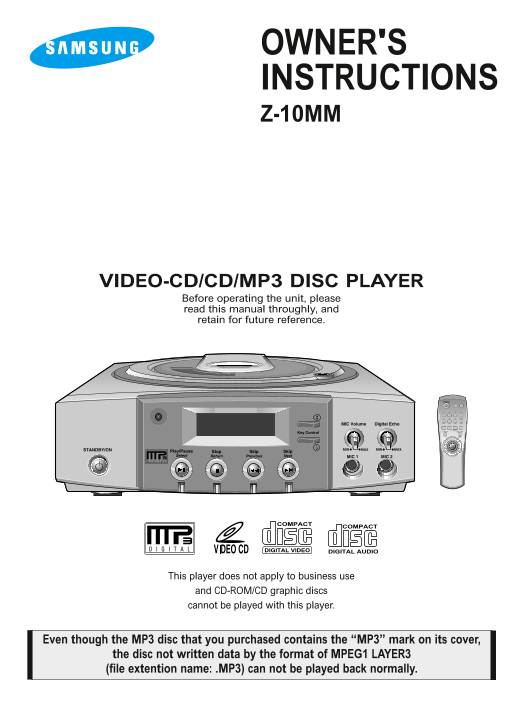
OWNER'S INSTRUCTIONS Z-10MM VIDEO-CD/CD/MP3 DISC PLAYER Before operating the unit, please read this manual throughly, and retain for future reference. COMPACT COMPACT DIGITAL VIDEO DIGITAL AUDIO This ...
Page 2
SAFETY PRECAU-ETY PRECAUTIONS CAUTION RISK OF ELECTRIC SHOCK CLASS 1 DO NOT OPEN LASER PRODUCT CAUTION TO REDUCE THE RISK OF ELECTRIC SHOCK, DO NOT REMOVE TOP COVER, NO USER SERVICEABLE PARTS INSIDE, ...
Page 3
SAFETY INSTRUCTIONS CONTENTS SAFETY INSTRUCTIONS SAFETY INSTRUCTIONS CONTROLS AND COMPONENTS---------------------------- REMOTE CONTROL SYSTEM CONNECTIONS ------------------------------------- MP3 DIS...
Page 4
SAFETY INSTRUCTIONS READ INSTRUCTIONS voltage points or short-out parts that could result in a fire All the safety and operating instructions should be read or electric shock. Never spill liquid of an...
Page 5
OUTDOOR ANTENNA GROUNDING SAFETY CHECK If an outside antenna is connected to the antenna Upon completion of any service or repairs to this video terminal, be sure the antenna system is grounded so as ...
Page 6
CONTROLS AND COMPONENTS FRONT PANEL 1. Power STANDBY/ON button 7. MIC jacks 2. Remote Sensor 8. Digital Echo Volume knob 3. Play/Pause Select button 9. MIC Volume knob 4. Stop Return button 10. Key Co...
Page 7
CONTROLS AND COMPONENTS REAR PANEL 1. AUDIO OUT1 2. VIDEO OUTPUT - Connect to the AUDIO IN of your - Connect to the VIDEO IN of your TV set. TV set. ACCESSORIES REMOTE CONTROL VIDEO CABLE AUDIO CABLE ...
Page 8
REMOTE CONTROL 1. STANDBY/ON button 2. DIGIT buttons 3. PROGRAM button 4. SOUND SELECTOR button 5. Al SLEEP button 6. SELECT(PLAY / PAUSE) button 7. STOP button 8. REPEAT/PAL/NTSC button 9. SLOW butto...
Page 9
SYSTEM CONNECTIONS VCD AND CDP + TV 1. Connect AUDIO OUT1 jack of the VCD and CDP to AUDIO IN jack of the TV. 2. Connect VIDEO OUT jack of the VCD and CDP to VIDEO IN jack of the TV.
Page 10
MP3-DISC PLAYBACK HOW TO PLAYBACK MP3 DISC directly HOW TO PLAYBACK MP3 DISC on MENU MODE Play/Pause After inserting MP3 Select After inserting MP3 DISC VIEW Disc in the Set, Press Disc in the Set, Pr...
Page 11
VIDEO-CD PLAYBACK HOW TO PLAYBACK VIDEO-CD version 2.0 Select a number from the menu and press it. Press the STANDBY/ON button. Ex) When selecting No. 4 A woman's day. Press the Open button. Insert a ...
Page 12
SLOW MOTION SELECT SOUND TO YOUR PREFERENCE Press the SLOW button on the remote control PREPARATION when the play function is on. 1. Press the STANDBY/ON button. -Voices do not come out when the (The ...
Page 13
DISC VIEW FUNCTION Desired music or video display can be used directly without by menu functions (VER 2.0 Mode). This function is possible in Ver 1.1 and Ver 2.0 menu off mode. TRACK VIEW In case of c...
Page 14
DISC VIEW FUNCTION REPEAT FUNCTION Turn on the TV. Load and play a disc. INDEX VIEW 1.TO REPEAT ONE TRACK This function acts as displaying the track in playing Press the REPEAT button. sequently by ti...
Page 15
PROGRAM FUNCTION This function can program up to 30 tracks during STOP mode. ex) To program No.4 track. Press the PROGRAM button. Press the PLAY/PAUSE button. • Programming is completed, and the first...
Page 16
ZOOM FUNCTION This function works only in the VCD play mode. Press the DISC VIEW/ZOOM key for 1 sec or longer to change the screen to 2 x ZOOM. DISC VIEW While in the 2 x ZOOM screen, press the DISC V...
Page 17
SEARCHING FUNCTIONS Turn on the TV. Load and play the disc. HIGH SPEED SEARCH NOTE In case of high speed search This function is used to searching disc for desired location. When searching a CD disc, ...
Page 18
SEARCHING FUNCTIONS TIME SEARCH LAST MEMORY FUNCTION If you press the STOP or STANDBY/ON Press the TIME button. button during VIDEO-CD playback, a play- back position slightly ahead of the current Tim...
Page 19
KARAOKE FUNCTION Turn on the TV. Load and play a disc. KEY CONTROL FUNCTION Connect the MIC. The key control will be displayed on the screen. Make sure to be at the karaoke mode. Press the Key Control...
Page 20
KARAOKE FUNCTION Adjust the Digital Echo. To decrease or increase the volume - This will add an echo to your voice, of the Microphone: giving you the feeling of singing on stage, Turning to the left d...
Page 21
TROUBLE SHOOTING SYMPTOM CHECK AND ACTION Picture appears late when – Repeated pressing of PLAY/STOP/OPEN caused disc SELECT(PLAY/PAUSE) button is pressed. drive motor to over heat, and protection cir...
Page 22
WHEN VIDEO IS DISPLAYED THROUGH SET CARE OF PLAYER AND DISCS - Source : VIDEO-CD DISC CARE OF DISCS - Display :TV monitor Use a soft, dry cloth for cleaning. Clean the disc with water diluted with neu...
Page 23
CARE OF PLAYER AND DISCS SPECIFICATIONS GENERAL – Power consumption: 8W Cleaning the Player - Use soft cloth or the dusting attachment of your vacuum SPECIFICATIONS – Weight: 1.6 kg cleaner to dust th...
Page 24
In case the need for Servicing arises Don't hesitate to call any nearby AS center with your name, address and telephone number when anything wrong with your product occurs. ELECTRONICS AH68-00715B