Samsung YP-T6AH Quick User Guide
Summary
Master your portable music experience with this comprehensive quick guide for the YP-T6 media player. The manual provides step-by-step instructions on connecting and safely disconnecting the USB cable, ensuring seamless file transfers between your PC and device. Learn how to download or upload large volumes of music, understand power management features, and intuitively navigate core functions like playback control and volume adjustment for a fuss-free listening session anywhere.
Page 1 Text Content
YP-T6 Quick Guide
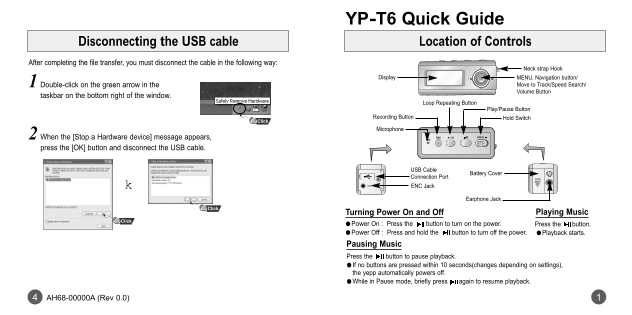
Disconnecting the USB cable Location of Controls
After completing the file transfer, you must disconnect the cable in the following way:
Neck strap Hook
Display MENU, Navigation button/
1 Double-click on the green arrow in the Move to Track/Speed Search/ Volume Button
taskbar on the bottom right of the window.
Loop Repeating Button
Play/Pause Button
Recording Button Hold Switch
Microphone
2 When the [Stop a Hardware device] message appears, press the [OK] button and disconnect the USB cable.
USB Cable
Battery Cover
Connection Port ENC Jack
Earphone Jack
Turning Power On and Off Playing Music
●Power On : Press the button to turn on the power. Press the button. ●Power Off : Press and hold the button to turn off the power. ●Playback starts.
Pausing Music Press the button to pause playback. If no buttons are pressed within 10 seconds(changes depending on settings), the yepp automatically powers off. ●While in Pause mode, briefly press again to resume playback.
AH68-00000A (Rev 0.0)
Page Summary Contents For Samsung YP-T6AH Quick User Guide
Manual Details
| Brand | Samsung |
|---|---|
| Pages | 2 |
| File Size | 116.29 KB |
| Published | June 04, 2026 |
Enter the captcha to get the download link:

Frequently Asked Questions
How do I connect and use the device with a computer?
Connect the player to your PC using the supplied USB cable, ensuring you install the USB driver first via the Installation CD.
What should I do when disconnecting the USB cable during file transfer?
Never disconnect the USB cable while the ‘WRITING/READING’ message is displayed, as this may cause malfunction.
How can I properly power on and off the player?
Press the Power button to turn on. To power off, press and hold the Power button.
What happens if I don't use the device for a while?
If no buttons are pressed within 10 seconds (depending on settings), the yepp will automatically power off.