Samsung YP-55I Quick User Guide
Summary
Master the operation of your YP-55 portable audio player with this comprehensive quick guide. This manual provides new users with step-by-step instructions on connecting, operating, and maximizing the device's potential. It thoroughly covers system setup, including USB driver installation, basic controls (volume, play/pause), and safe file management procedures for both downloading and uploading music or recorded files via PC connection. Ideal for immediate use, this guide ensures you can enjoy your audio content effortlessly straight out of the box.
Page 1 Text Content
Quick-55 2/26/04 11:38 AM Page 2
YP-55 Quick Guide
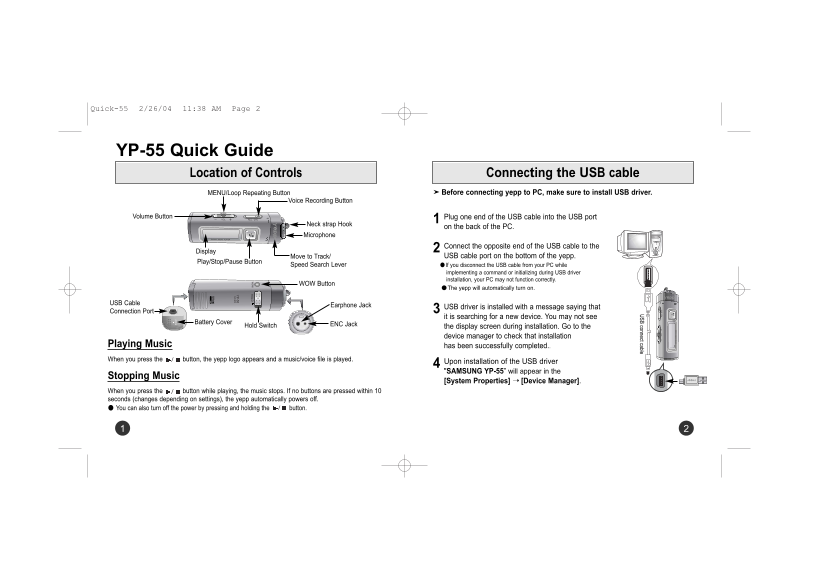
Location of Controls USB connect cable Connecting the USB cable
MENU/Loop Repeating Button Before connecting yepp to PC, make sure to install USB driver.
Voice Recording Button
Volume Button REC / ENCVOL Plug one end of the USB cable into the USB port
Neck strap Hook
on the back of the PC.
Microphone
Connect the opposite end of the USB cable to the
Display
Move to Track/ USB cable port on the bottom of the yepp.
Play/Stop/Pause Button
Speed Search Lever ● If you disconnect the USB cable from your PC while
implementing a command or initializing during USB driver installation, your PC may not function correctly.
WOW Button
● The yepp will automatically turn on.
USB Cable
Earphone Jack
USB driver is installed with a message saying that
Connection Port
it is searching for a new device. You may not see
Battery Cover
Hold Switch ENC Jack
the display screen during installation. Go to the device manager to check that installation
Playing Music has been successfully completed.. When you press the button, the yepp logo appears and a music/voice file is played.
Upon installation of the USB driver "SAMSUNG YP-55” will appear in the
Stopping Music
[System Properties] ➝ [Device Manager].
When you press the button while playing, the music stops. If no buttons are pressed within 10 seconds (changes depending on settings), the yepp automatically powers off. You can also turn off the power by pressing and holding the button.
Page Summary Contents For Samsung YP-55I Quick User Guide
Manual Details
| Brand | Samsung |
|---|---|
| Pages | 2 |
| File Size | 121.15 KB |
| Published | May 29, 2026 |
Enter the captcha to get the download link:

Frequently Asked Questions
What must I do before connecting the yepp to my PC?
You must install the USB driver before connecting the yepp to your PC.
How should I disconnect the USB cable after file transfer?
Turn on the yepp, connect it to the PC in Windows Explorer, then double-click the green arrow, and disconnect the cable safely.
What happens if I unplug the USB cable during a command or initialization?
The PC may not function correctly.
Where can I check if the USB driver installation was successful?
In the [System Properties] ➝ [Device Manager], you should see "SAMSUNG YP-55".
How do I manually power off the device?
Press and hold the MODE button when the yepp is on.