Roland A-88MKII MIDI Keyboard Controller Settings Editing Guide from a Computer
Summary
Unlock complex MIDI possibilities with detailed guidance for the A-88MKII controller keyboard. This manual teaches you how to utilize Control Maps to assign a vast range of customized MIDI messages—including notes, CCs, and Program Changes—to every pad and controller bank. Ideal for professional musicians, producers, and sound designers who require deep integration and limitless customization when performing with DAW software. Mastery of this system empowers advanced studio control.
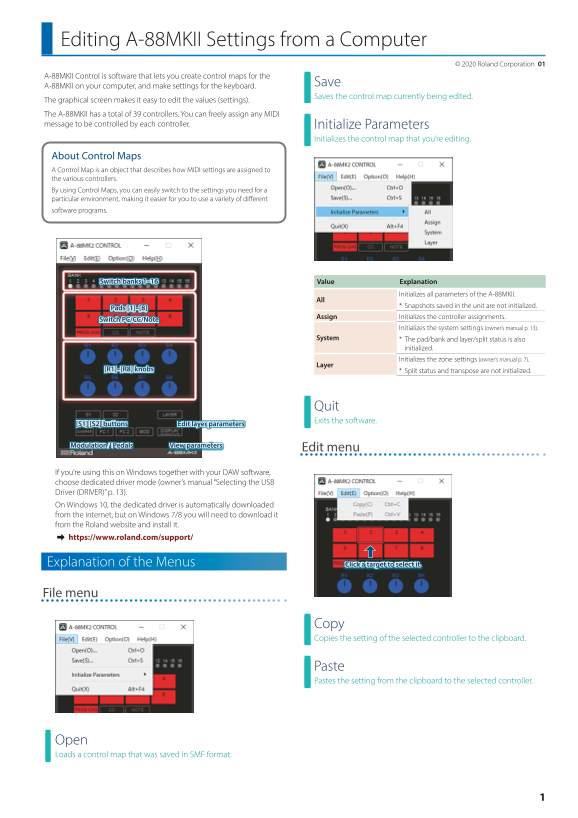
Page 1 Text Content
Editing A-88MKII Settings from a Computer
© 2020 Roland Corporation 01
A-88MKII Control is software that lets you create control maps for the
A-88MKII on your computer, and make settings for the keyboard.
Saves the control map currently being edited.
The graphical screen makes it easy to edit the values (settings). The A-88MKII has a total of 39 controllers. You can freely assign any MIDI message to be controlled by each controller. Initialize Parameters
Initializes the control map that you’re editing.
About Control Maps A Control Map is an object that describes how MIDI settings are assigned to the various controllers. By using Control Maps, you can easily switch to the settings you need for a particular environment, making it easier for you to use a variety of different software programs.
Switch banks 1–16 Value Explanation
Initializes all parameters of the A-88MKII.
* Snapshots saved in the unit are not initialized.
Pads [1]–[8]
Assign Initializes the controller assignments.
Switch PC/CC/Note
Initializes the system settings (owner’s manual p. 13).
System * The pad/bank and layer/split status is also
initialized. Initializes the zone settings (owner’s manual p. 7).
Layer
[R1]–[R8] knobs * Split status and transpose are not initialized.
Quit Exits the software.
[S1] [S2] buttons Edit layer parameters
Modulation / Pedals View parameters
Edit menu
If you’re using this on Windows together with your DAW software, choose dedicated driver mode (owner’s manual “Selecting the USB Driver (DRIVER)” p. 13). On Windows 10, the dedicated driver is automatically downloaded from the internet, but on Windows 7/8 you will need to download it from the Roland website and install it. & https://www.roland.com/support/
Explanation of the Menus Click a target to select it.
File menu
Copy Copies the setting of the selected controller to the clipboard.
Paste Pastes the setting from the clipboard to the selected controller.
Open Loads a control map that was saved in SMF format.
Page Summary Contents For Roland A-88MKII MIDI Keyboard Controller Settings Editing Guide from a Computer
Manual Details
| Brand | Roland |
|---|---|
| Pages | 9 |
| File Size | 1.06 MB |
| Published | June 05, 2026 |
Enter the captcha to get the download link:

Frequently Asked Questions
What is a Control Map?
A Control Map describes how MIDI settings are assigned to the various controllers, allowing you to easily switch between required settings for different software programs.
How can I assign different types of MIDI messages to the pads?
To each pad, you can assign three message types: Program Change (PC), Control Change (CC), and Note On (NT). This allows 16 banks with 8 pads, totaling 384 assignments.
How do I set up the key range for a specific Zone or Layer?
Use the LOW knob and HIGH knob in the layer edit window to specify the lower and upper limits of the desired key range.
Which driver mode should be used when connecting on Windows with DAW software?
When using this unit with your DAW software on Windows, you must choose dedicated driver mode.