Roland A-37 MIDI Keyboard Controller - MIDI Implementation User Manual
Summary
This professional manual provides exhaustive documentation for the A-37 MIDI controller, detailing every aspect of its connectivity and functionality. It comprehensively covers all standard MIDI messages—including Note On/Off, CC, and Program Change—as well as complex system protocols like System Exclusive (SYS EX) and Bulk Dump data transfer. Engineered for advanced producers, sound designers, and musicians who require deep control over their instruments, this guide empowers you to access low-level patch data, understand the detailed architecture of every parameter, and fully integrate the A-37 into any professional audio setup.
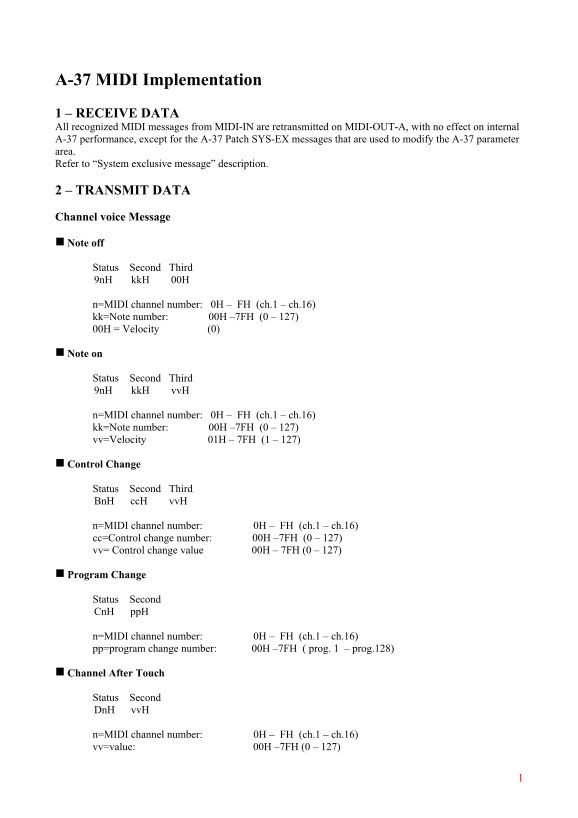
Page 1 Text Content
A-37 MIDI Implementation 1 – RECEIVE DATA All recognized MIDI messages from MIDI-IN are retransmitted on MIDI-OUT-A, with no effect on internal A-37 performance, except for the A-37 Patch SYS-EX messages that are used to modify the A-37 parameter area. Refer to “System exclusive message” description.
2 – TRANSMIT DATA
Channel voice Message
g Note off
Status Second Third 9n H kk H 00H
n=MIDI channel number: 0H – FH (ch.1 – ch.16) kk=Note number: 00H –7FH (0 – 127) 00H = Velocity (0)
g Note on
Status Second Third 9n H kk H vv H
n=MIDI channel number: 0H – FH (ch.1 – ch.16) kk=Note number: 00H –7FH (0 – 127) vv=Velocity 01H – 7FH (1 – 127)
g Control Change
Status Second Third Bn H cc H vv H
n=MIDI channel number: 0H – FH (ch.1 – ch.16) cc=Control change number: 00H –7FH (0 – 127) vv= Control change value 00H – 7FH (0 – 127)
g Program Change
Status Second Cn H pp H
n=MIDI channel number: 0H – FH (ch.1 – ch.16) pp=program change number: 00H –7FH ( prog. 1 – prog.128)
g Channel After Touch
Status Second Dn H vv H
n=MIDI channel number: 0H – FH (ch.1 – ch.16) vv=value: 00H –7FH (0 – 127)
Page Summary Contents For Roland A-37 MIDI Keyboard Controller - MIDI Implementation User Manual
Manual Details
| Brand | Roland |
|---|---|
| Pages | 6 |
| File Size | 81.02 KB |
| Published | June 04, 2026 |
Enter the captcha to get the download link:

Frequently Asked Questions
How can I determine the address for a specific patch number?
The address uses [1]/[nd]/[rd]: Patch Number. For example, PATCH-012 is 01H/0BH/00H.
What system messages are transmitted regularly without user input?
System Realtime Messages (Active Sensing Status FEH, Timing Clock Status F8H, Start Status FAH, Stop Status FCH) are transmitted constantly at intervals of approximately 250ms.
Does receiving MIDI data affect the A-37's internal performance?
Only messages used to modify parameters, such as SYS-EX messages, affect performance; standard MIDI inputs are retransmitted without effect on internal performance.