Roland TD-17 MIDI Implementation User's Manual
Summary
Experience advanced electronic music production with this professional drum module. This guide provides comprehensive coverage of complex MIDI transmission protocols, detailing how to receive and interpret various Channel Voice Messages, Channel Mode Messages, and System Exclusive status through multiple communication channels. Designed for serious musicians and audio engineers, it ensures seamless, deep integration, allowing you to link the TD-17 with external synthesizers and sequencing equipment for robust control and nuanced performance capabilities.
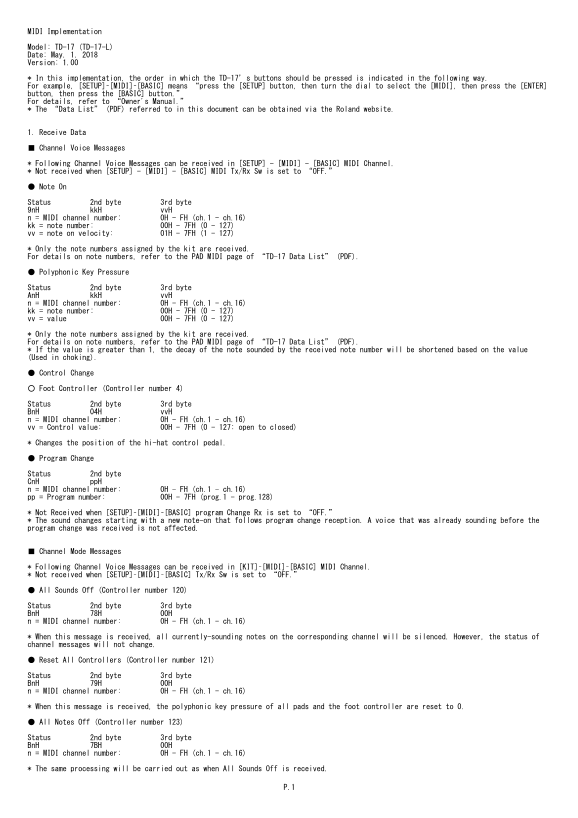
Page 1 Text Content
MIDI Implementation
Model: TD-17 (TD-17-L) Date: May. 1. 2018 Version: 1.00
* In this implementation, the order in which the TD-17’s buttons should be pressed is indicated in the following way. For example, [SETUP]–[MIDI]–[BASIC] means “press the [SETUP] button, then turn the dial to select the [MIDI], then press the [ENTER] button, then press the [BASIC] button.” For details, refer to “Owner's Manual.” * The “Data List” (PDF) referred to in this document can be obtained via the Roland website.
1. Receive Data
■ Channel Voice Messages
* Following Channel Voice Messages can be received in [SETUP] - [MIDI] - [BASIC] MIDI Channel. * Not received when [SETUP] - [MIDI] - [BASIC] MIDI Tx/Rx Sw is set to “OFF.”
● Note On
Status 2nd byte 3rd byte 9n H kk H vv H n = MIDI channel number: 0H - FH (ch.1 - ch.16) kk = note number: 00H - 7FH (0 - 127) vv = note on velocity: 01H - 7FH (1 - 127)
* Only the note numbers assigned by the kit are received. For details on note numbers, refer to the PAD MIDI page of “TD-17 Data List” (PDF).
● Polyphonic Key Pressure
Status 2nd byte 3rd byte An H kk H vv H n = MIDI channel number: 0H - FH (ch.1 - ch.16) kk = note number: 00H - 7FH (0 - 127) vv = value 00H - 7FH (0 - 127)
* Only the note numbers assigned by the kit are received. For details on note numbers, refer to the PAD MIDI page of “TD-17 Data List” (PDF). * If the value is greater than 1, the decay of the note sounded by the received note number will be shortened based on the value (Used in choking).
● Control Change
○ Foot Controller (Controller number 4)
Status 2nd byte 3rd byte Bn H 04H vv H n = MIDI channel number: 0H - FH (ch.1 - ch.16) vv = Control value: 00H - 7FH (0 - 127: open to closed)
* Changes the position of the hi-hat control pedal.
● Program Change
Status 2nd byte Cn H pp H n = MIDI channel number: 0H - FH (ch.1 - ch.16) pp = Program number: 00H - 7FH (prog.1 - prog.128)
* Not Received when [SETUP]–[MIDI]–[BASIC] program Change Rx is set to “OFF.” * The sound changes starting with a new note-on that follows program change reception. A voice that was already sounding before the program change was received is not affected.
■ Channel Mode Messages
* Following Channel Voice Messages can be received in [KIT]–[MIDI]–[BASIC] MIDI Channel. * Not received when [SETUP]–[MIDI]–[BASIC] Tx/Rx Sw is set to “OFF.”
● All Sounds Off (Controller number 120)
Status 2nd byte 3rd byte Bn H 78H 00H n = MIDI channel number: 0H - FH (ch.1 - ch.16)
* When this message is received, all currently-sounding notes on the corresponding channel will be silenced. However, the status of channel messages will not change.
● Reset All Controllers (Controller number 121)
Status 2nd byte 3rd byte Bn H 79H 00H n = MIDI channel number: 0H - FH (ch.1 - ch.16)
* When this message is received, the polyphonic key pressure of all pads and the foot controller are reset to 0.
● All Notes Off (Controller number 123)
Status 2nd byte 3rd byte Bn H 7BH 00H n = MIDI channel number: 0H - FH (ch.1 - ch.16)
* The same processing will be carried out as when All Sounds Off is received.
Page Summary Contents For Roland TD-17 MIDI Implementation User's Manual
Manual Details
| Brand | Roland |
|---|---|
| Pages | 36 |
| File Size | 100.47 KB |
| Published | May 27, 2026 |
Enter the captcha to get the download link:

Frequently Asked Questions
How is the button sequence for setup changes?
The order matters; e.g., [SETUP]–[MIDI]–[BASIC]. Refer to the Owner's Manual for full details.
What happens when the All Sounds Off message (120) is received?
All currently-sounding notes on that channel will be silenced, but the status of channel messages remains unchanged.
Can I receive Polyphonic Key Pressure Status?
Yes. The system receives note numbers (kk) and value (vv), which can also shorten decay for choking if the value is greater than 1.