Roland TD-20 Drum Sound Module MIDI Implementation User's Manual
Summary
This technical guide provides exhaustive details on the MIDI implantation model for the TD-20 unit. It offers advanced specifications that describe how various controller messages—including Bank Select, Modulation, Breath Controller inputs, and foot/expression pedal data—are received, processed, and recorded within a music sequencing environment. Ideal for professional musicians and sound engineers, this manual is essential for understanding system integration, achieving nuanced control depth, and mapping precise real-time performance dynamics across interconnected electronic instruments.
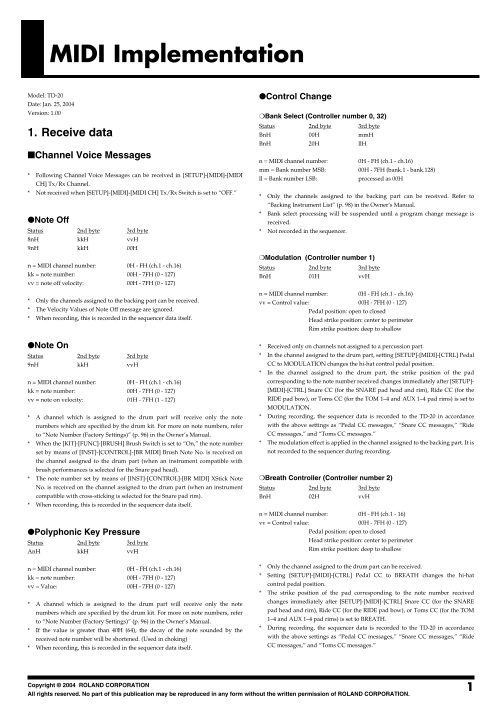
Page 1 Text Content
MIDI Implementation Model: TD-20 Control Change Date: Jan. 25, 2004 Version: 1.00
Bank Select (Controller number 0, 32)
Status 2nd byte 3rd byte
1. Receive data Bn H 00H mm H
Bn H 20H ll H
Channel Voice Messages
n = MIDI channel number: 0H - FH (ch.1 - ch.16) mm = Bank number MSB: 00H - 7FH (bank.1 - bank.128)
Following Channel Voice Messages can be received in [SETUP]-[MIDI]-[MIDI
ll = Bank number LSB: processed as 00H
CH] Tx/Rx Channel. Not received when [SETUP]-[MIDI]-[MIDI CH] Tx/Rx Switch is set to “OFF.”
Only the channels assigned to the backing part can be received. Refer to “Backing Instrument List” (p. 98) in the Owner’s Manual. Bank select processing will be suspended until a program change message is
Note Off received. Status 2nd byte 3rd byte Not recorded in the sequencer. 8n H kk H vv H 9n H kk H 00H
Modulation (Controller number 1)
n = MIDI channel number: 0H - FH (ch.1 - ch.16)
Status 2nd byte 3rd byte
kk = note number: 00H - 7FH (0 - 127)
Bn H 01H vv H
vv = note off velocity: 00H - 7FH (0 - 127)
n = MIDI channel number: 0H - FH (ch.1 - ch.16)
Only the channels assigned to the backing part can be received.
vv = Control value: 00H - 7FH (0 - 127)
The Velocity Values of Note Off message are ignored.
Pedal position: open to closed
When recording, this is recorded in the sequencer data itself.
Head strike position: center to perimeter Rim strike position: deep to shallow
Note On Received only on channels not assigned to a percussion part. Status 2nd byte 3rd byte In the channel assigned to the drum part, setting [SETUP]-[MIDI]-[CTRL] Pedal 9n H kk H vv H CC to MODULATION changes the hi-hat control pedal position. In the channel assigned to the drum part, the strike position of the pad n = MIDI channel number: 0H - FH (ch.1 - ch.16) corresponding to the note number received changes immediately after [SETUP]- kk = note number: 00H - 7FH (0 - 127) [MIDI]-[CTRL] Snare CC (for the SNARE pad head and rim), Ride CC (for the vv = note on velocity: 01H - 7FH (1 - 127) RIDE pad bow), or Toms CC (for the TOM 1–4 and AUX 1–4 pad rims) is set to MODULATION. A channel which is assigned to the drum part will receive only the note During recording, the sequencer data is recorded to the TD-20 in accordance numbers which are specified by the drum kit. For more on note numbers, refer with the above settings as “Pedal CC messages,” “Snare CC messages,” “Ride to “Note Number (Factory Settings)” (p. 96) in the Owner’s Manual. CC messages,” and “Toms CC messages.” When the [KIT]-[FUNC]-[BRUSH] Brush Switch is set to “On,” the note number The modulation effect is applied in the channel assigned to the backing part. It is set by means of [INST]-[CONTROL]-[BR MIDI] Brush Note No. is received on not recorded to the sequencer during recording.
the channel assigned to the drum part (when an instrument compatible with brush performances is selected for the Snare pad head).
The note number set by means of [INST]-[CONTROL]-[BR MIDI] XStick Note Breath Controller (Controller number 2)
No. is received on the channel assigned to the drum part (when an instrument Status 2nd byte 3rd byte compatible with cross-sticking is selected for the Snare pad rim). Bn H 02H vv H When recording, this is recorded in the sequencer data itself.
n = MIDI channel number: 0H - FH (ch.1 - 16) vv = Control value: 00H - 7FH (0 - 127)
Polyphonic Key Pressure Pedal position: open to closed Head strike position: center to perimeter
Status 2nd byte 3rd byte
Rim strike position: deep to shallow
An H kk H vv H
Only the channel assigned to the drum part can be received.
n = MIDI channel number: 0H - FH (ch.1 - ch.16)
Setting [SETUP]-[MIDI]-[CTRL] Pedal CC to BREATH changes the hi-hat
kk = note number: 00H - 7FH (0 - 127)
control pedal position.
vv = Value: 00H - 7FH (0 - 127)
The strike position of the pad corresponding to the note number received changes immediately after [SETUP]-[MIDI]-[CTRL] Snare CC (for the SNARE
A channel which is assigned to the drum part will receive only the note
pad head and rim), Ride CC (for the RIDE pad bow), or Toms CC (for the TOM
numbers which are specified by the drum kit. For more on note numbers, refer
1–4 and AUX 1–4 pad rims) is set to BREATH.
to “Note Number (Factory Settings)” (p. 96) in the Owner’s Manual.
During recording, the sequencer data is recorded to the TD-20 in accordance
If the value is greater than 40H (64), the decay of the note sounded by the
with the above settings as “Pedal CC messages,” “Snare CC messages,” “Ride
received note number will be shortened. (Used in choking)
CC messages,” and “Toms CC messages.”
When recording, this is recorded in the sequencer data itself.
Copyright © 2004 ROLAND CORPORATION All rights reserved. No part of this publication may be reproduced in any form without the written permission of ROLAND CORPORATION.
Page Summary Contents For Roland TD-20 Drum Sound Module MIDI Implementation User's Manual
Manual Details
| Brand | Roland |
|---|---|
| Pages | 14 |
| File Size | 87.73 KB |
| Published | May 31, 2026 |
Enter the captcha to get the download link:

Frequently Asked Questions
How can I adjust how the hi-hat pedal controls work?
Select [SETUP]-[MIDI]-[CTRL] Pedal CC to MODULATION; this changes the hi-hat control pedal position.
Does the device support multiple MIDI input types?
Yes, it supports general controllers and dedicated inputs for Expression (Controller 11), Foot Controller (Controller 4), Breath Controller (Controller 2), and Modulation (Controller 1).
What happens to Note Off messages?
Note Off messages are not recorded in the sequencer and have no effect on any settings.
Can I set specific strike positions via MIDI data?
Yes, by setting [SETUP]-[MIDI]-[CTRL] Snare CC, Ride CC, or Toms CC to MODULATION. This allows controlling pad head/rim strike positions.