Roland TD-50 Electronic Drum Sound Module TD-50 MIDI Implementation User's Manual
Summary
Master this advanced drum module with this technical guide dedicated to detailed MIDI implementation. Covering everything from navigating core settings through specialized CC message setup for hi-hat pedals and cymbals to interpreting polyphonic key pressure status, the manual serves as a comprehensive reference tool. It is essential reading for professional drummers, electronic musicians, and sound designers who require deep integration of high-fidelity drumming performance into external sequencers and production software.
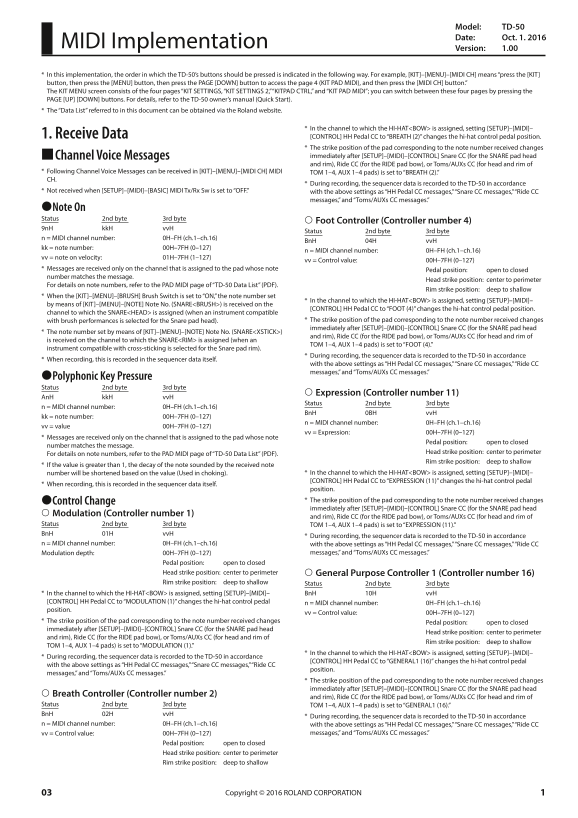
Page 1 Text Content
Model: TD-50 Date: Oct. 1. 2016
MIDI Implementation
Version: 1.00
* In this implementation, the order in which the TD-50’s buttons should be pressed is indicated in the following way. For example, [KIT]–[MENU]–[MIDI CH] means “press the [KIT] button, then press the [MENU] button, then press the PAGE [DOWN] button to access the page 4 (KIT PAD MIDI), and then press the [MIDI CH] button.” The KIT MENU screen consists of the four pages “KIT SETTINGS, “KIT SETTINGS 2,” “KITPAD CTRL,” and “KIT PAD MIDI”; you can switch between these four pages by pressing the PAGE [UP] [DOWN] buttons. For details, refer to the TD-50 owner’s manual (Quick Start). * The “Data List” referred to in this document can be obtained via the Roland website.
* In the channel to which the HI-HAT<BOW> is assigned, setting [SETUP]–[MIDI]–
1. Receive Data [CONTROL] HH Pedal CC to “BREATH (2)” changes the hi-hat control pedal position.
* The strike position of the pad corresponding to the note number received changes 9Channel Voice Messages immediately after [SETUP]–[MIDI]–[CONTROL] Snare CC (for the SNARE pad head and rim), Ride CC (for the RIDE pad bow), or Toms/AUXs CC (for head and rim of
* Following Channel Voice Messages can be received in [KIT]–[MENU]–[MIDI CH] MIDI TOM 1–4, AUX 1–4 pads) is set to “BREATH (2).” CH.
* During recording, the sequencer data is recorded to the TD-50 in accordance
* Not received when [SETUP]–[MIDI]–[BASIC] MIDI Tx/Rx Sw is set to “OFF.” with the above settings as “HH Pedal CC messages,” “Snare CC messages,” “Ride CC
messages,” and “Toms/AUXs CC messages.”
7Note On Status 2nd byte 3rd byte
Foot Controller (Controller number 4)
9n H kk H vv H
Status 2nd byte 3rd byte
n = MIDI channel number: 0H–FH (ch.1–ch.16)
Bn H 04H vv H
kk = note number: 00H–7FH (0–127)
n = MIDI channel number: 0H–FH (ch.1–ch.16)
vv = note on velocity: 01H–7FH (1–127)
vv = Control value: 00H–7FH (0–127)
* Messages are received only on the channel that is assigned to the pad whose note Pedal position: open to closed number matches the message.
Head strike position: center to perimeter
For details on note numbers, refer to the PAD MIDI page of “TD-50 Data List” (PDF).
Rim strike position: deep to shallow
* When the [KIT]–[MENU]–[BRUSH] Brush Switch is set to “ON,” the note number set
* In the channel to which the HI-HAT<BOW> is assigned, setting [SETUP]–[MIDI]–
by means of [KIT]–[MENU]–[NOTE] Note No. (SNARE<BRUSH>) is received on the
[CONTROL] HH Pedal CC to “FOOT (4)” changes the hi-hat control pedal position.
channel to which the SNARE<HEAD> is assigned (when an instrument compatible
with brush performances is selected for the Snare pad head). * The strike position of the pad corresponding to the note number received changes immediately after [SETUP]–[MIDI]–[CONTROL] Snare CC (for the SNARE pad head
* The note number set by means of [KIT]–[MENU]–[NOTE] Note No. (SNARE<XSTICK>)
and rim), Ride CC (for the RIDE pad bow), or Toms/AUXs CC (for head and rim of
is received on the channel to which the SNARE<RIM> is assigned (when an
TOM 1–4, AUX 1–4 pads) is set to “FOOT (4).”
instrument compatible with cross-sticking is selected for the Snare pad rim).
* During recording, the sequencer data is recorded to the TD-50 in accordance
* When recording, this is recorded in the sequencer data itself.
with the above settings as “HH Pedal CC messages,” “Snare CC messages,” “Ride CC messages,” and “Toms/AUXs CC messages.”
7Polyphonic Key Pressure Status 2nd byte 3rd byte
Expression (Controller number 11)
An H kk H vv H
Status 2nd byte 3rd byte
n = MIDI channel number: 0H–FH (ch.1–ch.16)
Bn H 0BH vv H
kk = note number: 00H–7FH (0–127)
n = MIDI channel number: 0H–FH (ch.1–ch.16)
vv = value 00H–7FH (0–127)
vv = Expression: 00H–7FH (0–127)
* Messages are received only on the channel that is assigned to the pad whose note
Pedal position: open to closed
number matches the message.
Head strike position: center to perimeter
For details on note numbers, refer to the PAD MIDI page of “TD-50 Data List” (PDF).
Rim strike position: deep to shallow
* If the value is greater than 1, the decay of the note sounded by the received note
number will be shortened based on the value (Used in choking). * In the channel to which the HI-HAT<BOW> is assigned, setting [SETUP]–[MIDI]– [CONTROL] HH Pedal CC to “EXPRESSION (11)” changes the hi-hat control pedal
* When recording, this is recorded in the sequencer data itself.
position. 7Control Change * The strike position of the pad corresponding to the note number received changes immediately after [SETUP]–[MIDI]–[CONTROL] Snare CC (for the SNARE pad head
Modulation (Controller number 1)
and rim), Ride CC (for the RIDE pad bow), or Toms/AUXs CC (for head and rim of
Status 2nd byte 3rd byte TOM 1–4, AUX 1–4 pads) is set to “EXPRESSION (11).” Bn H 01H vv H
* During recording, the sequencer data is recorded to the TD-50 in accordance
n = MIDI channel number: 0H–FH (ch.1–ch.16) with the above settings as “HH Pedal CC messages,” “Snare CC messages,” “Ride CC
Modulation depth: 00H–7FH (0–127) messages,” and “Toms/AUXs CC messages.”
Pedal position: open to closed Head strike position: center to perimeter General Purpose Controller 1 (Controller number 16) Rim strike position: deep to shallow Status 2nd byte 3rd byte * In the channel to which the HI-HAT<BOW> is assigned, setting [SETUP]–[MIDI]– Bn H 10H vv H [CONTROL] HH Pedal CC to “MODULATION (1)” changes the hi-hat control pedal n = MIDI channel number: 0H–FH (ch.1–ch.16) position.
vv = Control value: 00H–7FH (0–127)
* The strike position of the pad corresponding to the note number received changes Pedal position: open to closed immediately after [SETUP]–[MIDI]–[CONTROL] Snare CC (for the SNARE pad head
Head strike position: center to perimeter
and rim), Ride CC (for the RIDE pad bow), or Toms/AUXs CC (for head and rim of
Rim strike position: deep to shallow
TOM 1–4, AUX 1–4 pads) is set to “MODULATION (1).”
* In the channel to which the HI-HAT<BOW> is assigned, setting [SETUP]–[MIDI]–
* During recording, the sequencer data is recorded to the TD-50 in accordance
[CONTROL] HH Pedal CC to “GENERAL1 (16)” changes the hi-hat control pedal
with the above settings as “HH Pedal CC messages,” “Snare CC messages,” “Ride CC
position.
messages,” and “Toms/AUXs CC messages.”
* The strike position of the pad corresponding to the note number received changes immediately after [SETUP]–[MIDI]–[CONTROL] Snare CC (for the SNARE pad head
Breath Controller (Controller number 2)
and rim), Ride CC (for the RIDE pad bow), or Toms/AUXs CC (for head and rim of
Status 2nd byte 3rd byte TOM 1–4, AUX 1–4 pads) is set to “GENERAL1 (16).” Bn H 02H vv H
* During recording, the sequencer data is recorded to the TD-50 in accordance
n = MIDI channel number: 0H–FH (ch.1–ch.16) with the above settings as “HH Pedal CC messages,” “Snare CC messages,” “Ride CC
vv = Control value: 00H–7FH (0–127) messages,” and “Toms/AUXs CC messages.”
Pedal position: open to closed Head strike position: center to perimeter Rim strike position: deep to shallow
Copyright © 2016 ROLAND CORPORATION 03
Page Summary Contents For Roland TD-50 Electronic Drum Sound Module TD-50 MIDI Implementation User's Manual
Manual Details
| Brand | Roland |
|---|---|
| Pages | 30 |
| File Size | 143.85 KB |
| Published | June 04, 2026 |
Enter the captcha to get the download link:

Frequently Asked Questions
How do I access the MIDI settings for different pads?
The KIT MENU screen has four pages: 'KIT SETTINGS,' 'KIT SETTINGS 2,' 'KITPAD CTRL,' and 'KIT PAD MIDI.' Use the PAGE [UP] or [DOWN] buttons to switch between them.
How can I change the function of a hi-hat control pedal?
In the assigned Hi-Hat<BOW> channel, navigate to [SETUP]–[MIDI]–1. From there, select 'Receive Data [CONTROL] HH Pedal CC' and choose 'BREATH (2)' to modify its position.
Can I record complex pad strikes like rim or breath controls?
Yes, when recording, the sequencer data captures all defined actions, including data for foot controllers, note on status bytes, polyphonic key pressure, and control change messages.
What is required to track cross-sticking performance using a snare pad?
Select an instrument compatible with cross-sticking in [KIT]–[MENU]–[NOTE] Note No. (SNARE<BRUSH>) for the Snare pad head.