Rockwell Automation 1585BP UTP Plug Installation Instructions
Summary
This comprehensive manual provides detailed instructions for terminating modular plugs and connecting industrial cable assemblies. It guides qualified technicians through essential steps, including proper cable preparation (adhering to T568A/B color codes), utilizing a crimp tool to successfully insert and latch the plug housing, and securely finishing the assembly with specialized hardware. Designed for telecommunications professionals and electricians, this resource ensures accurate installation practices required to achieve robust, durable, and IP67-rated industrial connectivity while strictly adhering to critical electrical safety standards.
Page 1 Text Content
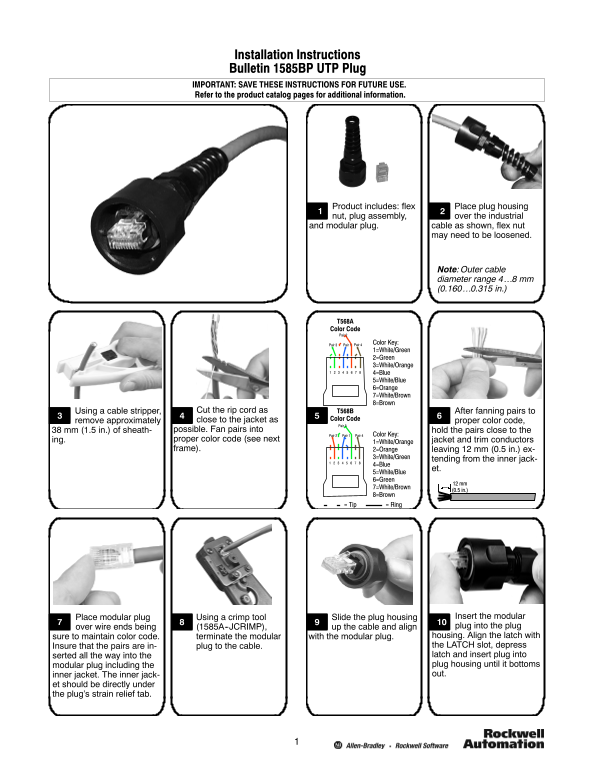
Installation Instructions Bulletin 1585BP UTP Plug IMPORTANT: SAVE THESE INSTRUCTIONS FOR FUTURE USE. Refer to the product catalog pages for additional information.
Product includes: flex Place plug housing nut, plug assembly, over the industrial and modular plug. cable as shown, flex nut
may need to be loosened.
Note:Outer cable diameter range 4…8 mm (0.160…0.315 in.)
T568A Color Code Pair
Pair Pair Pair Color Key: 1=White/Green 2=Green 3=White/Orange 4=Blue 5=White/Blue 6=Orange 7=White/Brown 8=Brown
Using cable stripper, Cut the rip cord as T568B After fanning pairs to
close to the jacket as Color Code
remove approximately proper color code,
mm (1.5 in.) of sheath- possible. Fan pairs into hold the pairs close to the
Pair Pair 4Pair Color Key:
ing. proper color code (see next jacket and trim conductors
1=White/Orange
frame). 2=Orange leaving mm (0.5 in.) ex-
3=White/Green
tending from the inner jack-
4=Blue
5=White/Blue 6=Green
7=White/Brown
(0.5 in.)
8=Brown Tip Ring
Place modular plug Using crimp tool Slide the plug housing Insert the modular over wire ends being (1585A--JCRIMP), up the cable and align plug into the plug sure to maintain color code. terminate the modular with the modular plug. housing. Align the latch with Insure that the pairs are in- plug to the cable. the LATCH slot, depress serted all the way into the latch and insert plug into modular plug including the plug housing until it bottoms inner jacket. The inner jack- out.
et should be directly under the plug’s strain relief tab.
Page Summary Contents For Rockwell Automation 1585BP UTP Plug Installation Instructions
Manual Details
| Brand | Rockwell Automation |
|---|---|
| Pages | 2 |
| File Size | 1.37 MB |
| Published | June 05, 2026 |
Enter the captcha to get the download link:
