Performance Study of Four Socket PowerEdge R940 Servers with Intel Skylake Processors
Summary
Discover powerful computing with the Dell EMC PowerEdge R940 server, featuring Intel Skylake processors and supporting massive workloads up to 122TB of storage. This technical summary details a comprehensive performance study comparing the next-generation platform against older models. Ideal for data centers running demanding High-Performance Computing (HPC) applications—including CFD, data warehousing, or complex analytics. Learn how R940 achieves significant performance leaps (over 45%) and unmatched scalability for your most intensive computing needs.
Page 1 Text Content
Performance study of four Socket Power Edge R940 Server with Intel Skylake processors
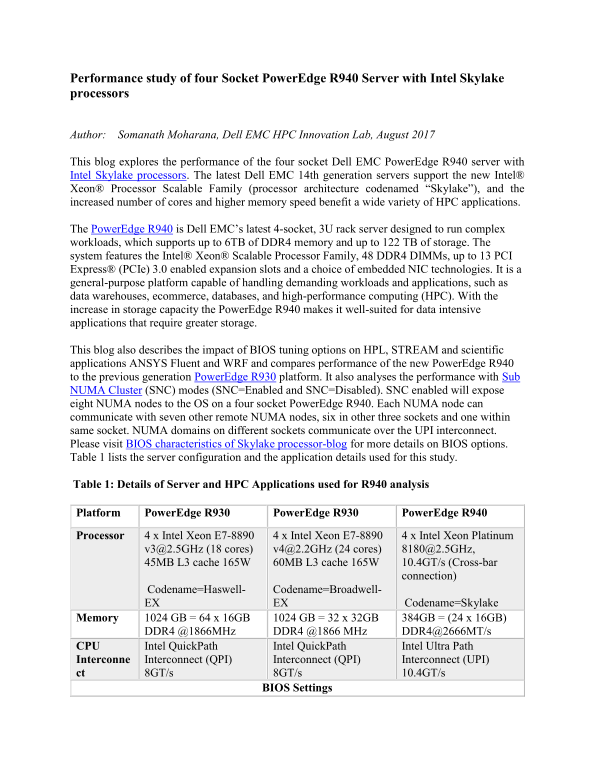
Author: Somanath Moharana, Dell EMC HPC Innovation Lab, August 2017 This blog explores the performance of the four socket Dell EMC Power Edge R940 server with Intel Skylake processors. The latest Dell EMC 14th generation servers support the new Intel® Xeon® Processor Scalable Family (processor architecture codenamed “Skylake”), and the increased number of cores and higher memory speed benefit a wide variety of HPC applications. The Power Edge R940 is Dell EMC’s latest 4-socket, 3U rack server designed to run complex workloads, which supports up to 6TB of DDR4 memory and up to 122 TB of storage. The system features the Intel® Xeon® Scalable Processor Family, 48 DDR4 DIMMs, up to 13 PCI Express® (PCIe) 3.0 enabled expansion slots and a choice of embedded NIC technologies. It is a general-purpose platform capable of handling demanding workloads and applications, such as data warehouses, ecommerce, databases, and high-performance computing (HPC). With the increase in storage capacity the Power Edge R940 makes it well-suited for data intensive applications that require greater storage. This blog also describes the impact of BIOS tuning options on HPL, STREAM and scientific applications ANSYS Fluent and WRF and compares performance of the new Power Edge R940 to the previous generation Power Edge R930 platform. It also analyses the performance with Sub NUMA Cluster (SNC) modes (SNC=Enabled and SNC=Disabled). SNC enabled will expose eight NUMA nodes to the OS on a four socket Power Edge R940. Each NUMA node can communicate with seven other remote NUMA nodes, six in other three sockets and one within same socket. NUMA domains on different sockets communicate over the UPI interconnect. Please visit BIOS characteristics of Skylake processor-blog for more details on BIOS options. Table 1 lists the server configuration and the application details used for this study. Table 1: Details of Server and HPC Applications used for R940 analysis Platform Power Edge R930 Power Edge R930 Power Edge R940 Processor 4 x Intel Xeon E7-8890 4 x Intel Xeon E7-8890 4 x Intel Xeon Platinum
[email protected] (18 cores) [email protected] (24 cores) [email protected], 45MB L3 cache 165W 60MB L3 cache 165W 10.4GT/s (Cross-bar
connection)
Codename=Haswell- Codename=Broadwell- EX EX Codename=Skylake
Memory 1024 GB = 64 x 16GB 1024 GB = 32 x 32GB 384GB = (24 x 16GB)
DDR4 @1866MHz DDR4 @1866 MHz DDR4@2666MT/s
CPU Intel Quick Path Intel Quick Path Intel Ultra Path Interconne Interconnect (QPI) Interconnect (QPI) Interconnect (UPI) ct 8GT/s 8GT/s 10.4GT/s
BIOS Settings
Page Summary Contents For Performance Study of Four Socket PowerEdge R940 Servers with Intel Skylake Processors
Manual Details
| Brand | Intel |
|---|---|
| Pages | 8 |
| File Size | 1.05 MB |
| Published | May 23, 2026 |
Enter the captcha to get the download link:

Frequently Asked Questions
What is the maximum storage capacity of the PowerEdge R940 server?
It supports up to 122 TB of storage, making it particularly well-suited for data-intensive applications.
How can optimal performance be achieved using BIOS settings?
For best results across all analyzed datasets, select the "Performance SNC = Enabled" option in the BIOS settings.
Does the R940 significantly outperform previous server generations?
Yes, it shows substantial gains, demonstrating 46% to 87% better performance when compared to older models like the PowerEdge R930.