Panasonic SC-HTB20 Quick User Guide
Summary
Introducing the SC-HTB20 Home Theater Audio System, designed to elevate your living room sound experience. This quick start guide provides complete setup instructions for new users, covering everything from optimal speaker placement to complex cable connectivity. Master the installation process by learning how to properly connect AC power, use HDMI ARC for audio return, and integrate with other smart electronics seamlessly. Essential reading for anyone building or upgrading a cinematic home entertainment system.
Page 1 Text Content
SC-HTB20_PPC_ESG_VQC8931_eng.fm 5 ページ 2012年3月7日 水曜日 午後1時31分
Quick Start Guide Home Theater Audio System SC-HTB20
Step 1: Choose in the configuration that is right for you
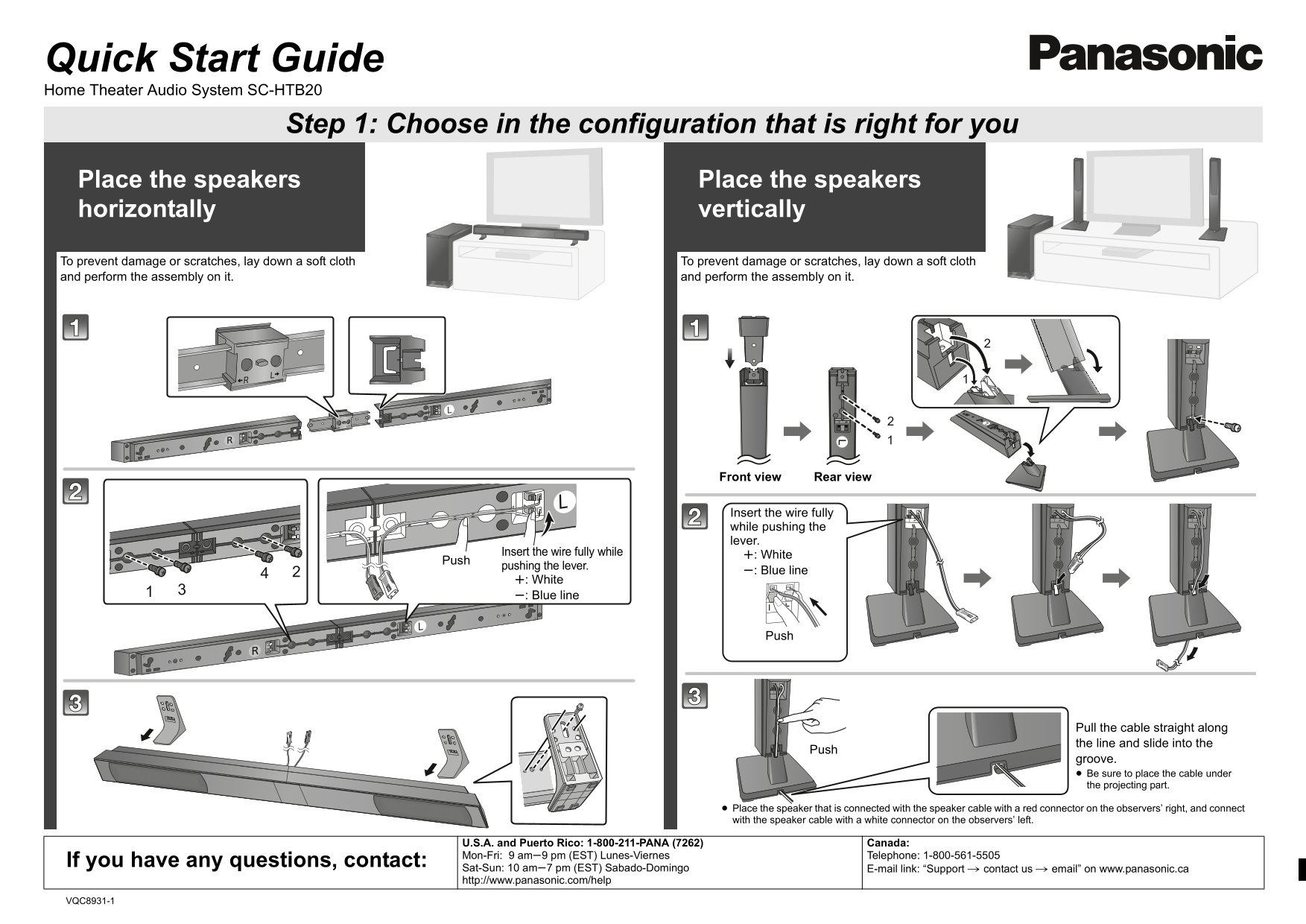
Place the speakers Place the speakers horizontally vertically
To prevent damage or scratches, lay down a soft cloth To prevent damage or scratches, lay down a soft cloth and perform the assembly on it. and perform the assembly on it.
Front view Rear view
Insert the wire fully while pushing the lever.
Insert the wire fully while r: White
pushing the lever.
s: Blue line
r: White s: Blue line
Pull the cable straight along the line and slide into the
groove. Be sure to place the cable under the projecting part.
Place the speaker that is connected with the speaker cable with a red connector on the observers’ right, and connect with the speaker cable with a white connector on the observers’ left.
U.S.A. and Puerto Rico: 1-800-211-PANA (7262) Canada: Mon-Fri: 9 ams9 pm (EST) Lunes-Viernes Telephone: 1-800-561-5505
If you have any questions, contact:
Sat-Sun: 10 ams7 pm (EST) Sabado-Domingo E-mail link: “Support # contact us # email” on www.panasonic.ca http://www.panasonic.com/help
VQC8931-1
Page Summary Contents For Panasonic SC-HTB20 Quick User Guide
Manual Details
| Brand | Panasonic |
|---|---|
| Pages | 2 |
| File Size | 1.66 MB |
| Published | June 22, 2026 |
Enter the captcha to get the download link:

Frequently Asked Questions
What should I connect if my TV is HDMI (ARC) compatible?
Connect it to the TV’s ARC terminal on an HDMI cable; this feature allows audio return without additional wiring.
When connecting the active subwoofer, what step must be completed first?
Do not connect the AC power supply cord to the active subwoofer until all main connections are complete.
How do I manage the volume when watching TV with this system?
Use the TV’s remote control and press [i VOLj] button on the TV's remote.