Panasonic SC-ZT2 Quick Start Guide
Summary
Optimize your home entertainment with this guide for the SC-ZT2 Home Theater Audio System. This manual provides comprehensive, step-by-step instructions covering every aspect of setup, allowing new users to easily calibrate their system. Learn essential procedures like connecting speakers, establishing a stable wireless link, and performing detailed sound tests via optical or HDMI inputs. Whether you are linking two primary speakers or integrating optional surround units, this guide ensures you achieve optimal, cinematic audio quality right out of the box.
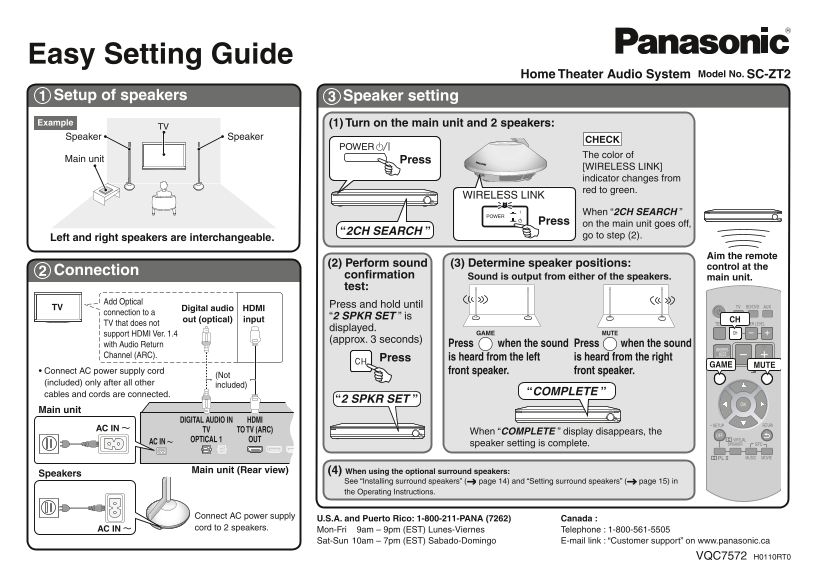
Page 1 Text Content
Easy Setting Guide
Home Theater Audio System Model No. SC-ZT2
Setup of speakers Speaker setting
(1) Turn on the main unit and 2 speakers:
TVExample
Speaker Speaker
CHECK The color of
Main unit Press
[WIRELESS LINK] indicator changes from red to green.
WIRELESS LINK
When “2CH SEARCH ”
POWER
Press on the main unit goes off,
“2CH SEARCH ”
Left and right speakers are interchangeable. go to step (2).
Aim the remote
(2) Perform sound (3) Determine speaker positions:
control at the
Connection
confirmation Sound is output from either of the speakers. main unit. test:
Add Optical
Press and hold until
TV Digital audio HDMI
connection to a
“2 SPKR SET ” is
out (optical) input CH
TV that does not
displayed.
support HDMI Ver. 1.4 GAME MUTE
(approx. 3 seconds)
with Audio Return Press when the sound Press when the sound
Channel (ARC).
Press is heard from the left is heard from the right
GAME MUTE
• Connect AC power supply cord front speaker. front speaker.
(included) only after all other
included)
cables and cords are connected. “COMPLETE ”
“2 SPKR SET ”
Main unit
DIGITAL AUDIO IN HDMI
AC IN TV TO TV (ARC)
When “COMPLETE ” display disappears, the
OPTICAL 1 OUT
AC IN speaker setting is complete.
Main unit (Rear view) (4) When using the optional surround speakers:
Speakers
See “Installing surround speakers” ( page 14) and “Setting surround speakers” ( page 15) in the Operating Instructions.
Connect AC power supply
U.S.A. and Puerto Rico: 1-800-211-PANA (7262) Canada :
AC IN cord to 2 speakers. Mon-Fri 9am – 9pm (EST) Lunes-Viernes Telephone : 1-800-561-5505
Sat-Sun 10am – 7pm (EST) Sabado-Domingo E-mail link : “Customer support” on www.panasonic.ca
VQC7572 H0110RT0
Page Summary Contents For Panasonic SC-ZT2 Quick Start Guide
Manual Details
| Brand | Panasonic |
|---|---|
| Pages | 1 |
| File Size | 398.15 KB |
| Published | June 18, 2026 |
Enter the captcha to get the download link:

Frequently Asked Questions
How do I complete the initial speaker setup?
Connect all cables and cords, then press [WIRELESS LINK]. The '2 SPKR SET' display confirms completion when the message disappears.
What is needed for wireless connection confirmation?
Pressing [WIRELESS LINK] makes the indicator change from red to green. Sound output checks (left/right) should also be verified.
How can I connect my TV via HDMI and ARC?
Use an HDMI cable connecting the TV's ARC port to the main unit's HDMI IN port. A '2 SPKR SET' test will confirm function.
Where can I find instructions for surround speakers?
Refer to page 14 ('Installing surround speakers') and page 15 ('Setting surround speakers') in the Operating Instructions.