# A B C D E F G H I J K L M N O P Q R S T U V W X Y Z

Panasonic SC-PM53 SC-PM533 User Guide & Manual

Summary

Panasonic SC-PM53/PM533 CD stereo system operating instructions. Micro component system with CD/CD-R/RW/MP3 player, cassette recorder, AM/FM tuner with presets, and timer. Covers speaker placement, connections, playback, radio tuning, timer recording, equalizer settings, remote control, and troubleshooting. For home audio consumers seeking compact multi-format stereo.
📄 Preview 📖 Table of Contents Contents PAGE OF 24

Page 1 Text Content

Operating Instructions

CD Stereo System

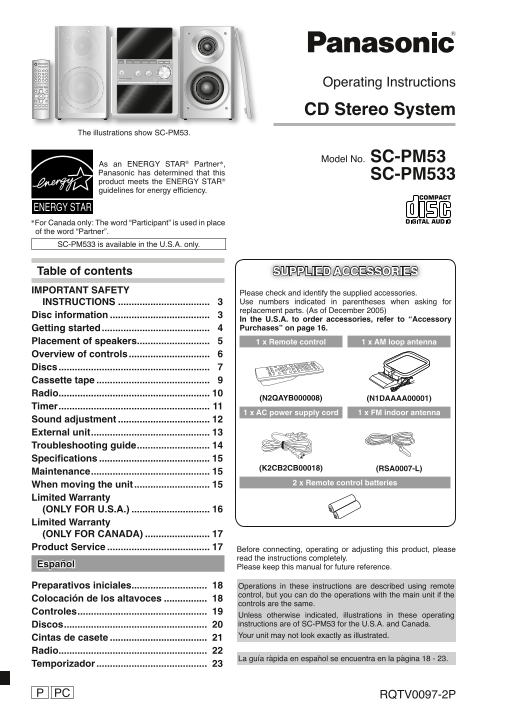
The illustrations show SC-PM53.

Model No. SC-PM53

SC-PM533

SC-PM533 is available in the U.S.A. only.

Table of contents SUPPLIED ACCESSORIES IMPORTANT SAFETY

Please check and identify the supplied accessories. INSTRUCTIONS .................................. 3 Use numbers indicated in parentheses when asking for replacement parts. (As of December 2005)

Disc information ..................................... 3

In the U.S.A. to order accessories, refer to “Accessory Getting started ........................................ 4 Purchases” on page 16.

Placement of speakers ........................... 5 1 x Remote control 1 x AM loop antenna Overview of controls .............................. 6 Discs ........................................................ 7 Cassette tape .......................................... 9 Radio ........................................................ 10

(N2QAYB000008) (N1DAAAA00001)

Timer ........................................................ 11

1 x AC power supply cord 1 x FM indoor antenna

Sound adjustment .................................. 12 External unit ............................................ 13 Troubleshooting guide ........................... 14 Specifi cations ......................................... 15

(K2CB2CB00018) (RSA0007-L)

Maintenance ............................................ 15

When moving the unit ............................ 15 2 x Remote control batteries

Limited Warranty (ONLY FOR U.S.A.) ............................. 16 Limited Warranty (ONLY FOR CANADA) ........................ 17 Product Service ...................................... 17 Before connecting, operating or adjusting this product, please

read the instructions completely.

Español

Please keep this manual for future reference.

Preparativos iniciales ............................ Operations in these instructions are described using remote

control, but you can do the operations with the main unit if the

Colocación de los altavoces ................

controls are the same.

Controles ................................................

Unless otherwise indicated, illustrations in these operating Discos ..................................................... instructions are of SC-PM53 for the U.S.A. and Canada. Your unit may not look exactly as illustrated.

Cintas de casete .................................... Radio .......................................................

La guía rápida en español se encuentra en la página 18 - 23.

Temporizador .........................................

PC RQTV0097-2P

RQTV0097_2P_EN.indd 1 2/6/06 3:33:54 PM

Page Summary Contents For Panasonic SC-PM53 SC-PM533 User Guide & Manual

Page 1 Operating Instructions CD Stereo System The illustrations show SC-PM53. Model No. SC-PM53 SC-PM533 SC-PM533 is available in the U.S.A. only. Table of contents SUPPLIED ACCESSORIES IMPORTANT SAFETY Ple...
Page 2 Dear customer Thank you for purchasing this product. For optimum performance and safety, please read these instructions carefully. These operating instructions are applicable to the following system. ...
Page 3 Disc information • This unit can play MP3 or WMA fi les and CD-DA format audio Not doing the following will cause damage to the unit. CD-R/RWs that have been fi nalized. Removing the power plug • It m...
Page 4 Getting started Step 1 - Making the connections Connect the AC power supply cord only after all other connections have been made. 1 Connect the AM loop antenna. 2 Connect the FM indoor antenna. AM ANT...
Page 5 Step 2 - Inserting batteries into the remote control ■ Batteries • Insert so the poles (+ and –) match those in the remote control. • Remove if the remote control is not going to be used for a long pe...
Page 6 Overview of controls Main unit Refer to numbers in parentheses for page reference. Top of unit Headphone jack ( Avoid listening for prolonged periods of time to prevent hearing damage. Plug type: 3.5 ...
Page 7 Discs Numeric buttons Disc trays Basic play Play Mode function CD CD MP3 WMA MP3 WMA Press [y] to turn the unit on. Press [CD 6] and then [STOP 7]. Press [1 3~ 5 3] to select your desired tray. Press ...
Page 8 Discs (continued) Checking which discs are in the trays (CD CHECK) Program play CD This function allows you to program up to 24 tracks. MP3 WMA Press [CD CHECK]. Press [CD 6] and then [STOP 7]. Press ...
Page 9 Cassette tape Recording Use normal position tapes. High position and metal position tapes can be used, but this unit will not be able to record or erase them correctly. Preparation Wind the leader tap...
Page 10 Radio Memory preset Up to 15 stations can be set in both the FM and AM bands. Numeric Preparation buttons Press [TUNER/BAND] to select “FM” or “AM”. Automatic presetting Press and hold [PROGRAM] to st...
Page 11 Timer Using the play or record timer You can set the timer to come on at a certain time to wake you up (play timer) or to record from the radio or a music port source (record timer). Preparation Turn ...
Page 12 Timer (Continued) Sound adjustment Other basic operations To Action change the settings Repeat steps 1 to 4 and 6 on page 11. change the source 1) Press [˚PLAY/REC] to clear the timer or volume indica...
Page 13 External unit The buttons described for “External unit” are mainly for Enjoying surround sound the main unit unless indicated otherwise. Enable you to add natural width and depth to the stereo sound. ...
Page 14 Troubleshooting guide Before requesting service, make the following checks. If you are in doubt about some of the check points, or if the remedies indicated in the chart do not solve the problem, refe...
Page 15 Specifi cations AMPLIFIER SECTION CD SECTION FTC OUTPUT POWER both channel driven Disc played [8 cm (3") or 12 cm (5")] simultaneously (1) CD-Audio (CD-DA) 10% Total harmonic distortion (2) ...
Page 16 Limited Warranty (ONLY FOR U.S.A.) Panasonic Consumer Electronics Company, Panasonic Puerto Rico, Inc. Division of Panasonic Corporation of North America Ave. 65 de Infantería, Km. 9.5 One Panasonic W...
Page 17 Limited Warranty (ONLY FOR CANADA) Panasonic Canada Inc. PANASONIC/TECHNICS PRODUCT – LIMITED WARRANTY Panasonic Canada Inc. warrants this product to be free from defects in material and workmanship a...
Page 18 Preparativos iniciales Paso 1 - Conexiones Conecte el cable de alimentación de CA sólo después de haber hecho todas las demás conexiones. 1 Conecte la antena de cuadro de AM. 2 Conecte la antena inter...
Page 19 Controles Aparato principal Los números entre paréntesis indican la página de referencia. Parte superior del aparato Toma de auriculares ( Procure evitar utilizarlos mucho rato con el fi n de evitar l...
Page 20 Discos Botones numéricos Bandeja de disco Reproducción básica Función de modo de reproducción CD CD MP3 WMA MP3 WMA Pulse [y] para encender el aparato. Pulse [CD 6] y después [STOP 7]. Pulse [1 3~ 5 3...
Page 21 Cintas de casete Grabación Use cintas de posición normal. Pueden usarse cintas de posición alta y de metal, pero el aparato no las grabará ni las borrará correctamente. Preparación Rebobine la cinta o...
Page 22 Radio Grabación de emisoras en memoria Se puede presintonizar un máximo de 15 emisoras en cada Botones banda, FM y AM. numéricos Preparación Pulse [TUNER/BAND] para seleccionar “FM” o “AM”. Presintoni...
Page 23 Temporizador Pulse [CLOCK/TIMER] repetidamente para seleccionar el temporizador deseado. CLOCK ˚ PLAY ˚ REC Visulización original Entre 5 segundos, pulse [4/REW/4] o [3/FF/¢] para ajustar la hora de i...
Page 24 Panasonic Consumer Electronics Panasonic Puerto Rico, Inc. Panasonic Canada Inc. En Sp Company, Division of Panasonic Ave. 65 de Infantería, Km. 9.5 5770 Ambler Drive Corporation of North America San ...

Manual Details

Brand Panasonic
Pages 24
File Size 3.71 MB
Published June 16, 2026
7 views

Enter the captcha to get the download link:

captcha

Frequently Asked Questions

What disc formats can this system play?

It plays MP3, WMA files and CD-DA format audio on finalized CD-R/RWs.

How do I safely remove the power plug?

Wait until "GOODBYE" is displayed when the unit turns off, then remove the plug.

Where is the model number located?

It is on either the back or the bottom of the unit.

How many tracks can the unit access on a disc?

The unit can access up to 99 tracks on a disc.