Page 1
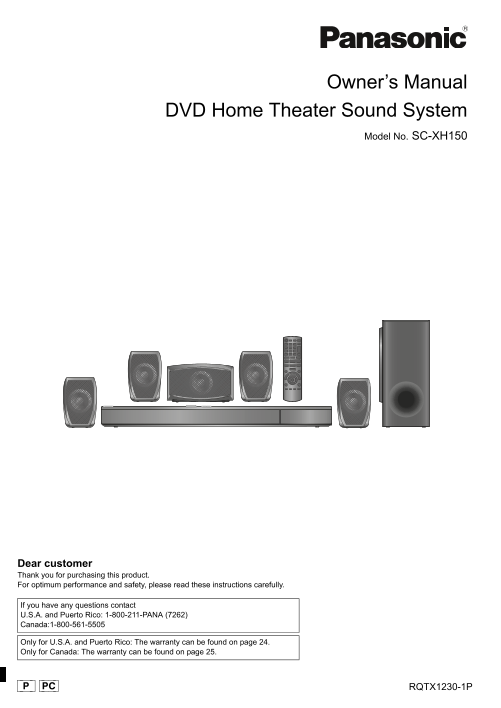
SC-XH150 PPC_eng.book Page 1 Friday, December 24, 2010 12:10 PM Owner’s Manual DVD Home Theater Sound System Model No. SC-XH150 Dear customer Thank you for purchasing this product. For optimum perform...
Page 2
SC-XH150 PPC_eng.book Page 2 Friday, December 24, 2010 12:10 PM Before connecting, operating or adjusting this product, System SC-XH150 TX please read the instructions completely. Please keep this Mai...
Page 3
SC-XH150 PPC_eng.book Page 3 Friday, December 24, 2010 12:10 PM TV INPUT 10CANCEL MUTE EXT-IN DVD i Pod RADIO SEARCH SEARCHPLAY SKIP SKIPSLOW TO P M EN PAUSE FUNCTIONS EXIT START PLAY MODE RETURN –REP...
Page 4
SC-XH150 PPC_eng.book Page 4 Friday, December 24, 2010 12:10 PM ef er en ce th er pe ra tio ns Pl ay in is cs et tin St ar te Control reference guide Avoiding interference with other Panasonic equipme...
Page 5
SC-XH150 PPC_eng.book Page 5 Friday, December 24, 2010 12:10 PM TABLE OF CONTENTS Getting Started Playing Discs Accessories . . . . . . . . . . . . . . . . . . . . . . . . . . . . . . . . . . . .2 Bas...
Page 6
SC-XH150 PPC_eng.book Page 6 Friday, December 24, 2010 12:10 PM TX step 1 Positioning step 2 Connections How you set up your speakers can affect the bass and the sound field. Turn off all equipment be...
Page 7
SC-XH150 PPC_eng.book Page 7 Friday, December 24, 2010 12:10 PM Connection without an ARC compatible TV Audio and video connections To listen to the TV audio on the sound system, connect the optical O...
Page 8
SC-XH150 PPC_eng.book Page 8 Friday, December 24, 2010 12:10 PM TX step 3 AC power supply cord connection step 5 Easy setup The Easy setup screen assists you in making necessary To household AC outlet...
Page 9
SC-XH150 PPC_eng.book Page 9 Friday, December 24, 2010 12:10 PM Listening/confirming the preset channels Using the START menu Press [EXT-IN, RADIO]4 to select “FM”. You can select desired source, chan...
Page 10
SC-XH150 PPC_eng.book Page 10 Friday, December 24, 2010 12:10 PM ef er en ce th er pe ra tio ns Pl ay in is cs et tin St ar te TX Listening to the TV or other device’s Enjoying sound effects from all ...
Page 11
SC-XH150 PPC_eng.book Page 11 Friday, December 24, 2010 12:10 PM EQ (Equalizer) You can select sound quality settings. Basic play Each time you press [2, 1]8: FLAT: Cancel (no effect is added). Prepar...
Page 12
SC-XH150 PPC_eng.book Page 12 Friday, December 24, 2010 12:10 PM ef er en ce th er pe ra tio ns Pl ay in is cs et tin St ar te [DVD-V] Show a disc top menu: [TOP MENU]7 TX [DVD-V] Show a disc menu: [M...
Page 13
SC-XH150 PPC_eng.book Page 13 Friday, December 24, 2010 12:10 PM Repeat play Play Speed This works only when the elapsed play time can be displayed. It also works with all JPEG content. [DVD-V] To cha...
Page 14
SC-XH150 PPC_eng.book Page 14 Friday, December 24, 2010 12:10 PM ef er en ce th er pe ra tio ns Pl ay in is cs et tin St ar te One touch play TX Linked operations with the TV You can turn the main uni...
Page 15
SC-XH150 PPC_eng.book Page 15 Friday, December 24, 2010 12:10 PM Easy control only with VIERA remote control (For “HDAVI Control 2 or later”) You can control the playback menus of this unit with the T...
Page 16
SC-XH150 PPC_eng.book Page 16 Friday, December 24, 2010 12:10 PM ef er en ce th er pe ra tio ns Pl ay in is cs et tin St ar te Basic controls (For music and videos only) To use the i Pod touch/i Phone...
Page 17
SC-XH150 PPC_eng.book Page 17 Friday, December 24, 2010 12:10 PM a Center speaker b Surround speaker Time Delay Difference (Approx.) Setting Difference (Approx.) Setting When connected with a Plasma d...
Page 18
SC-XH150 PPC_eng.book Page 18 Friday, December 24, 2010 12:10 PM ef er en ce th er pe ra tio ns Pl ay in is cs et tin St ar te FL Control TX Discs that can be played On (VOL 0): The unit’s display wil...
Page 19
SC-XH150 PPC_eng.book Page 19 Friday, December 24, 2010 12:10 PM Region number [DVD-V] Speaker installation option The player plays DVD-Video marked with labels containing the region number “1” or “AL...
Page 20
SC-XH150 PPC_eng.book Page 20 Friday, December 24, 2010 12:10 PM ef er en ce th er pe ra tio ns Pl ay in is cs et tin St ar te Troubleshooting guide “REMOTE 1” or “REMOTE 2” Match the modes on the mai...
Page 21
SC-XH150 PPC_eng.book Page 21 Friday, December 24, 2010 12:10 PM Disc operation Picture size does not fit the screen. Change “TV Aspect” in the Video menu. ( 16) It takes time before play starts. [MP3...
Page 22
SC-XH150 PPC_eng.book Page 22 Friday, December 24, 2010 12:10 PM ef er en ce th er pe ra tio ns Pl ay in is cs et tin St ar te SPEAKER SECTION TX Specifications [Front\speakers\SB-HF270] Type way, 1 s...
Page 23
SC-XH150 PPC_eng.book Page 23 Friday, December 24, 2010 12:10 PM Licenses Manufactured under license from Dolby Laboratories. Dolby, Pro Logic, and the double-D symbol are trademarks of Dolby Laborato...
Page 24
SC-XH150 PPC_eng.book Page 24 Friday, December 24, 2010 12:10 PM ef er en ce th er pe ra tio ns Pl ay in is cs et tin St ar te TX Limited Warranty (ONLY FOR U.S.A. AND PUERTO RICO) Panasonic Consumer ...
Page 25
SC-XH150 PPC_eng.book Page 25 Friday, December 24, 2010 12:10 PM Limited Warranty (ONLY FOR CANADA) Panasonic Canada Inc. 5770 Ambler Drive, Mississauga, Ontario L4W 2T3 PANASONIC PRODUCT - LIMITED WA...
Page 26
SC-XH150 PPC_eng.book Page 22 Friday, December 24, 2010 12:10 PM User memo: THE FOLLOWING APPLIES ONLY IN THE U.S.A. FCC Note: DATE OF PURCHASE ___________________________________________ This equipme...