# A B C D E F G H I J K L M N O P Q R S T U V W X Y Z

Panasonic SC-HT40 User Guide

Summary

Comprehensive operating instructions for the SC-HT40 Home Theater Audio System. This manual is designed for new owners, guiding them through complete setup, detailed wiring connections, and optimal speaker placement. Discover advanced functionality, including basic operation controls, sound field customization, radio use, making recordings, and model maintenance routines. It also provides essential safety guidelines and troubleshooting tips to ensure reliable, high-quality audio performance in your home environment.
📄 Preview 📖 Table of Contents Contents PAGE OF 24

Page 1 Text Content

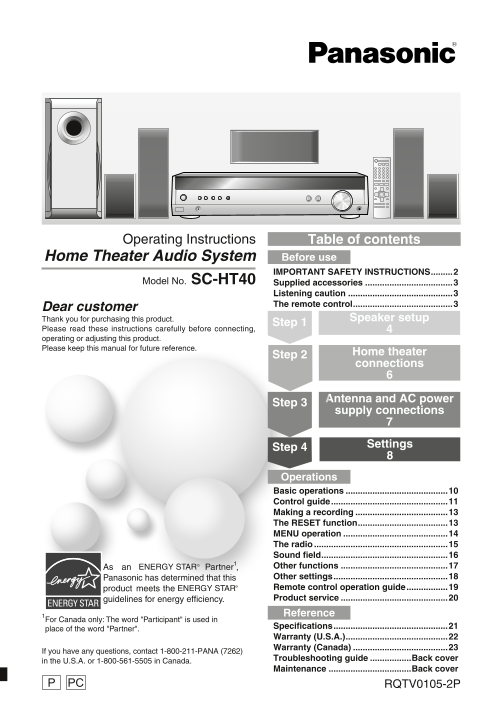
Operating Instructions Table of contents

Home Theater Audio System Before use IMPORTANT SAFETY INSTRUCTIONS .........2

Model No. SC-HT40 Supplied accessories ....................................3

Listening caution ...........................................3 The remote control .........................................3Dear customer

Thank you for purchasing this product.

Step 1 Speaker setup

Please read these instructions carefully before connecting, operating or adjusting this product. Please keep this manual for future reference.

Home theater

Step 2

connections

Antenna and AC power

Step 3

supply connections

Settings

Step 4

Operations Basic operations ..........................................10 Control guide ................................................11 Making a recording ......................................13 The RESET function .....................................13 MENU operation ...........................................14 The radio .......................................................15 Sound field ....................................................16 Other functions ............................................17 Other settings ...............................................18 Remote control operation guide .................19 Product service ............................................20 Reference

For Canada only: The word "Participant" is used in

Specifications ...............................................21

place of the word "Partner".

Warranty (U.S.A.) ..........................................22 Warranty (Canada) .......................................23

If you have any questions, contact 1-800-211-PANA (7262)

Troubleshooting guide .................Back cover

in the U.S.A. or 1-800-561-5505 in Canada.

Maintenance ..................................Back cover

PC RQTV0105-2PP

SC-HT40PP.indb 1 1/20/2006 5:26:07 PM

Page Summary Contents For Panasonic SC-HT40 User Guide

Page 1 Operating Instructions Table of contents Home Theater Audio System Before use IMPORTANT SAFETY INSTRUCTIONS .........2 Model No. SC-HT40 Supplied accessories ....................................3 List...
Page 2 ANTENNA LEAD IN WIRE GROUND CLAMP ANTENNA ELECTRIC DISCHARGE UNIT SERVICE (NEC SECTION 810-20) EQUIPMENT GROUNDING CONDUCTORS (NEC SECTION 810-21) GROUND CLAMPS IM IN IO IMPORTANT SAFETY INST POWER SE...
Page 3 System SC-HT40 CAUTION! DO NOT INSTALL OR PLACE THIS UNIT IN A BOOKCASE, AV Control Receiver SA-HT40 BUILT-IN CABINET OR IN ANOTHER CONFINED SPACE. Front speakers SB-PF40 ENSURE THE UNIT IS WELL VENTI...
Page 4 ea ke se tu te Sticker sheet Supplied Step SURROUND (center) (subwoofer) SUB Speaker setup accessories SURROUND (center) (subwoofer) SUB Attach the stickers to the speaker cables. Front speaker (L) Su...
Page 5 SURROUND (center) (subwoofer) SUB SURROUND (center) (subwoofer) SUB Connect the speakers to the receiver. Note Never short-circuit White cord White cord with blue stripe negative (-) speaker wires. SU...
Page 6 th ea te co ec ti te Home theater connections Step Stereo connection cable Optical fiber cable Coaxial cable Other (not included) (not included) (not included) accessories Turn off all components befo...
Page 7 Antenna and AC power supply connections Step AC power supply cord FM indoor antenna AM loop antenna Supplied accessories FM indoor antenna For best reception FM outdoor antenna (included) Adhesive tap...
Page 8 et ti te Step Settings Change the settings to suit your equipment to the environment in which you are using it. Before making any changes, read the descriptions of the settings, note the factory setti...
Page 9 RECEIVER AV SYSTEM TV TV TUNEMENU VOLUME DVR/DVD-P TUNER SETUP ENTERPOWER VOLUME BAND TV/VIDEO Display MUTING VOLUME RETURN SUBWOOFER SKIP SLOW/SEARCH STOP PAUSE PLAY Switch on. qg FUNCTIONSDIRECT NAV...
Page 10 RECEIVER AV TV SYSTEM TV VOLUME DVR/DVD-P TUNER TV/VIDEO MUTING VOLUME SUBWOOFER SKIP SLOW/SEARCH as ic er at io STOP PAUSE PLAY Basic operations qg FUNCTIONSDIRECT NAVIGATOR TOP MENU TUNER DIRECT TUN...
Page 11 Control guide Remote control This page describes the buttons used to control this unit. See the guide starting page 19 for the buttons that control other units. [^, RECEIVER] [TV] [DVR/DVD-P] RECEIVER...
Page 12 tr l g id Control guide Main unit [8, POWER] [-MENU, ―SETUP, [TUNE, 3, 4] [ENTER] Press to switch the unit from on to standby mode RETURN] For tuning the radio Used during menu or or vice versa. In st...
Page 13 Making a recording Main unit INPUT SELECTOR [INPUT SELECTOR, <, >] [VOLUME] For selecting input. Volume control. POWER INPUT SELECTORTUNEMENU SURROUND VOLUME SETUP ENTER MUSIC RETURN MUSIC PORT ...
Page 14 er at io MENU operation Display This is an outline of the operations you can perform with TUNEMENU SETUP ENTER POWER INPUT SELECTORTUNEMENU SURROUND VOLUME the MENU. SETUP ENTER MUSIC RETURN RETURN MU...
Page 15 The radio TUNER RECEIVER AV TV SYSTEM TV VOLUME DVR/DVD-P TUNER POWER INPUT SELECTORTUNEMENU SURROUND VOLUME BAND SETUP ENTER MUSIC TV/VIDEO RETURN MUTING MUSIC PORT VOLUME SUBWOOFER MENU ENTER SETUP ...
Page 16 fi el RECEIVER AV TV SYSTEM TV Sound field VOLUME DVR/DVD-P TUNER TV/VIDEO MUTING VOLUME SUBWOOFER SUBWOOFER SKIP SLOW/SEARCH STOP PAUSE PLAY qg FUNCTIONSDIRECT NAVIGATOR TOP MENU TUNER SURROUND DIREC...
Page 17 RECEIVER AV TV SYSTEM TV Other functions VOLUME DVR/DVD-P TUNER BAND TV/VIDEO RECEIVER AV TV SYSTEM TV MUTING VOLUME DVR/DVD-P TUNER VOLUME SUBWOOFER TV/VIDEO MUTING MUTING SKIP SLOW/SEARCH VOLUME STO...
Page 18 th er et ti Other settings TUNEMENU SETUP ENTER RETURN POWER INPUT SELECTORTUNEMENU SURROUND VOLUME SETUP ENTER MUSIC RETURN MUSIC PORT Setting descriptions Changing the settings INPUT MODE (Input mod...
Page 19 Remote control operation guide This remote control can operate Panasonic DVD recorders, DVD players, and televisions. Note that this remote control cannot operate some equipment and that it may not be...
Page 20 em te tr l o er at io id e/ Remote control operation guide ro ct er vi ce RECEIVER AV TV Watching TV SYSTEM TV Switch on VOLUME DVR/DVD-P TUNER TV/VIDEO AV TV/VIDEO SYSTEM MUTING VOLUME Switch on the ...
Page 21 Specifications (IHF'78) g AMPLIFIER SECTION g SPEAKER SECTION RMS output power of each channel driven Front speaker (SB-PF40) 10 % total harmonic distortion Type 1 Way, 1 Speaker, Bass-ref. 1 k Hz fro...
Page 22 ef er en ce ar ra ty .S .A Warranty (U.S.A.) Panasonic Consumer Electronics Company, Panasonic Puerto Rico, Inc. Division of Panasonic Corporation of North America Ave. 65 de Infantería, Km. 9.5 One P...
Page 23 Warranty (Canada) Panasonic Canada Inc. PANASONIC/TECHNICS PRODUCT – LIMITED WARRANTY Panasonic Canada Inc. warrants this product to be free from defects in material and workmanship and agrees to reme...
Page 24 Troubleshooting guide Before requesting service, make the below checks. If you are in doubt about some of the check points, or if the remedies indicated in the chart do not solve the problem, refer to...

Manual Details

Brand Panasonic
Pages 24
File Size 2.42 MB
Published June 17, 2026
6 views

Enter the captcha to get the download link:

captcha

Frequently Asked Questions

How do I clean the SC-HT40 system?

Wipe with a soft, dry cloth. Never use alcohol, paint thinner or benzine.

Why is there no sound from surround speakers?

The source may be stereo. Use Dolby Pro Logic II or SFC sound mode.

What does 'FAN LOCK' on the display mean?

The cooling fan is obstructed. Remove the object blocking the fan.