Panasonic KX-TS6W User's Manual
Summary
Manage your communication needs with this comprehensive integrated telephone system unit. This manual provides step-by-step instructions for setup, covering wall mounting, handset connection, and advanced features like multi-station memory storage (up to 10 numbers) and One-Touch auto-dialing. Users can efficiently dial directly, redial the last number, or utilize call waiting services. Designed for reliable, crisp operation in commercial settings, it ensures you maximize connectivity with simple dialing modes (Tone/Pulse).
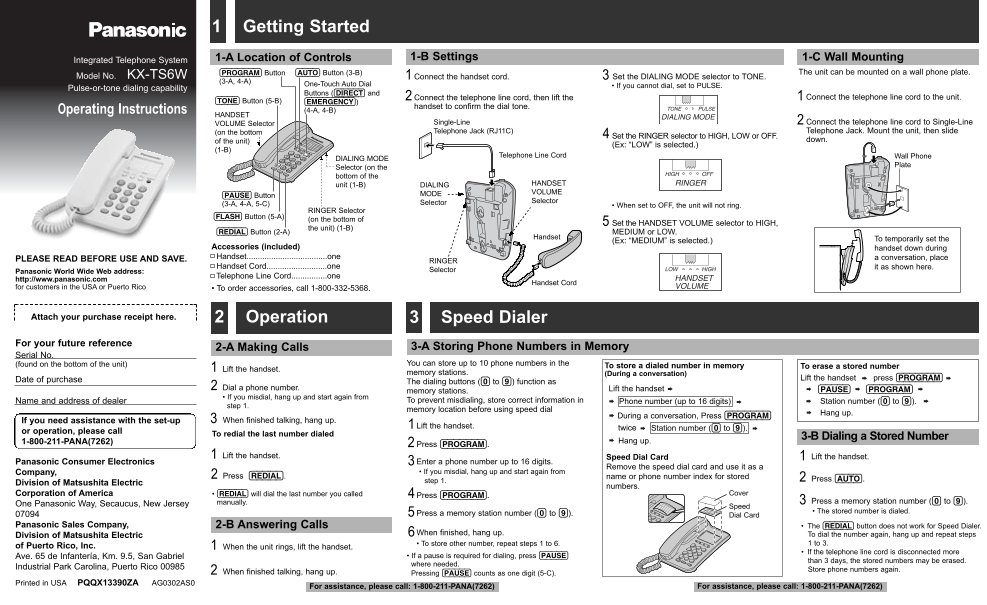
Page 1 Text Content
TS6Wfront PQQX13390ZA 4/4/02 1:52 PM Page 1
1 Getting Started
1-A Location of Controls 1-B Settings 1-C Wall Mounting
Integrated Telephone System
Button (AUTO) Button (3-B)(PROGRAM) The unit can be mounted on a wall phone plate.
Model No. KX-TS6W Connect the handset cord. Set the DIALING MODE selector to TONE.
One-Touch Auto Dial • If you cannot dial, set to PULSE.
Pulse-or-tone dialing capability
Buttons ((DIRECT) and
Connect the telephone line cord, then lift the Connect the telephone line cord to the unit.
(TONE) Button (5-B) (EMERGENCY))
handset to confirm the dial tone.
Operating Instructions (4-A, 4-B)
HANDSET
VOLUME Selector Single-Line Connect the telephone line cord to Single-Line (on the bottom Telephone Jack (RJ11C) Telephone Jack. Mount the unit, then slide
Set the RINGER selector to HIGH, LOW or OFF.
of the unit) down.
(Ex: “LOW” is selected.)
Telephone Line Cord Wall Phone
DIALING MODE
Plate
Selector (on the bottom of the
unit (1-B) DIALING HANDSET MODE VOLUME
(PAUSE) Button
Selector Selector
(3-A, 4-A, 5-C) • When set to OFF, the unit will not ring.
RINGER Selector
(FLASH) Button (5-A)
(on the bottom of
Set the HANDSET VOLUME selector to HIGH,
the unit) (1-B)
(REDIAL) Button (2-A) MEDIUM or LOW.
Handset
(Ex: “MEDIUM” is selected.) To temporarily set the
Accessories (included) handset down during Handset....................................one a conversation, place
PLEASE READ BEFORE USE AND SAVE. RINGER
Handset Cord...........................one it as shown here.
Panasonic World Wide Web address: Selector
Telephone Line Cord................one
http://www.panasonic.com
Handset Cord
for customers in the USA or Puerto Rico • To order accessories, call 1-800-332-5368.
Attach your purchase receipt here. 2 Operation Speed Dialer For your future reference
2-A Making Calls 3-A Storing Phone Numbers in Memory
Serial No.
(found on the bottom of the unit) You can store up to 10 phone numbers in the
To store a dialed number in memory To erase a stored number
Lift the handset.
memory stations. (During a conversation)
Date of purchase Lift the handset press (PROGRAM)
The dialing buttons ((0) to (9)) function as
Dial a phone number. Lift the handset (PAUSE) (PROGRAM)
memory stations.
• If you misdial, hang up and start again from
Name and address of dealer To prevent misdialing, store correct information in Phone number (up to 16 digits) Station number ((0) to (9)).
step 1.
memory location before using speed dial
Hang up.
During a conversation, Press (PROGRAM)
If you need assistance with the set-up When finished talking, hang up.3
Lift the handset.
twice Station number ((0) to (9)).
or operation, please call
To redial the last number dialed
3-B Dialing a Stored Number
1-800-211-PANA(7262) Hang up.
Press (PROGRAM).
Lift the handset. Speed Dial Card Lift the handset.
Panasonic Consumer Electronics Enter a phone number up to 16 digits.
Remove the speed dial card and use it as a
Company, • If you misdial, hang up and start again from
Press (REDIAL). name or phone number index for stored
step 1. Press (AUTO).
Division of Matsushita Electric
numbers.
Corporation of America • (REDIAL) will dial the last number you called Cover
Press (PROGRAM).
manually. Press a memory station number ((0) to (9)).
One Panasonic Way, Secaucus, New Jersey
Speed
• The stored number is dialed.
Press a memory station number ((0) to (9)). Dial Card
Panasonic Sales Company, 2-B Answering Calls The (REDIAL) button does not work for Speed Dialer.
When finished, hang up. To dial the number again, hang up and repeat steps
Division of Matsushita Electric
• To store other number, repeat steps 1 to 6. 1 to 3.
of Puerto Rico, Inc. When the unit rings, lift the handset.
• If the telephone line cord is disconnected more
Ave. 65 de Infantería, Km. 9.5, San Gabriel • If a pause is required for dialing, press (PAUSE)
than 3 days, the stored numbers may be erased.
where needed.
Industrial Park Carolina, Puerto Rico 00985
Store phone numbers again.
When finished talking, hang up.2 Pressing (PAUSE) counts as one digit (5-C).
Printed in USA PQQX13390ZA AG0302AS0
For assistance, please call: 1-800-211-PANA(7262) For assistance, please call: 1-800-211-PANA(7262)
Page Summary Contents For Panasonic KX-TS6W User's Manual
Manual Details
| Brand | Panasonic |
|---|---|
| Pages | 2 |
| File Size | 159.57 KB |
| Published | June 17, 2026 |
Enter the captcha to get the download link:

Frequently Asked Questions
How can I store a phone number in the unit's memory?
Lift the handset, press (PROGRAM), and then follow steps 1 to 3 using the dialing buttons.
What happens if I misdial a number when using speed dial?
If you misdial, hang up and start again from step 1.
Can this unit handle call waiting service for analog PBX users?
Yes, press (FLASH) button while talking to inform the system of a call-waiting tone.
What is the recommended care for maintenance?
Routine care involves wiping the unit with a soft cloth and avoiding abrasive cleaners like benzine or thinner.