Page 1
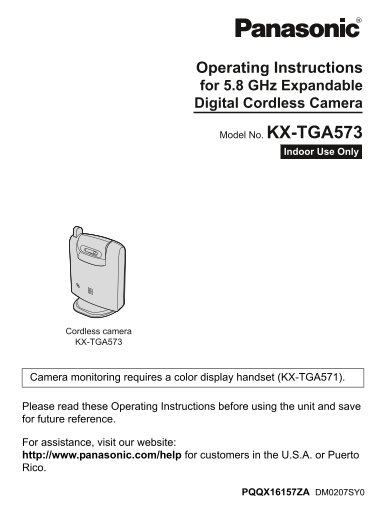
TG5779(e)_camera.OI.book Page 1 Wednesday, February 14, 2007 11:04 AM Operating Instructions for 5.8 GHz Expandable Digital Cordless Camera Model No. KX-TGA573 Indoor Use Only Cordless camera KX-TGA57...
Page 2
TG5779(e)_camera.OI.book Page 2 Wednesday, February 14, 2007 11:04 AM Table of Contents Introduction Feature highlight. . . . . . . . . . . . . . . . . . . 3 Important safety instructions . . . . . . ...
Page 3
TG5779(e)_camera.OI.book Page 3 Wednesday, February 14, 2007 11:04 AM Introduction Feature highlight Camera monitoring using the color display handset Important: LThis unit is compatible only with the...
Page 4
TG5779(e)_camera.OI.book Page 4 Wednesday, February 14, 2007 11:04 AM Introduction LThe AC adaptor is used as the main disconnect device. Ensure that the AC Important safety outlet is installed near t...
Page 5
TG5779(e)_camera.OI.book Page 5 Wednesday, February 14, 2007 11:04 AM Introduction frequency) energy. (The product Move away from the electrical operates in the frequency range of 5.76 appliances. GHz...
Page 6
TG5779(e)_camera.OI.book Page 6 Wednesday, February 14, 2007 11:04 AM Preparation Controls Antenna Indicator Camera lens DIP switches MIC (Microphone) Speaker {Call button} PROG. (Program) Understandi...
Page 7
TG5779(e)_camera.OI.book Page 7 Wednesday, February 14, 2007 11:04 AM Preparation Setting up the cordless camera Connecting the AC adaptor and the call button Connect the AC adaptor cord by pressing t...
Page 8
TG5779(e)_camera.OI.book Page 8 Wednesday, February 14, 2007 11:04 AM Preparation Adjusting the cordless camera lens angle Aim the camera lens by pushing the tab (A) and rotating the lens forward or b...
Page 9
TG5779(e)_camera.OI.book Page 9 Wednesday, February 14, 2007 11:04 AM Preparation Setting the DIP switches DIP switches (Default position: ON) OFF*1 You can set the following functions by using the DI...
Page 10
TG5779(e)_camera.OI.book Page 10 Wednesday, February 14, 2007 11:04 AM Preparation Symbols used in these operating instructions Symbol Meaning { }: button name/soft key name The words in the brackets ...
Page 11
TG5779(e)_camera.OI.book Page 11 Wednesday, February 14, 2007 11:04 AM Camera Monitoring LThe cordless camera may not page handsets in the following conditions: Camera monitoring when other users are ...
Page 12
TG5779(e)_camera.OI.book Page 12 Wednesday, February 14, 2007 11:04 AM Camera Monitoring Handset display item for camera Paging using the cordless camera monitoring audio sensor Displayed Meaning Impo...
Page 13
TG5779(e)_camera.OI.book Page 13 Wednesday, February 14, 2007 11:04 AM Camera Monitoring Paging using the cordless camera call Useful settings while camera button monitoring With a color display hands...
Page 14
TG5779(e)_camera.OI.book Page 14 Wednesday, February 14, 2007 11:04 AM Camera Monitoring Setting the audio detection sensitivity The cordless camera features a sensor that detects human voices such as...
Page 15
TG5779(e)_camera.OI.book Page 15 Wednesday, February 14, 2007 11:04 AM Useful Information Deregistering the cordless Registering the cordless camera camera The base unit can cancel the registration of...
Page 16
TG5779(e)_camera.OI.book Page 16 Wednesday, February 14, 2007 11:04 AM Useful Information Wall mounting The cordless camera can be mounted by the standard mounting or upside down mounting. CAUTION: LM...
Page 17
TG5779(e)_camera.OI.book Page 17 Wednesday, February 14, 2007 11:04 AM Useful Information Mounting the cordless camera on the wall Standard mounting Drive the screws (not included) into the Mount the ...
Page 18
TG5779(e)_camera.OI.book Page 18 Wednesday, February 14, 2007 11:04 AM Useful Information About the screws for wall mounting LUse the recommended screw size below. LDrive the mounting screws leaving e...
Page 19
TG5779(e)_camera.OI.book Page 19 Wednesday, February 14, 2007 11:04 AM Useful Information Troubleshooting Problem Cause & solution The cordless camera LCheck the connections (page 7). does not wor...
Page 20
TG5779(e)_camera.OI.book Page 20 Wednesday, February 14, 2007 11:04 AM Useful Information Problem Cause & solution I pressed {Call button} LWhile the image of the cordless camera is being but the ...
Page 21
TG5779(e)_camera.OI.book Page 21 Wednesday, February 14, 2007 11:04 AM Useful Information FCC and other information This device complies with Part 15 of the – Connect the equipment into an outlet FCC ...
Page 22
TG5779(e)_camera.OI.book Page 22 Wednesday, February 14, 2007 11:04 AM Useful Information Notice For assistance, please visit http://www.panasonic.com/help
Page 23
TG5779(e)_camera.OI.book Page 23 Wednesday, February 14, 2007 11:04 AM Useful Information Specifications Operating environment 5 °C – 40 °C (41 °F – 104 °F) Frequency 5.76 GHz – 5.84 GHz Dimensions Ap...
Page 24
TG5779(e)_camera.OI.book Page 24 Wednesday, February 14, 2007 11:04 AM Index Index A Answering the page: 13 Audio detection sensitivity: 14 C Call button: 7, 13 Camera angle: 8 Camera indicator: 6 Cam...
Page 25
TG5779(e)_camera.OI.book Page 25 Wednesday, February 14, 2007 11:04 AM If you need assistance with setup or operation Visit our website: http://www.panasonic.com/help Contact us via the web at: http:/...