Panasonic KX-TG6440 User's Guide and Manual
Summary
Panasonic KX-TG6440 expandable digital cordless answering system with base unit, four KX-TGA641 handsets, and one KX-TGA740 handset. Features DECT 6.0 technology, answering machine, phonebook, caller ID, call blocking, and multi-handset expandability. Covers accessories including adaptors, batteries, chargers, and belt clips. Published 2009 for home and small office users.
Page 1 Text Content
TG6440(e).fm Page 1 Tuesday, January 6, 2009 6:38 PM
Expandable Digital Cordless Answering System
Model No. KX-TG6440
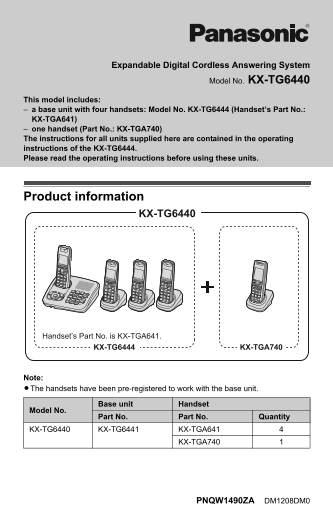
This model includes: a base unit with four handsets: Model No. KX-TG6444 (Handset’s Part No.: KX-TGA641) one handset (Part No.: KX-TGA740) The instructions for all units supplied here are contained in the operating instructions of the KX-TG6444. Please read the operating instructions before using these units.
Product information
KX-TG6440
Handset’s Part No. is KX-TGA641.
KX-TG6444 KX-TGA740
Note: LThe handsets have been pre-registered to work with the base unit.
Base unit Handset
Model No.
Part No. Part No. Quantity
KX-TG6440 KX-TG6441 KX-TGA641
KX-TGA740
PNQW1490ZA DM1208DM0
Page Summary Contents For Panasonic KX-TG6440 User's Guide and Manual
Manual Details
| Brand | Panasonic |
|---|---|
| Pages | 6 |
| File Size | 261.70 KB |
| Published | June 16, 2026 |
Enter the captcha to get the download link:

Frequently Asked Questions
Are the handsets pre-registered to the base unit?
Yes, the handsets are pre-registered to work with the base unit out of the box.
What is the display size of the KX-TGA740 handset?
The KX-TGA740 handset has a 2.1-inch display.
How many AC adaptors are included with the system?
Five AC adaptors (Part No. PQLV219Z) are supplied in the package.
How do I temporarily switch display modes on the handset?
Press the right soft key when viewing lists or selecting menu icons to toggle between multi and single item display modes.