# A B C D E F G H I J K L M N O P Q R S T U V W X Y Z

Panasonic KX-NT321 Quick Reference Guide

Summary

This comprehensive manual serves as your essential guide for operating the IP Proprietary Telephone (KX-NT321). It provides detailed, hands-on instructions covering every feature from core calling functions to advanced networking and conferencing abilities. Learn how to manage complex call transfers, adjust system settings like ringer volume and backlight, and utilize key features such as auto-dialing and multiple-party calls. Ideal for professional users and administrators who require full control over their PBX communication system.
📄 Preview PAGE OF 20

Page 1 Text Content

NT321M_QRG.fm Page 1 Tuesday, January 15, 2008 4:51 PM

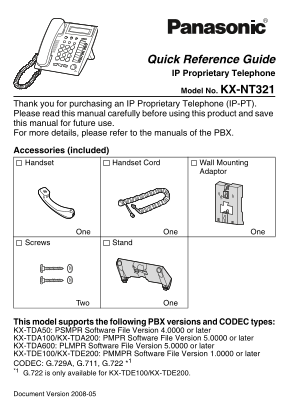
Quick Reference Guide IP Proprietary Telephone Model No. KX-NT321

Thank you for purchasing an IP Proprietary Telephone (IP-PT). Please read this manual carefully before using this product and save this manual for future use. For more details, please refer to the manuals of the PBX.

Accessories (included) Handset Handset Cord Wall Mounting

Adaptor

One One One

Screws Stand

Two One

This model supports the following PBX versions and CODEC types: KX-TDA50: PSMPR Software File Version 4.0000 or later KX-TDA100/KX-TDA200: PMPR Software File Version 5.0000 or later KX-TDA600: PLMPR Software File Version 5.0000 or later KX-TDE100/KX-TDE200: PMMPR Software File Version 1.0000 or later CODEC: G.729A, G.711, G.722 *1 *1 G.722 is only available for KX-TDE100/KX-TDE200.

Document Version 2008-05

Page Summary Contents For Panasonic KX-NT321 Quick Reference Guide

Page 1 NT321M_QRG.fm Page 1 Tuesday, January 15, 2008 4:51 PM Quick Reference Guide IP Proprietary Telephone Model No. KX-NT321 Thank you for purchasing an IP Proprietary Telephone (IP-PT). Please read this ...
Page 2 NT321M_QRG.fm Page 2 Tuesday, January 15, 2008 4:51 PM Location of Controls Location of Controls Document Version 2008-05
Page 3 NT321M_QRG.fm Page 3 Tuesday, January 15, 2008 4:51 PM Location of Controls LCD (Liquid Crystal HOLD: Used to place a call Display) on hold. AUTO DIAL/STORE: Used SP-PHONE for System/Personal Speed (S...
Page 4 NT321M_QRG.fm Page 4 Tuesday, January 15, 2008 4:51 PM Settings Settings Speaker volume While in a hands-free conversation Handset/Headset While using the handset or volume*1 headset Press Up to incre...
Page 5 NT321M_QRG.fm Page 5 Tuesday, January 15, 2008 4:51 PM Features List Features List Icon Meanings = Flexible CO button = Off-hook = On-hook (CO) = Feature number = Talk = Confirmation Tone C. Tone Maki...
Page 6 NT321M_QRG.fm Page 6 Tuesday, January 15, 2008 4:51 PM Features List Personal Speed Dialing To store personal speed desired no.* dial no. (2 digits) (max. 32 digits) C. Tone * Enter CO line access num...
Page 7 NT321M_QRG.fm Page 7 Tuesday, January 15, 2008 4:51 PM Features List Useful Features Multiple Party Conversation To add other parties during a conversation (i.e., conference) assigned as a desired Con...
Page 8 NT321M_QRG.fm Page 8 Tuesday, January 15, 2008 4:51 PM Features List Before Leaving Your Desk Call Forwarding Both Calls Outside Calls Intercom Calls All calls extension no. Busy OR No answer CO line ...
Page 9 NT321M_QRG.fm Page 9 Tuesday, January 15, 2008 4:51 PM Features List Leaving a message VPS extension no. From your own extension Mailbox Password* From someone else’s extension mailbox no. Mailbox Pas...
Page 10 NT321M_QRG.fm Page 10 Tuesday, January 15, 2008 4:51 PM Connection Connection <Back view> To a Switching Hub. To a PC. Optional AC adaptor (not included). Clamp AC adaptor Headset Recommended: K...
Page 11 NT321M_QRG.fm Page 11 Tuesday, January 15, 2008 4:51 PM Stand Usage Stand Usage Attaching the Stand Place the catches (A) of the stand into hooks located in the unit. Gently push the stand in the dire...
Page 12 NT321M_QRG.fm Page 12 Tuesday, January 15, 2008 4:51 PM Stand Usage Adjusting from High to Low Position Hold the stand with both hands as shown and gently push the stand in the direction indicated unt...
Page 13 NT321M_QRG.fm Page 13 Tuesday, January 15, 2008 4:51 PM Wall Mounting Wall Mounting 1.Remove the stand if it is attached. For information on removing the stand, refer to page 11. 2.Attach the wall mou...
Page 14 NT321M_QRG.fm Page 14 Tuesday, January 15, 2008 4:51 PM Important Information Important Information When using a KX-NT321 IP-PT, keep the following conditions in mind. If the unit does not operate pro...
Page 15 NT321M_QRG.fm Page 15 Tuesday, January 15, 2008 4:51 PM Important Information Placement 1) Do not place heavy objects on top of this unit. 2) Care should be taken so that objects do not fall onto, and...
Page 16 NT321M_QRG.fm Page 16 Tuesday, January 15, 2008 4:51 PM Important Information Important Safety Instructions When using this unit, basic safety precautions, including those below, should always be foll...
Page 17 NT321M_QRG.fm Page 17 Tuesday, January 15, 2008 4:51 PM Important Information FCC Information F.C.C. REQUIREMENTS AND RELEVANT INFORMATION This equipment has been tested and found to comply with the l...
Page 18 NT321M_QRG.fm Page 18 Tuesday, January 15, 2008 4:51 PM Important Information Customer Information This equipment complies with Part 68 of the FCC rules and the requirements adopted by the ACTA. On th...
Page 19 NT321M_QRG.fm Page 19 Tuesday, January 15, 2008 4:51 PM Wall Mounting Template Wall Mounting Template 100 m (3-15/16 in) 83 m (3-1/4 in) One screw here for base unit WALL MOUNTING TEMPLATE 1. Drive th...
Page 20 NT321M_QRG.fm Page 20 Tuesday, January 15, 2008 4:51 PM Panasonic Consumer Electronics Company, Division of Panasonic Corporation of North America One Panasonic Way Secaucus, New Jersey 07094 Panasoni...

Manual Details

Brand Panasonic
Pages 20
File Size 712.38 KB
Published June 01, 2026
72 views

Enter the captcha to get the download link:

captcha

Frequently Asked Questions

How do I leave a message or call back a party who left a voicemail?

Press the MESSAGE key; the lamp will flash green when you receive a call from that person.

Which PBX versions are compatible with this IP proprietary phone?

It supports KX-TDA50 (v4.0000+), KX-TDA100/200 (v5.0000+), KX-TDA600 (v5.0000+), and KX-TDE100/200 (v1.0000+).

What should I do if my voice echoes through the handset or headset?

When using the volume controls, decrease the volume to eliminate the echo.

How is the NT321 unit mounted to a wall?

Drive screws into the wall as indicated on the template and then hook the unit onto the screw heads.