Netgear WNDR4300 - Premium Edition N750 Wireless Dual Band Gigabit Router Installation Guide
Summary
Elevate your home network with the N750 Dual Band Gigabit Router, providing robust and secure wireless internet connectivity. This essential manual offers comprehensive guides for every user, covering simple setup of your modem connection through advanced dual-band Wi-Fi configurations. Whether connecting smart devices via WPS or manually linking laptops and tablets, the guide includes detailed troubleshooting and parental controls. Perfect for homeowners and small businesses needing reliable, high-speed, modern networking solutions.
Page 1 Text Content
Installation Guide
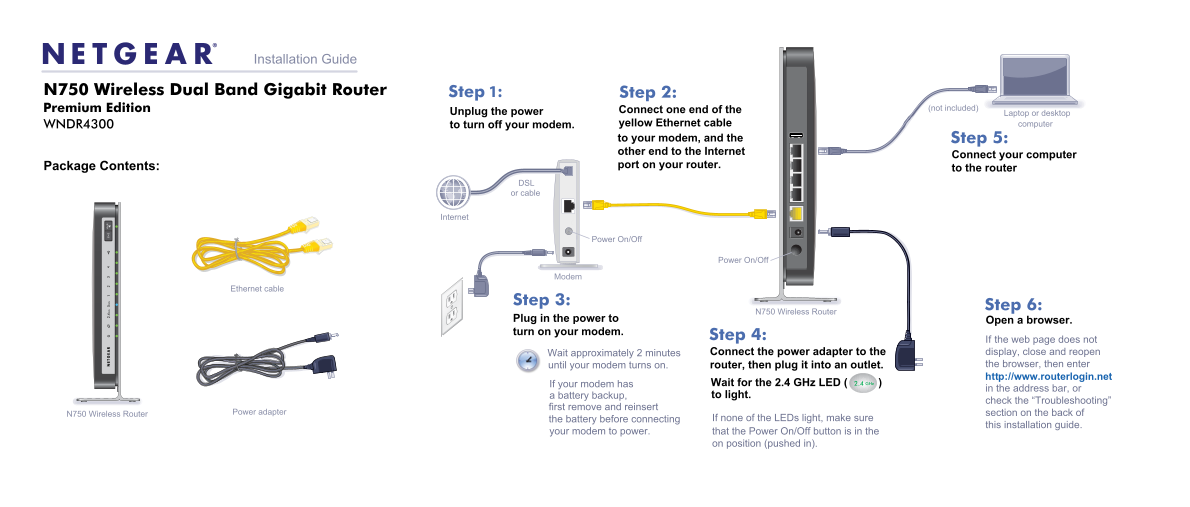
N750 Wireless Dual Band Gigabit Router Step 1: Step 2:
Premium Edition Connect one end of the (not included)
Unplug the power Laptop or desktop
WNDR4300 to turn off your modem. yellow Ethernet cable computer to your modem, and the Step 5: other end to the Internet
Connect your computer
Package Contents: port on your router.
to the router
DSL or cable
Internet
Power On/Off
Power On/Off
Modem
Ethernet cable
Step 3:
Step 6:
N750 Wireless Router
Plug in the power to Open a browser. turn on your modem.
Step 4:
If the web page does not Wait approximately 2 minutes Connect the power adapter to the display, close and reopen until your modem turns on. router, then plug it into an outlet. the browser, then enter http://www.routerlogin.net
If your modem has Wait for the 2.4 GHz LED ( )2.4 GHz
in the address bar, or
a battery backup, to light.
check the “Troubleshooting”
first remove and reinsert
Power adapter section on the back of
N750 Wireless Router
the battery before connecting If none of the LEDs light, make sure
this installation guide.
your modem to power. that the Power On/Off button is in the
on position (pushed in).
Page Summary Contents For Netgear WNDR4300 - Premium Edition N750 Wireless Dual Band Gigabit Router Installation Guide
Manual Details
| Brand | NETGEAR |
|---|---|
| Pages | 2 |
| File Size | 579.40 KB |
| Published | June 05, 2026 |
Enter the captcha to get the download link:

Frequently Asked Questions
How do I initially connect my router to save it?
Connect one end of a yellow Ethernet cable from the WNDR4300 to your modem, and the other end to the Internet port on your router.
What should I do if the web page won't display after setup?
Close and reopen the browser. If issues persist, check the 'Troubleshooting' section of the manual first.
How can I connect a wireless device using WPS?
Press the WPS button on the router, then within two minutes, press the WPS button on your client device to complete the connection process.
What is mandatory after installation for support services?
You must locate the serial number and register your product at https://my.netgear.com before you can use NETGEAR telephone support.