LEXMARK 910 Series Installation Guide/Manual/User's Handbook
Summary
This comprehensive installation guide ensures a smooth out-of-box experience for your new printer. It provides detailed, step-by-step instructions covering everything from safely unpacking and connecting the hardware to correctly loading paper and setting up ink cartridges. Users will also receive expert guidance on installing the necessary software for both Windows and Mac OS X systems, ensuring your device is fully functional and ready for printing with minimal technical hassle.
Page 1 Text Content
安装指南 (简体中文 *21B0998* Setup (language) 安裝指南 (繁體中文) 설치 (언어
910 Series
http://support.lexmark.com/
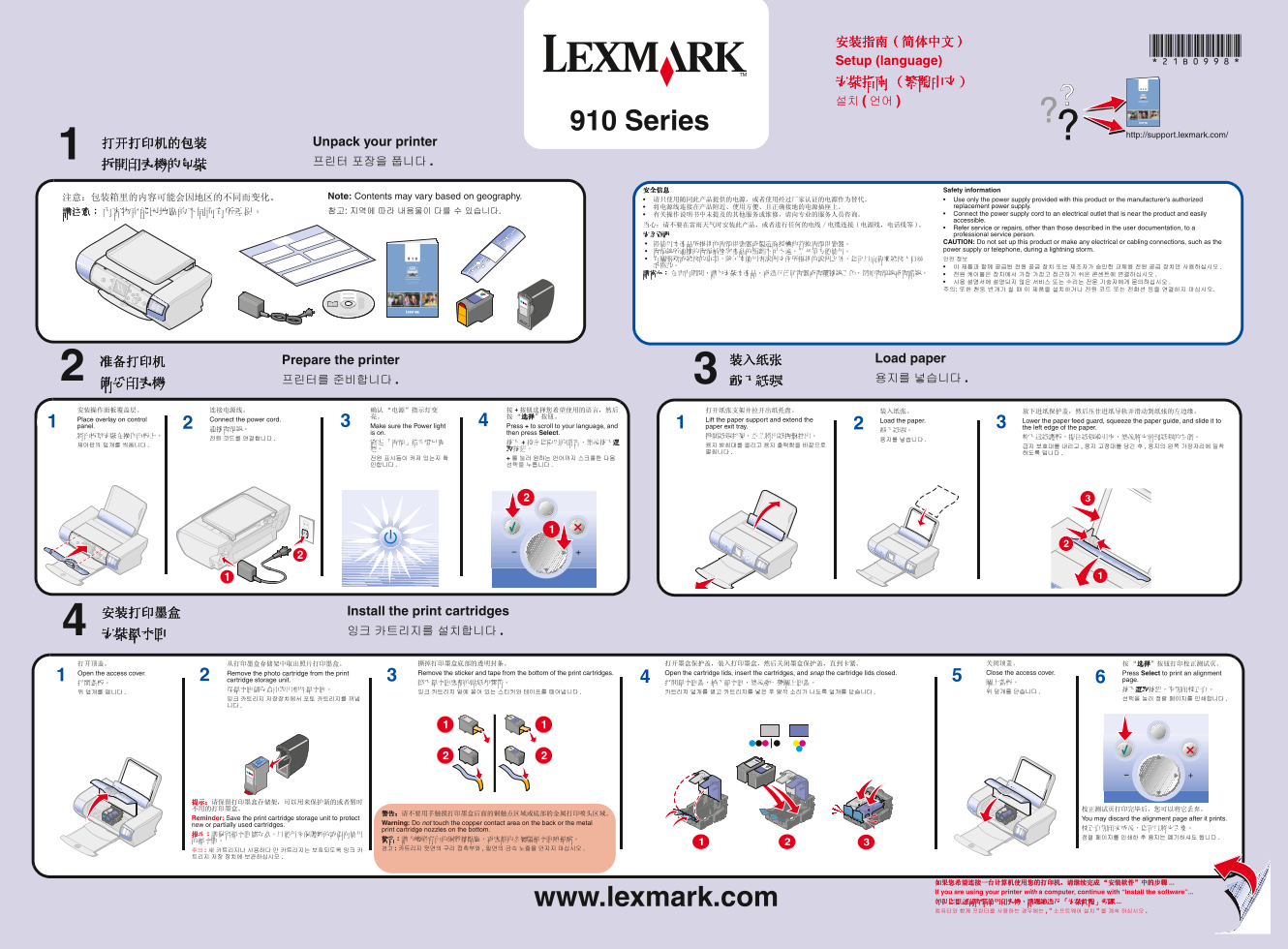
打开打印机的包装 Unpack your printer 拆開印表機的包裝 프린터 포장을 풉니다 .1
安全信息 Safety information
注意:包装箱里的内容可能会因地区的不同而变化。 Note: Contents may vary based on geography.
请只使用随同此产品提供的电源,或者使用经过厂家认证的电源作为替代。 Use only the power supply provided with this product or the manufacturer's authorized
将电源线连接在产品附近、使用方便、且正确接地的电源插座上。 replacement power supply.
有关操作说明书中未提及的其他服务或维修,请向专业的服务人员咨询。 Connect the power supply cord to an electrical outlet that is near the product and easily accessible.
Refer service or repairs, other than those described in the user documentation, to a
安全資訊 professional service person.
• 僅使用本產品所提供的電源供應器或製造商授權的替換電源供應器。 CAUTION: Do not set up this product or make any electrical or cabling connections, such as the • 電源線所連接的電源插座與產品的距離不可太遠,且必須方便使用。 power supply or telephone, during a lightning storm.
Prepare the printer 装入纸张 Load paper
Place overlay on control Connect the power cord. Lift the paper support and extend the Load the paper. Lower the paper feed guard, squeeze the paper guide, and slide it to panel. Make sure the Power light Press + to scroll to your language, and paper exit tray. the left edge of the paper.
is on. then press Select.
安装打印墨盒 Install the print cartridges 安裝墨水匣 잉크 카트리지를 설치합니다 .4
打开顶盖。 从打印墨盒存储架中取出照片打印墨盒。 撕掉打印墨盒底部的透明封条。 打开墨盒保护盖,装入打印墨盒,然后关闭墨盒保护盖,直到卡紧。 关闭顶盖。 “选择”按钮打印校正测试页。 Open the access cover. Remove the photo cartridge from the print Remove the sticker and tape from the bottom of the print cartridges. Open the cartridge lids, insert the cartridges, and snap the cartridge lids closed. Close the access cover. Press Select to print an alignment
cartridge storage unit. page.
Reminder: Save the print cartridge storage unit to protect You may discard the alignment page after it prints.
new or partially used cartridges. Warning: Do not touch the copper contact area on the back or the metal
print cartridge nozzles on the bottom. 校正頁列印完成後,您可以將它丟棄。
如果您希望连接一台计算机使用您的打印机,请继续完成 “安装软件”中的步骤 If you are using your printer with a computer, continue with “Install the software”...
www.lexmark.com 如果您想透過電腦使用印表機,請繼續進行 「安裝軟體」步驟
Page Summary Contents For LEXMARK 910 Series Installation Guide/Manual/User's Handbook
Manual Details
| Brand | Lexmark |
|---|---|
| Pages | 2 |
| File Size | 25.61 MB |
| Published | May 25, 2026 |
Enter the captcha to get the download link:

Frequently Asked Questions
我在连接打印机与电脑时,需要注意哪些事项?
确保电脑已开机,通过USB数据线连接好打印机和电脑。为避免安装错误,请关闭所有应用程序并暂时禁用任何防病毒软件。" planejamento de fundo