Lexmark 7300 Series Multi-Function Printer User's Guide - 7300 Series Multi-Function Copier
Summary
The 7300 Series is a comprehensive All-In-One multi-function printer designed for versatile office needs. This user manual provides essential guidance for setup, operation, and troubleshooting of your device. It thoroughly covers everything from safe power connection guidelines to installing print cartridges and software components. New users will find step-by-step instructions on preparing the machine, connecting it to a computer, navigating language settings, and resolving common issues like power light detection or incorrect language displays, ensuring a smooth start right out of the box.
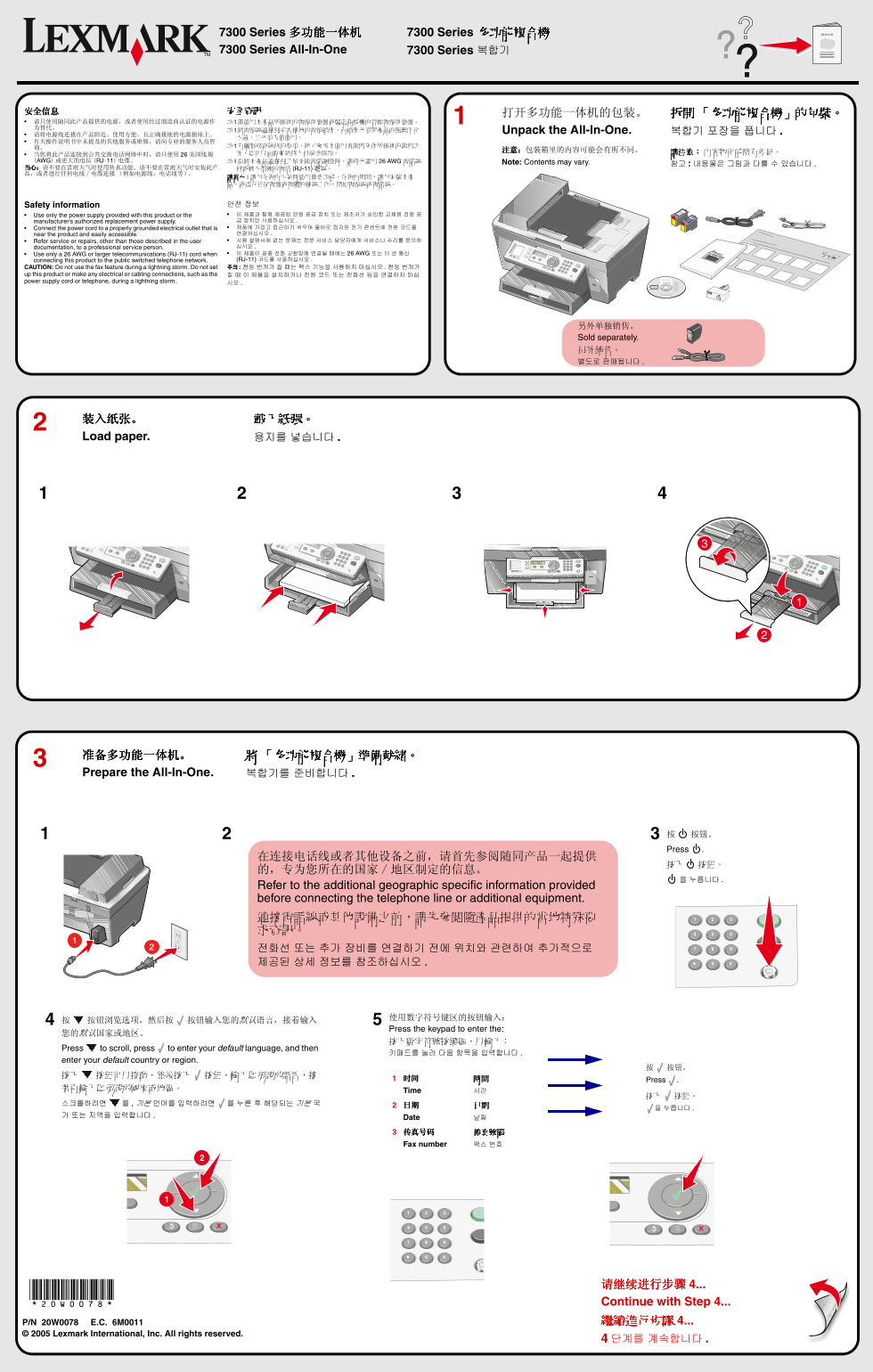
Page 1 Text Content
7300 Series 多功能一体机 7300 Series 多功能複合機 7300 Series All-In-One 7300 Series 복합기
將電源線連接到妥善接地的電源插座,而插座必須與產品的距離不可 Unpack the All-In-One. 복합기 포장을 풉니다
当您将此产品连接到公共交换电话网络中时,请只使用 美国线规 (AWG)或更大的电信 (RJ-11)电缆。 要將本產品連接到公眾交換電話網路時,請務必選用 26 AWG 電話線
Note: Contents may vary. 참고 내용물은 그림과 다를 수 있습니다
当心:请不要在雷雨天气时使用传真功能。请不要在雷雨天气时安装此产 材或較大型號的電信 (RJ-11) 纜線。 品,或者进行任何电线/电缆连接 (例如电源线,电话线等)。
Safety information 안전 정보 Use only the power supply provided with this product or the 이 제품과 함께 제공된 전원 공급 장치 또는 제조자가 승인한 교체용 전원 공 manufacturer’s authorized replacement power supply. 급 장치만 사용하십시오 Connect the power cord to a properly grounded electrical outlet that is 제품에 가깝고 접근하기 쉬우며 올바로 접지된 전기 콘센트에 전원 코드를 near the product and easily accessible. 연결하십시오 Refer service or repairs, other than those described in the user 사용 설명서에 없는 문제는 전문 서비스 담당자에게 서비스나 수리를 문의하 documentation, to a professional service person. 십시오 Use only a 26 AWG or larger telecommunications (RJ-11) cord when 이 제품이 공중 전화 교환망에 연결될 때에는 26 AWG 또는 더 큰 통신 connecting this product to the public switched telephone network. (RJ-11) 코드를 사용하십시오 CAUTION: Do not use the fax feature during a lightning storm. Do not set 주의 :천둥 번개가 칠 때는 팩스 기능을 사용하지 마십시오 . 천둥 번개가
up this product or make any electrical or cabling connections, such as the 칠 때 이 제품을 설치하거나 전원 코드 또는 전화선 등을 연결하지 마십 power supply cord or telephone, during a lightning storm.
另外单独销售。 Sold separately. 另外銷售。 별도로 판매됩니다
装入纸张。 載入紙張。 Load paper. 용지를 넣습니다
准备多功能一体机。 「多功能複合機」準備就緒。 Prepare the All-In-One. 복합기를 준비합니다
按 按钮。 Press .
Refer to the additional geographic specific information provided before connecting the telephone line or additional equipment. 連接電話線或其他設備之前,請先參閱隨產品提供的當地特殊要 求資訊。 전화선 또는 추가 장비를 연결하기 전에 위치와 관련하여 추가적으로 제공된 상세 정보를 참조하십시오
Press the keypad to enter the:
Press to scroll, press to enter your default language, and then
enter your default country or region.
时间 時間 Press .
Time 시간
Date 날짜
传真号码 傳真號碼 Fax number 팩스 번호
*20W0078* 请继续进行步骤 4... Continue with Step 4... P/N 20W0078 E.C. 6M0011 繼續進行步驟 4...
Lexmark International, Inc. All rights reserved.
Page Summary Contents For Lexmark 7300 Series Multi-Function Printer User's Guide - 7300 Series Multi-Function Copier
Manual Details
| Brand | Lexmark |
|---|---|
| Pages | 2 |
| File Size | 2.60 MB |
| Published | May 30, 2026 |
Enter the captcha to get the download link:

Frequently Asked Questions
如何安全连接多功能一体机电源?
只使用提供的或制造商认证的电源,并将电源线连接到妥善接地的、方便使用的电源插座。
必须使用何种电缆规格连接公共交换电话网络?
当连接到公用交换电话网络时,请务必选用 26 AWG 或更大的电信 (RJ-11) 电缆。
在雷雨天气下操作需注意什么?
切勿在雷雨天气使用传真功能,或进行任何电线/电缆连接。
如果多功能一体机没有电源指示灯亮起怎么办?
断开电源后,请确保将电源线完全插入机器和插座中,并尝试连接至其他正常使用的电力插座。
计算机安装软件需要注意哪些事项?
关闭所有程序、暂时禁用防病毒软件,并在安装完成后务必重新启用防病毒软件。