Lenze Inverters-Servo inverters 94 SimpleServo servo inverters 94 SimpleServo 500 servo inverters Operating instructions SimpleServo 500 600 IMSS500 Quick Start Guide (Language: DE, EN)
Summary
The SimpleServo motor control system is a comprehensive solution designed for accurate torque and velocity automation. This guide provides essential setup instructions, covering everything from single and three-phase power connections to utilizing encoder feedback systems. Get up and running quickly by following detailed steps on connecting via RS232 serial cables and installing the accompanying MotionView software. Ideal for engineers and technicians requiring robust, controlled linear motion solutions at their desk or in a professional setting.
Page 1 Text Content
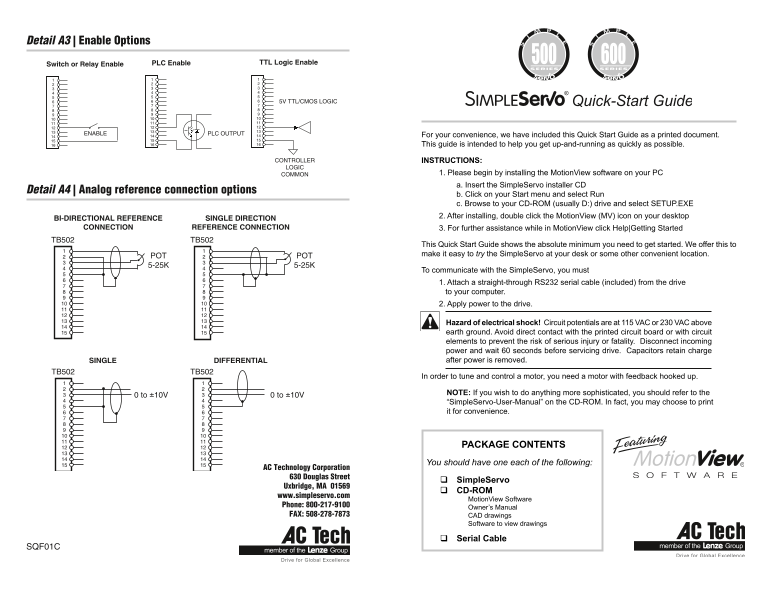
Detail A3 | Enable Options
Switch or Relay Enable PLC Enable TTL Logic Enable
5V TTL/CMOS LOGIC
ENABLE PLC OUTPUT For your convenience, we have included this Quick Start Guide as a printed document.
This guide is intended to help you get up-and-running as quickly as possible.
CONTROLLER INSTRUCTIONS: LOGIC
COMMON 1. Please begin by installing the Motion View software on your PC a. Insert the Simple Servo installer CD
Detail A4 | Analog reference connection options
b. Click on your Start menu and select Run c. Browse to your CD-ROM (usually D:) drive and select SETUP.EXE 2. After installing, double click the Motion View (MV) icon on your desktop
BI-DIRECTIONAL REFERENCE SINGLE DIRECTION
CONNECTION REFERENCE CONNECTION 3. For further assistance while in Motion View click Help|Getting Started
TB502 TB502
This Quick Start Guide shows the absolute minimum you need to get started. We offer this to make it easy to try the Simple Servo at your desk or some other convenient location.
POT POT 5-25K 5-25K
To communicate with the Simple Servo, you must 1. Attach a straight-through RS232 serial cable (included) from the drive to your computer. 2. Apply power to the drive.
Hazard of electrical shock! Circuit potentials are at 115 VAC or 230 VAC above earth ground. Avoid direct contact with the printed circuit board or with circuit elements to prevent the risk of serious injury or fatality. Disconnect incoming power and wait 60 seconds before servicing drive. Capacitors retain charge SINGLE DIFFERENTIAL after power is removed.
TB502 TB502
In order to tune and control a motor, you need a motor with feedback hooked up.
NOTE: If you wish to do anything more sophisticated, you should refer to the
0 to ±10V 0 to ±10V
“Simple Servo-User-Manual” on the CD-ROM. In fact, you may choose to print it for convenience.
PACKAGE CONTENTS You should have one each of the following:
AC Technology Corporation 630 Douglas Street
Simple Servo
Uxbridge, MA 01569
CD-ROM
www.simpleservo.com
Motion View Software
Phone: 800-217-9100
Owner’s Manual
FAX: 508-278-7873 CAD drawings
Software to view drawings
Serial Cable
SQF01C
Page Summary Contents For Lenze Inverters-Servo inverters 94 SimpleServo servo inverters 94 SimpleServo 500 servo inverters Operating instructions SimpleServo 500 600 IMSS500 Quick Start Guide (Language: DE, EN)
Manual Details
| Brand | Lenze |
|---|---|
| Pages | 2 |
| File Size | 301.49 KB |
| Published | June 03, 2026 |
Enter the captcha to get the download link:

Frequently Asked Questions
How do I begin setting up the SimpleServo?
Install MotionView software on your PC, then double-click the MotionView icon on your desktop.
What equipment is required to control a motor with SimpleServo?
You need a motor with feedback hooked up and must connect a straight-through RS232 serial cable from the drive to your computer.
How much time do I wait before servicing or disconnecting power?
Disconnect incoming power and wait 60 seconds because capacitors retain charge after power is removed.