JVC KD-VR200 Installation and User Guide
Summary
The JVC KD-R200 single-DIN unit provides reliable audio performance, supporting both traditional CDs and modern digital files like MP3 and WMA. This comprehensive manual guides users through every aspect of ownership, covering detailed professional installation procedures, wiring diagrams, basic operation instructions, and critical maintenance tips. It is the essential guide for DIY enthusiasts and professional installers looking to achieve perfect setup and guarantee a superior sound experience in their vehicle while adhering to safety standards.
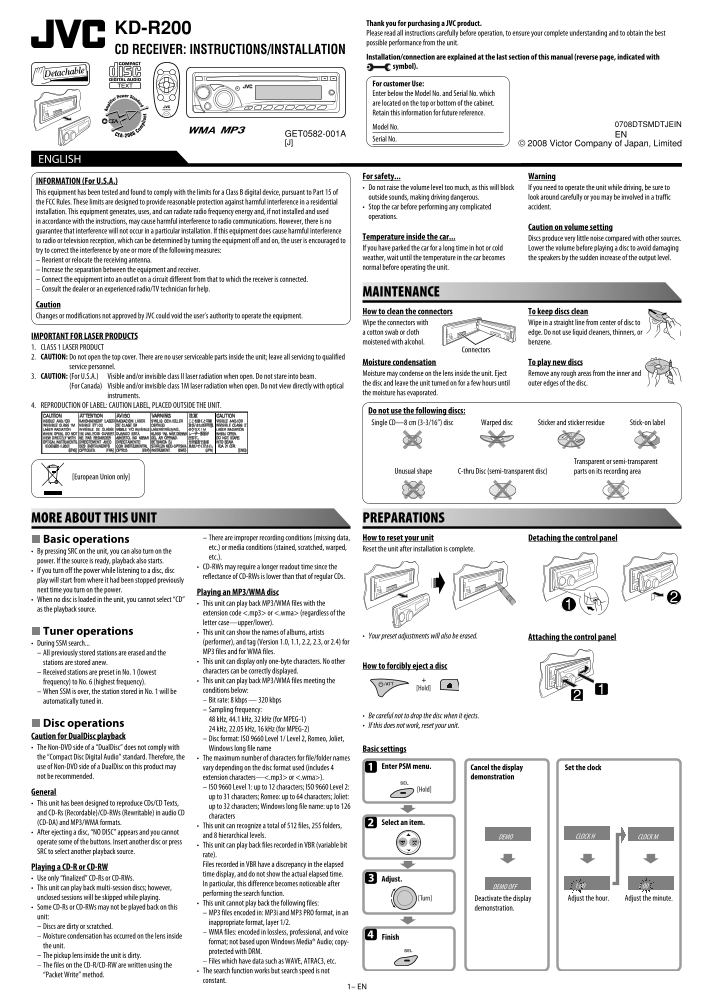
Page 1 Text Content
Thank you for purchasing a JVC product.
KD-R200 Please read all instructions carefully before operation, to ensure your complete understanding and to obtain the best
possible performance from the unit.
CD RECEIVER: INSTRUCTIONS/INSTALLATION
Installation/connection are explained at the last section of this manual (reverse page, indicated with symbol).
For customer Use: Enter below the Model No. and Serial No. which are located on the top or bottom of the cabinet. Retain this information for future reference.
0708DTSMDTJEIN
Model No.
GET0582-001A EN
Serial No.
[J] © 2008 Victor Company of Japan, Limited
ENGLISH ESPAÑOL
For safety... Warning
INFORMATION (For U.S.A.)
• Do not raise the volume level too much, as this will block If you need to operate the unit while driving, be sure to
This equipment has been tested and found to comply with the limits for a Class B digital device, pursuant to Part 15 of
outside sounds, making driving dangerous. look around carefully or you may be involved in a traffic
the FCC Rules. These limits are designed to provide reasonable protection against harmful interference in a residential
• Stop the car before performing any complicated accident.
installation. This equipment generates, uses, and can radiate radio frequency energy and, if not installed and used
operations.
in accordance with the instructions, may cause harmful interference to radio communications. However, there is no
Caution on volume setting
guarantee that interference will not occur in a particular installation. If this equipment does cause harmful interference
Temperature inside the car... Discs produce very little noise compared with other sources.
to radio or television reception, which can be determined by turning the equipment off and on, the user is encouraged to
If you have parked the car for a long time in hot or cold Lower the volume before playing a disc to avoid damaging
try to correct the interference by one or more of the following measures:
weather, wait until the temperature in the car becomes the speakers by the sudden increase of the output level.
– Reorient or relocate the receiving antenna.
normal before operating the unit.
– Increase the separation between the equipment and receiver. – Connect the equipment into an outlet on a circuit different from that to which the receiver is connected. – Consult the dealer or an experienced radio/TV technician for help.
MAINTENANCE
Caution
How to clean the connectors To keep discs clean
Changes or modifications not approved by JVC could void the user’s authority to operate the equipment.
Wipe the connectors with Wipe in a straight line from center of disc to a cotton swab or cloth edge. Do not use liquid cleaners, thinners, or
IMPORTANT FOR LASER PRODUCTS
moistened with alcohol. benzene.
1. CLASS 1 LASER PRODUCT
Connectors
2. CAUTION: Do not open the top cover. There are no user serviceable parts inside the unit; leave all servicing to qualified
Moisture condensation To play new discs
service personnel.
Moisture may condense on the lens inside the unit. Eject Remove any rough areas from the inner and
3. CAUTION: (For U.S.A.) Visible and/or invisible class II laser radiation when open. Do not stare into beam.
the disc and leave the unit turned on for a few hours until outer edges of the disc.
(For Canada) Visible and/or invisible class 1M laser radiation when open. Do not view directly with optical
the moisture has evaporated.
instruments.
4. REPRODUCTION OF LABEL: CAUTION LABEL, PLACED OUTSIDE THE UNIT.
Do not use the following discs:
Single CD—8 cm (3-3/16”) disc Warped disc Sticker and sticker residue Stick-on label
Transparent or semi-transparent
Unusual shape C-thru Disc (semi-transparent disc) parts on its recording area
[European Union only]
MORE ABOUT THIS UNIT PREPARATIONS
Basic operations – There are improper recording conditions (missing data, How to reset your unit Detaching the control panel etc.) or media conditions (stained, scratched, warped, Reset the unit after installation is complete.
• By pressing SRC on the unit, you can also turn on the
etc.).
power. If the source is ready, playback also starts.
• CD-RWs may require a longer readout time since the
• If you turn off the power while listening to a disc, disc
reflectance of CD-RWs is lower than that of regular CDs.
play will start from where it had been stopped previously next time you turn on the power.
Playing an MP3/WMA disc
• When no disc is loaded in the unit, you cannot select “CD”
• This unit can play back MP3/WMA files with the
as the playback source.
extension code <.mp3> or <.wma> (regardless of the letter case—upper/lower).
Tuner operations • This unit can show the names of albums, artists
• Your preset adjustments will also be erased. Attaching the control panel
• During SSM search... (performer), and tag (Version 1.0, 1.1, 2.2, 2.3, or 2.4) for – All previously stored stations are erased and the MP3 files and for WMA files. stations are stored anew. • This unit can display only one-byte characters. No other
How to forcibly eject a disc
– Received stations are preset in No. 1 (lowest characters can be correctly displayed. frequency) to No. 6 (highest frequency). • This unit can play back MP3/WMA files meeting the – When SSM is over, the station stored in No. 1 will be conditions below: automatically tuned in. – Bit rate: 8 kbps — 320 kbps – Sampling frequency:
• Be careful not to drop the disc when it ejects.
48 k Hz, 44.1 k Hz, 32 k Hz (for MPEG-1)
Disc operations • If this does not work, reset your unit.
24 k Hz, 22.05 k Hz, 16 k Hz (for MPEG-2)
Caution for Dual Disc playback
– Disc format: ISO 9660 Level 1/ Level 2, Romeo, Joliet,
• The Non-DVD side of a “Dual Disc” does not comply with Windows long file name Basic settings the “Compact Disc Digital Audio” standard. Therefore, the • The maximum number of characters for file/folder names
use of Non-DVD side of a Dual Disc on this product may vary depending on the disc format used (includes 4 Enter PSM menu. Cancel the display Set the clock
not be recommended. extension characters—<.mp3> or <.wma>). demonstration
– ISO 9660 Level 1: up to 12 characters; ISO 9660 Level 2:
General
up to 31 characters; Romeo: up to 64 characters; Joliet:
• This unit has been designed to reproduce CDs/CD Texts,
up to 32 characters; Windows long file name: up to 126
and CD-Rs (Recordable)/CD-RWs (Rewritable) in audio CD
characters
(CD-DA) and MP3/WMA formats. Select an item.
• This unit can recognize a total of 512 files, 255 folders,
• After ejecting a disc, “NO DISC” appears and you cannot
and 8 hierarchical levels.
operate some of the buttons. Insert another disc or press
• This unit can play back files recorded in VBR (variable bit
SRC to select another playback source.
rate). Files recorded in VBR have a discrepancy in the elapsed
Playing a CD-R or CD-RW
time display, and do not show the actual elapsed time.
• Use only “finalized” CD-Rs or CD-RWs. Adjust.
In particular, this difference becomes noticeable after
• This unit can play back multi-session discs; however,
performing the search function.
unclosed sessions will be skipped while playing. Deactivate the display Adjust the hour. Adjust the minute.
• This unit cannot play back the following files:
• Some CD-Rs or CD-RWs may not be played back on this demonstration.
– MP3 files encoded in: MP3i and MP3 PRO format, in an
unit:
inappropriate format, layer 1/2.
– Discs are dirty or scratched.
– WMA files: encoded in lossless, professional, and voice
– Moisture condensation has occurred on the lens inside Finish
format; not based upon Windows Media® Audio; copy-
the unit.
protected with DRM.
– The pickup lens inside the unit is dirty.
– Files which have data such as WAVE, ATRAC3, etc.
– The files on the CD-R/CD-RW are written using the
• The search function works but search speed is not
“Packet Write” method.
constant.
1– EN
EN_KD-R200[J]_1.indd 1 6/3/08 4:46:44 PM
Page Summary Contents For JVC KD-VR200 Installation and User Guide
Manual Details
| Brand | JVC |
|---|---|
| Pages | 4 |
| File Size | 616.06 KB |
| Published | May 24, 2026 |
Enter the captcha to get the download link:

Frequently Asked Questions
How do I prevent damage from extreme temperatures?
If parked in hot or cold weather, wait until the temperature is normal before operating the unit.
What is the proper way to clean the connectors?
Wipe the connectors with a clean cotton swab or cloth edge, moving straight from the center of the disc to the edge. Never use liquid cleaners.
Can this unit play digital audio files besides CDs?
Yes, it can play back MP3/WMA files, and CD-RWs may require a longer readout time initially.
What precautions must I take if there is condensation?
Remove any rough areas from the inner disc, leave the unit turned on for several hours until the moisture has evaporated.