HP Officejet Pro 8600 e-All-in-One Printer Series - N911 Installation Poster
Summary
This comprehensive user guide provides step-by-step instructions for setting up your HP Officejet Pro printer safely and efficiently. It walks first-time users through everything from initial unpacking and connecting power to installing essential accessories, loading paper, and setting language preferences. Included instructions cover the complete setup process and emphasize product registration, ensuring you receive optimized support and service right out of the box.
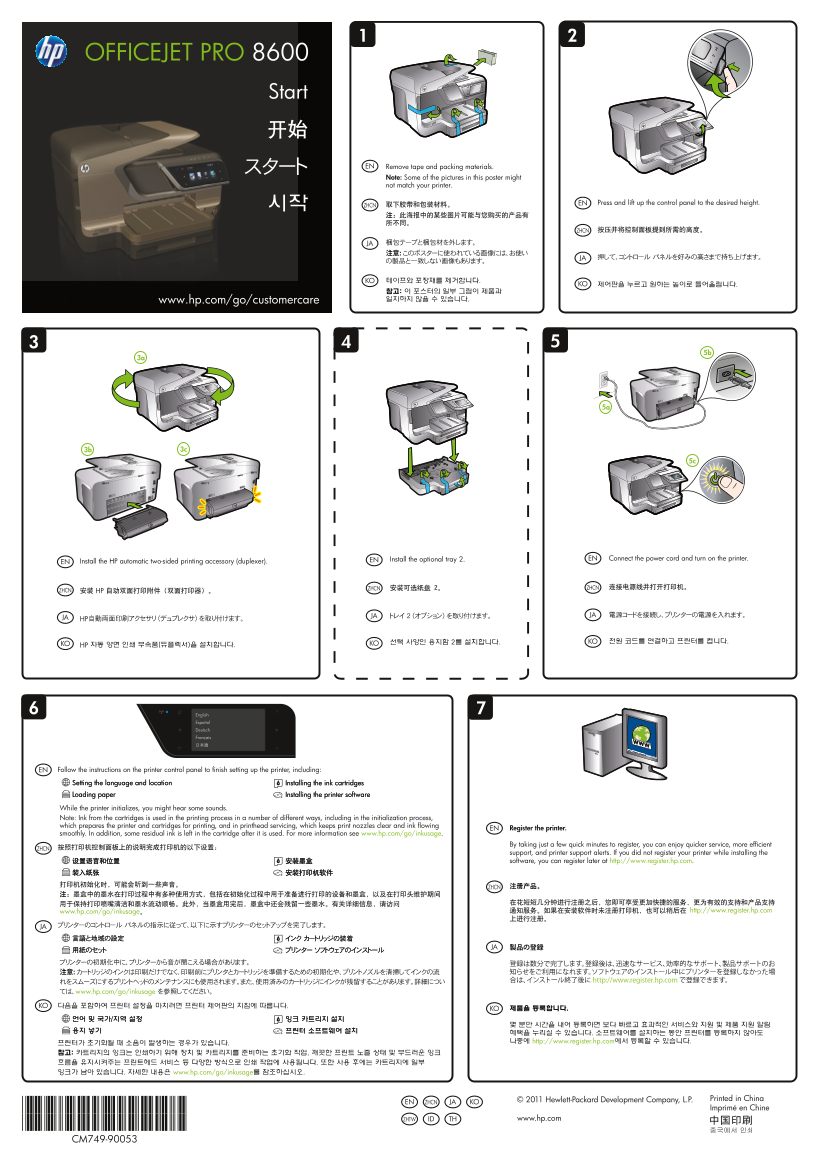
Page 1 Text Content
OFFICEJET PRO 8600
Start 开始
スタート EN Remove tape and packing materials. Note: Some of the pictures in this poster might not match your printer.
取下胶带和包装材料。 EN Press and lift up the control panel to the desired height.
시작 ZHCN 注:此海报中的某些图片可能与您购买的产品有 所不同。
ZHCN 按压并将控制面板提到所需的高度。
JA 梱包テープと梱包材を外します。 注意: このポスターに使われている画像には、お使い
JA 押して、コントロール パネルを好みの高さまで持ち上げます。
KO 테이프와 포장재를 제거합니다.
KO 제어판을 누르고 원하는 높이로 들어올립니다.
참고: 이 포스터의 일부 그림이 제품과 www.hp.com/go/customercare 일치하지 않을 수 있습니다.
EN Install the optional tray 2. EN Connect the power cord and turn on the printer.Install the HP automatic two-sided printing accessory (duplexer).
ZHCN 安装可选纸盘 2。 ZHCN 连接电源线并打开打印机。
ZHCN 安装 HP 自动双面打印附件(双面打印器)。
JA トレイ 2 (オプション) を取り付けます。 JA 電源コードを接続し、プリンターの電源を入れます。HP自動両面印刷アクセサリ (デュプレクサ) を取り付けます。
선택 사양인 용지함 2를 설치합니다. KO 전원 코드를 연결하고 프린터를 켭니다.
KO HP 자동 양면 인쇄 부속품(듀플렉서)을 설치합니다. KO
English Español Deutsch Français 日本語
EN Follow the instructions on the printer control panel to finish setting up the printer, including: Setting the language and location Installing the ink cartridges Loading paper Installing the printer software While the printer initializes, you might hear some sounds. Note: Ink from the cartridges is used in the printing process in a number of different ways, including in the initialization process, which prepares the printer and cartridges for printing, and in printhead servicing, which keeps print nozzles clear and ink flowing
EN Register the printer.
smoothly. In addition, some residual ink is left in the cartridge after it is used. For more information see www.hp.com/go/inkusage.
By taking just a few quick minutes to register, you can enjoy quicker service, more efficient
ZHCN 按照打印机控制面板上的说明完成打印机的以下设置:
support, and printer support alerts. If you did not register your printer while installing the
设置语言和位置 安装墨盒 software, you can register later at http://www.register.hp.com. 装入纸张 安装打印机软件 打印机初始化时,可能会听到一些声音。 注册产品。
用于保持打印喷嘴清洁和墨水流动顺畅。此外,当墨盒用完后,墨盒中还会残留一些墨水。有关详细信息,请访问 在花短短几分钟进行注册之后,您即可享受更加快捷的服务、更为有效的支持和产品支持 www.hp.com/go/inkusage。 通知服务。如果在安装软件时未注册打印机,也可以稍后在 http://www.register.hp.com 上进行注册。
JA プリンターのコントロール パネルの指示に従って、以下に示すプリンターのセットアップを完了します。 言語と地域の設定 インク カートリッジの装着
JA 製品の登録
注意: カートリッジのインクは印刷だけでなく、印刷前にプリンタとカートリッジを準備するための初期化や、プリントノズルを清掃してインクの流 知らせをご利用になれます。ソフトウェアのインストール中にプリンターを登録しなかった場 れをスムーズにするプリントヘッドのメンテナンスにも使用されます。また、使用済みのカートリッジにインクが残留することがあります。詳細につい 合は、インストール終了後に http://www.register.hp.com で登録できます。
ては、www.hp.com/go/inkusage を参照してください。
KO 다음을 포함하여 프린터 설정을 마치려면 프린터 제어판의 지침에 따릅니다.
KO 제품을 등록합니다.
혜택을 누리실 수 있습니다. 소프트웨어를 설치하는 동안 프린터를 등록하지 않아도 프린터가 초기화될 때 소음이 발생하는 경우가 있습니다. 나중에 http://www.register.hp.com에서 등록할 수 있습니다.
참고: 카트리지의 잉크는 인쇄하기 위해 장치 및 카트리지를 준비하는 초기화 작업, 깨끗한 프린트 노즐 상태 및 부드러운 잉크 흐름을 유지시켜주는 프린트헤드 서비스 등 다양한 방식으로 인쇄 작업에 사용됩니다. 또한 사용 후에는 카트리지에 일부 잉크가 남아 있습니다. 자세한 내용은 www.hp.com/go/inkusage를 참조하십시오.
© 2011 Hewlett-Packard Development Company, L.P. Printed in China
EN ZHCN JA KO
*CM749-90053* Imprimé en Chine
ZHTW ID TH www.hp.com
*CM749-90053* CM749-90053
Page Summary Contents For HP Officejet Pro 8600 e-All-in-One Printer Series - N911 Installation Poster
Manual Details
| Brand | HP |
|---|---|
| Pages | 2 |
| File Size | 1.69 MB |
| Published | June 06, 2026 |
Enter the captcha to get the download link:

Frequently Asked Questions
How do I initially set up the printer?
Follow the instructions on the control panel to complete setup, including language/location setting and loading paper.
Does using the ink cartridge affect other printing processes?
Yes, the ink is used in initialization (preparing device/cartridge) and printhead servicing (keeping nozzles clear).
What should I do if I don't register my printer during setup?
You can still register later at http://www.register.hp.com for quicker service and support.
Are there residual inks left in the cartridges?
Yes, some residual ink is left in the cartridge after it has been used; see www.hp.com/go/inkusage for details.