HP Officejet Pro 8500 All-in-One Printer Series - A909 Setup Poster
Summary
The HP Officejet Pro 8500 is a versatile all-in-one wireless printer designed for modern homes and small businesses. This comprehensive Getting Started Guide provides new users with clear instructions on setting up and operating your device. The manual covers essential topics, including initial setup, connecting wirelessly via Wi-Fi, faxing procedures, detailed software installation for Mac OS X and Windows, and troubleshooting tips. It is the perfect resource for anyone needing to maximize functionality from their new high-performance printer effortlessly.
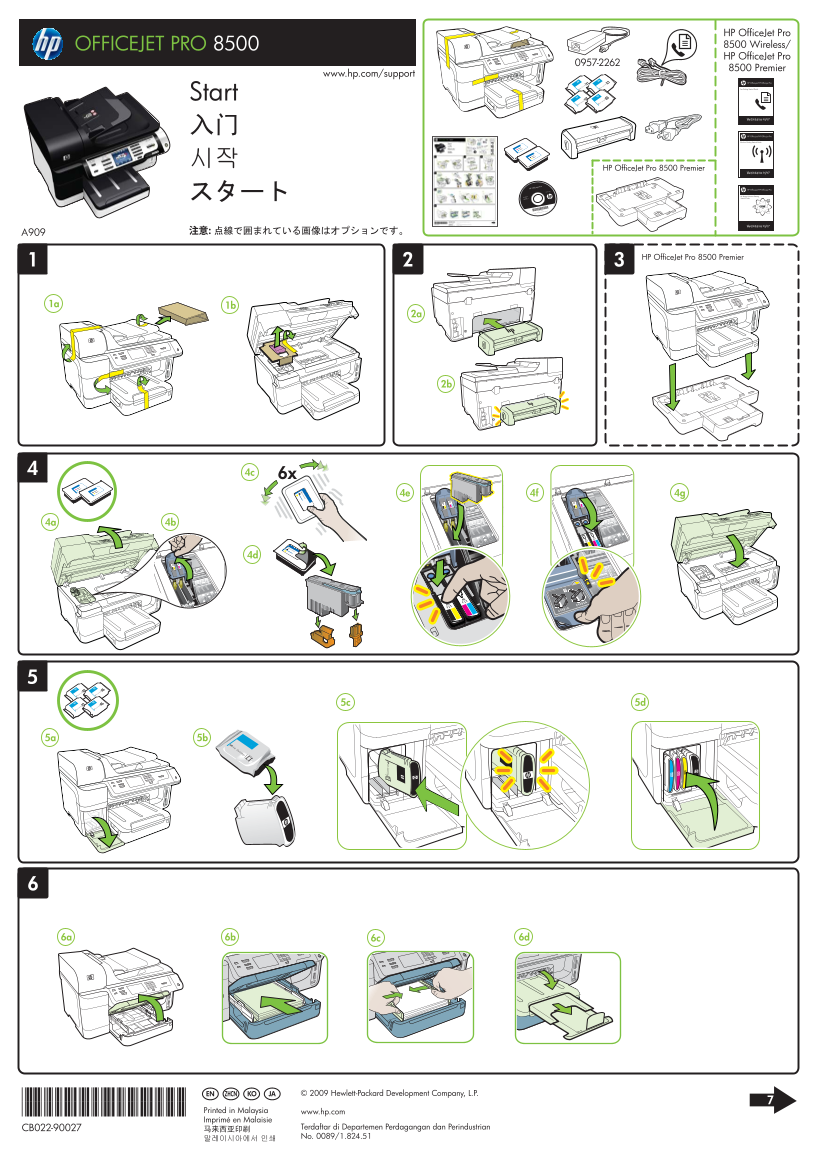
Page 1 Text Content
HP Office Jet Pro OFFICEJET PRO 8500 8500 Wireless/ HP Office Jet Pro
8500 Premier
www.hp.com/support
HP Officejet/HP Officejet Pro
Fax Getting Started Guide
Start
HP Officejet/HP Officejet Pro
Wireless Getting Started Guide
HP Office Jet Pro 8500 Premier
HP Officejet/HP Officejet Pro
HP Digital Solutions Getting Started Guide
HP Office Jet Pro 8500 Premier
*CB022-90027* EN ZHCN JAKO © 2009 Hewlett-Packard Development Company, L.P.
*CB022-90027* Printed in Malaysia www.hp.com Imprimé en Malaisie
CB022-90027 Terdaftar di Departemen Perdagangan dan Perindustrian No. 0089/1.824.51
Page Summary Contents For HP Officejet Pro 8500 All-in-One Printer Series - A909 Setup Poster
Manual Details
| Brand | HP |
|---|---|
| Pages | 2 |
| File Size | 846.96 KB |
| Published | June 06, 2026 |
Enter the captcha to get the download link:

Frequently Asked Questions
What should I do before connecting the USB cable when using Windows?
Install the software first according to the prompt.
How can I connect the printer wirelessly (802.11)?
Use the touch screen's [Network] > [Wireless Setup Wizard].
Where can I find technical support and user guides for this product?
Check HP’s support website at www.hp.com/support, which hosts electronic User Guides for Windows and Mac OS X.
What is the ink used for besides printing in the cartridges?
The ink is used for initialization (preparing device and cartridges) and printhead servicing to keep nozzles clear.