HP LaserJet P2015 Series Printer - HP LaserJet P2015 - (Multiple Language) Getting Started Guide
Summary
Get comprehensive support for your HP LaserJet P2015 printer with this essential guide. The manual provides detailed setup instructions, crucial safety warnings, regulatory compliance information (including FCC standards), and expert troubleshooting tips. Designed for new and existing users, it ensures safe operation while offering step-by-step guidance to maximize the performance of your printing equipment.
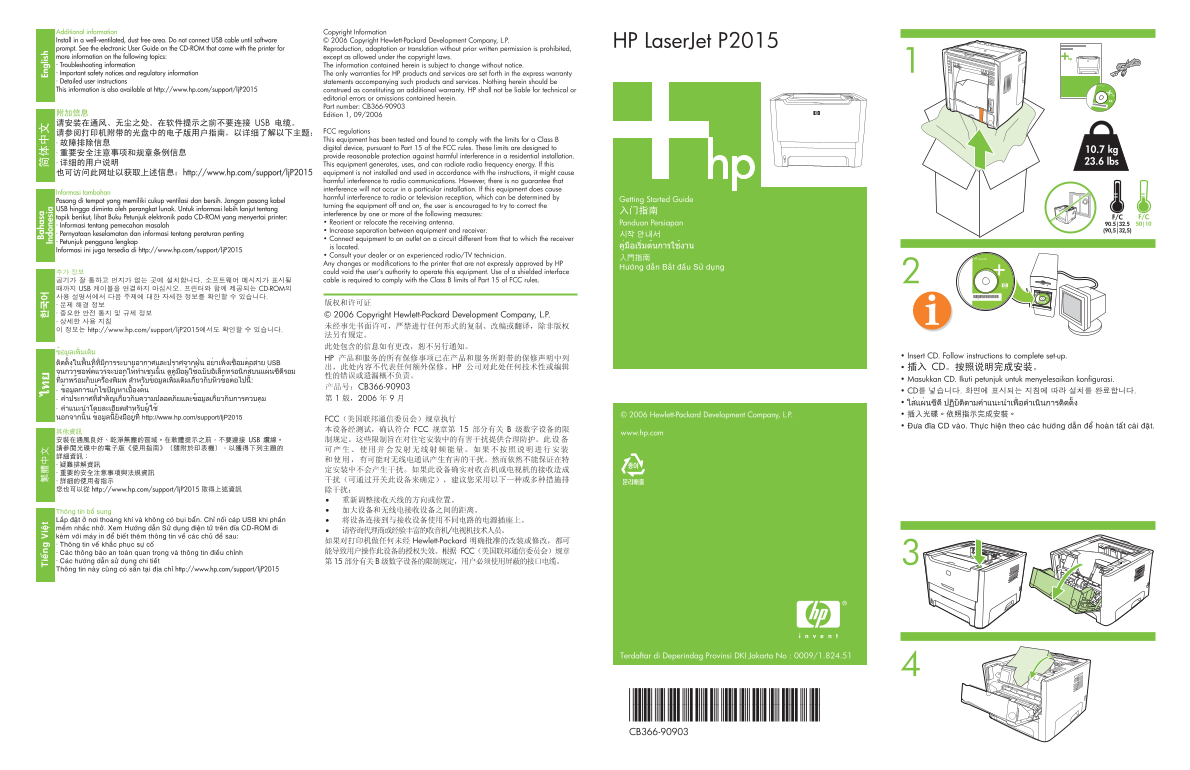
Page 1 Text Content
Additional information Copyright Information Install in a well-ventilated, dust free area. Do not connect USB cable until software © 2006 Copyright Hewlett-Packard Development Company, L.P. Ba ha sa
ie án ie ät HP Laser Jet P2015 En gl is
prompt. See the electronic User Guide on the CD-ROM that came with the printer for Reproduction, adaptation or translation without prior written permission is prohibited, In do ne si more information on the following topics: except as allowed under the copyright laws. · Troubleshooting information The information contained herein is subject to change without notice. · Important safety notices and regulatory information The only warranties for HP products and services are set forth in the express warranty · Detailed user instructions statements accompanying such products and services. Nothing herein should be This information is also available at http://www.hp.com/support/lj P2015 construed as constituting an additional warranty. HP shall not be liable for technical or
editorial errors or omissions contained herein. Part number: CB366-90903 Edition 1, 09/2006
FCC regulations This equipment has been tested and found to comply with the limits for a Class B digital device, pursuant to Part 15 of the FCC rules. These limits are designed to
10.7 kg
provide reasonable protection against harmful interference in a residential installation.
This equipment generates, uses, and can radiate radio frequency energy. If this 23.6 lbs
equipment is not installed and used in accordance with the instructions, it might cause harmful interference to radio communications. However, there is no guarantee that interference will not occur in a particular installation. If this equipment does cause
Informasi tambahan
harmful interference to radio or television reception, which can be determined by
Pasang di tempat yang memiliki cukup ventilasi dan bersih. Jangan pasang kabel
turning the equipment off and on, the user is encouraged to try to correct the
USB hingga diminta oleh perangkat lunak. Untuk informasi lebih lanjut tentang
interference by one or more of the following measures:
topik berikut, lihat Buku Petunjuk elektronik pada CD-ROM yang menyertai printer: F/C F/C
• Reorient or relocate the receiving antenna. 90.5|32.5 50|10
· Informasi tentang pemecahan masalah
• Increase separation between equipment and receiver. (90,5|32,5)
· Pernyataan keselamatan dan informasi tentang peraturan penting
• Connect equipment to an outlet on a circuit different from that to which the receiver
· Petunjuk pengguna lengkap
is located.
Informasi ini juga tersedia di http://www.hp.com/support/lj P2015
• Consult your dealer or an experienced radio/TV technician. Any changes or modifications to the printer that are not expressly approved by HP could void the user’s authority to operate this equipment. Use of a shielded interface cable is required to comply with the Class B limits of Part 15 of FCC rules.
© 2006 Hewlett-Packard Development Company, L.P.
www.hp.com
Thoâng tin boå sung Laép ñaët ôû nôi thoaùng khí vaø khoâng coù buïi baån. Chæ noái caùp USB khi phaàn meàm nhaéc nhôû. Xem Höôùng daãn Söû duïng ñieän töû treân ñóa CD-ROM ñi keøm vôùi maùy in ñeå bieát theâm thoâng tin veà caùc chuû ñeà sau: · Thoâng tin veà khaéc phuïc söï coá · Caùc thoâng baùo an toaøn quan troïng vaø thoâng tin ñieàu chænh · Caùc höôùng daãn söû duïng chi tieát Thoâng tin naøy cuõng coù saün taïi ñòa chæ http://www.hp.com/support/lj P2015T
Terdaftar di Deperindag Provinsi DKI Jakarta No : 0009/1.824.51
*CB366-90903* *CB366-90903* CB366-90903
Page Summary Contents For HP LaserJet P2015 Series Printer - HP LaserJet P2015 - (Multiple Language) Getting Started Guide
Manual Details
| Brand | HP |
|---|---|
| Pages | 2 |
| File Size | 1.11 MB |
| Published | June 03, 2026 |
Enter the captcha to get the download link:

Frequently Asked Questions
Where should I install this printer for best operation?
Install it in a well-ventilated, dust free area.
When can I connect the USB power cable to the device?
Do not connect the USB cable until prompted by the software run.**
What steps can I take if I experience radio frequency interference?
Try reorienting or relocating the receiving antenna, increasing equipment separation, or using a separate circuit outlet.
Where is the most complete set of user instructions located?
Check the electronic User Guide on the CD-ROM or visit http://www.hp.com/support/ljP2015.