Fairchild AN-6033 Component Calculations & Simulation Tools for FAN2106 Data Manual
Summary
This comprehensive technical resource provides calculation tools and advanced simulation models for designing with the FAN2106 IC. It enables engineers to accurately estimate component values, predict system losses, and validate performance using industry-standard software like Excel add-ins and PSpice. The manual offers detailed instructions on running both DC/AC calculations (including Bode Plots) and load transient response simulations. Ideal for power electronics designers needing reliable modeling of the entire circuit domain.
Page 1 Text Content
www.fairchildsemi.com
AN-6033 Component Calculations & Simulation Tools for FAN2106
Summary
Before Running the Calculator
Fairchild Semiconductor has developed application tools to
1. Copy AN-6033.ZIP to an empty folder (e.g.
minimize the design time for the FAN2106 IC. The
FAN2106).
following (independent) tools are available:
2. Extract the calculator from AN-6033.ZIP into that
A spreadsheet calculator to calculate all the component
folder.
values and estimate losses
3. Run Microsoft Excel and choose File… New… to open
The Excel-based spreadsheet accepts a few design
a blank worksheet (or in Windows, run Start…
variables and returns recommendations on the
Programs… Microsoft Excel).
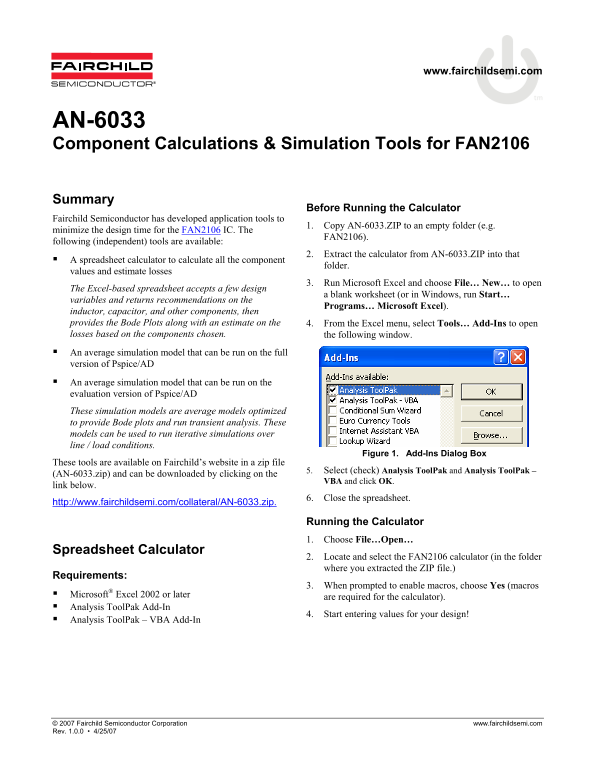
inductor, capacitor, and other components, then provides the Bode Plots along with an estimate on the 4. From the Excel menu, select Tools… Add-Ins to open losses based on the components chosen. the following window. An average simulation model that can be run on the full version of Pspice/AD An average simulation model that can be run on the evaluation version of Pspice/AD These simulation models are average models optimized to provide Bode plots and run transient analysis. These models can be used to run iterative simulations over line / load conditions.
Figure 1. Add-Ins Dialog Box
These tools are available on Fairchild’s website in a zip file
5. Select (check) Analysis Tool Pak and Analysis Tool Pak –
(AN-6033.zip) and can be downloaded by clicking on the
VBA and click OK.
link below.
6. Close the spreadsheet.
http://www.fairchildsemi.com/collateral/AN-6033.zip.
Running the Calculator 1. Choose File…Open…
Spreadsheet Calculator
2. Locate and select the FAN2106 calculator (in the folder where you extracted the ZIP file.)
Requirements:
3. When prompted to enable macros, choose Yes (macros
Microsoft® Excel 2002 or later
are required for the calculator).
Analysis Tool Pak Add-In
4. Start entering values for your design!
Analysis Tool Pak – VBA Add-In
© 2007 Fairchild Semiconductor Corporation www.fairchildsemi.com Rev. 1.0.0 • 4/25/07
Page Summary Contents For Fairchild AN-6033 Component Calculations & Simulation Tools for FAN2106 Data Manual
Manual Details
| Brand | Fairchild |
|---|---|
| Pages | 5 |
| File Size | 86.93 KB |
| Published | June 06, 2026 |
Enter the captcha to get the download link:

Frequently Asked Questions
What prerequisites are required to use the spreadsheet calculator?
Microsoft Excel 2002 or later is required, in addition to the Analysis ToolPak Add-In and Analysis ToolPak – VBA Add-In.
How do I simulate load transient conditions?
For load transient analysis, select “Application Circuit – Transient” when unzipping AN-6033.ZIP into a folder. Remember to set up R_LOAD to the desired value before running the simulation.
What is the recommended phase margin for stability?
Fairchild recommends at least 60° of phase margin when the gain crosses 0dB to ensure system stability over production variations.
Can this model be used for both evaluation and full versions of PSpice/AD?
Yes, the PSpice models are configured for both evaluation and full version of PSpice-A/D, providing AC (Bode plots) and Transient response analyses.