EXTECH INSTRUMENTS CT100 Network Cable Tester User Guide
Summary
The CT100 Network Cable Tester System is an essential tool for IT professionals and network technicians designed to accurately validate structured wiring integrity. This unit automatically tests both RJ45 and coaxial cables against multiple industry standards (including 10Base-T and EIA/TIA 568B), checking continuity, shorts, and wire crosses. The comprehensive manual provides step-by-step guidance on operational use, proper connection procedures, result interpretation (Pass/Fail indicators), and necessary maintenance for all wiring types.
Page 1 Text Content
User Guide
CT100 Network Cable Tester Introduction Congratulations on your purchase of the Extech CT100 Network Cable Tester System. The system consists of a Transmitter and a Receiver. This system automatically performs the following tests: Continuity, Open/Short Circuits, and Wire Crosses (Reversals). The CT100 tests “F” type coaxial and RJ45 terminated cables meeting the following wiring standards:
• 10Base-T • AT&T258A • EIA/TIA 568B • Token Ring
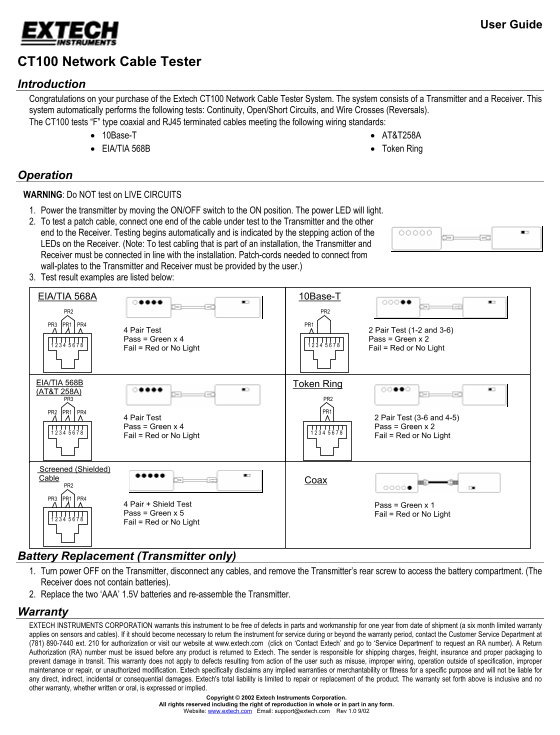
Operation WARNING: Do NOT test on LIVE CIRCUITS 1. Power the transmitter by moving the ON/OFF switch to the ON position. The power LED will light. 2. To test a patch cable, connect one end of the cable under test to the Transmitter and the other end to the Receiver. Testing begins automatically and is indicated by the stepping action of the LEDs on the Receiver. (Note: To test cabling that is part of an installation, the Transmitter and Receiver must be connected in line with the installation. Patch-cords needed to connect from wall-plates to the Transmitter and Receiver must be provided by the user.) 3. Test result examples are listed below: EIA/TIA 568A 10Base-T
PR2 PR2
PR3 PR1 PR4 PR1
4 Pair Test 2 Pair Test (1-2 and 3-6) Pass = Green x 4 Pass = Green x 2
Fail = Red or No Light Fail = Red or No Light
EIA/TIA 568B Token Ring (AT&T 258A) PR3 PR2
PR2 PR1 PR4 PR1
4 Pair Test 2 Pair Test (3-6 and 4-5) Pass = Green x 4 Pass = Green x 2
Fail = Red or No Light Fail = Red or No Light
Screened (Shielded) Cable
PR3 PR1 PR4
4 Pair + Shield Test Pass = Green x 1 Pass = Green x 5 Fail = Red or No Light Fail = Red or No Light
Battery Replacement (Transmitter only) 1. Turn power OFF on the Transmitter, disconnect any cables, and remove the Transmitter’s rear screw to access the battery compartment. (The Receiver does not contain batteries). 2. Replace the two ‘AAA’ 1.5V batteries and re-assemble the Transmitter. Warranty EXTECH INSTRUMENTS CORPORATION warrants this instrument to be free of defects in parts and workmanship for one year from date of shipment (a six month limited warranty applies on sensors and cables). If it should become necessary to return the instrument for service during or beyond the warranty period, contact the Customer Service Department at (781) 890-7440 ext. 210 for authorization or visit our website at www.extech.com (click on ‘Contact Extech’ and go to ‘Service Department’ to request an RA number). A Return Authorization (RA) number must be issued before any product is returned to Extech. The sender is responsible for shipping charges, freight, insurance and proper packaging to prevent damage in transit. This warranty does not apply to defects resulting from action of the user such as misuse, improper wiring, operation outside of specification, improper maintenance or repair, or unauthorized modification. Extech specifically disclaims any implied warranties or merchantability or fitness for a specific purpose and will not be liable for any direct, indirect, incidental or consequential damages. Extech's total liability is limited to repair or replacement of the product. The warranty set forth above is inclusive and no other warranty, whether written or oral, is expressed or implied.
Copyright © 2002 Extech Instruments Corporation.
All rights reserved including the right of reproduction in whole or in part in any form.
Website: www.extech.com Email: [email protected] Rev 1.0 9/02
Page Summary Contents For EXTECH INSTRUMENTS CT100 Network Cable Tester User Guide
Manual Details
| Brand | Extech Instruments |
|---|---|
| Pages | 1 |
| File Size | 125.43 KB |
| Published | May 19, 2026 |
Enter the captcha to get the download link:

Frequently Asked Questions
What types of cable standards does the CT100 test?
It tests cables meeting standards like 10Base-T, AT&T258A, EIA/TIA 568B, and includes coaxial/shielded testing.
What must I do before using the Cable Tester?
Always remember to power it on by flipping the ON/OFF switch to the ON position and WARNING: NEVER test on live circuits.
How is the CT100 system assembled for a test?
Connect one end of the patch cable under test to the Transmitter, and the other end to the Receiver. The system initiates testing automatically.
What do I need to know about battery maintenance?
The Transmitter uses two 'AAA' 1.5V batteries, which can be replaced by removing a rear screw.