EXTECH INSTRUMENTS 445815 Humidity Alert II User's Guide
Summary
Monitor environmental conditions with the Extech Humidity Alert II, a robust hygrometer-thermometer featuring remote probes and programmable alarm limits for optimal accuracy in ducts or challenging locations. This comprehensive manual guides users through complete setup, including temperature and humidity calibration, setting specific Hi/Lo %RH alarms, and managing Max/Min data logging. Designed for professionals requiring reliable environmental monitoring, the guide ensures safe operation, maintenance, and proper use of all advanced features.
Page 1 Text Content
User’s Guide
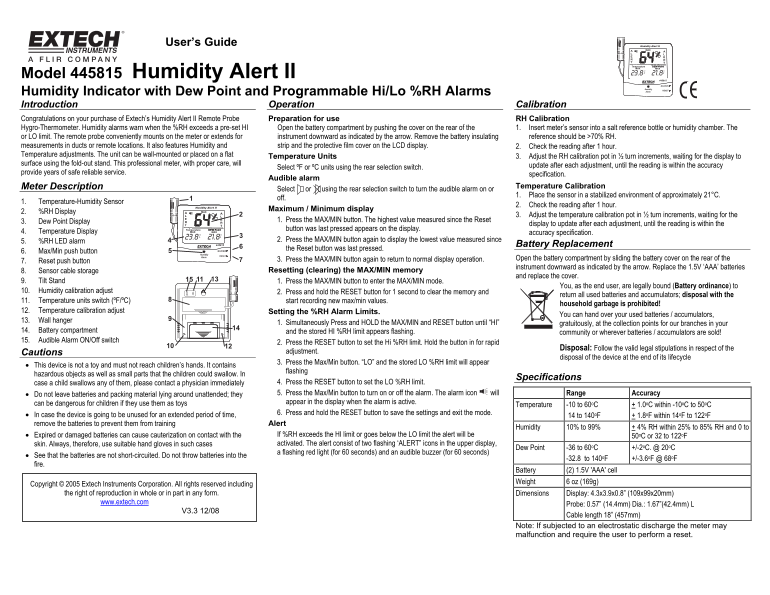
Model 445815 Humidity Alert II Humidity Indicator with Dew Point and Programmable Hi/Lo %RH Alarms CC Introduction Operation Calibration Congratulations on your purchase of Extech’s Humidity Alert II Remote Probe Preparation for use RH Calibration Hygro-Thermometer. Humidity alarms warn when the %RH exceeds a pre-set HI Open the battery compartment by pushing the cover on the rear of the 1. Insert meter’s sensor into a salt reference bottle or humidity chamber. The or LO limit. The remote probe conveniently mounts on the meter or extends for instrument downward as indicated by the arrow. Remove the battery insulating reference should be >70% RH. measurements in ducts or remote locations. It also features Humidity and strip and the protective film cover on the LCD display. 2. Check the reading after 1 hour. Temperature adjustments. The unit can be wall-mounted or placed on a flat
Temperature Units 3. Adjust the RH calibration pot in ½ turn increments, waiting for the display to
surface using the fold-out stand. This professional meter, with proper care, will
update after each adjustment, until the reading is within the accuracy
Select ºF or ºC units using the rear selection switch.
provide years of safe reliable service.
specification.
Audible alarm
Meter Description Temperature Calibration
Select or using the rear selection switch to turn the audible alarm on or
1. Place the sensor in a stabilized environment of approximately 21°C.
1. Temperature-Humidity Sensor
2. Check the reading after 1 hour.
Maximum / Minimum display
2. %RH Display
3. Adjust the temperature calibration pot in ½ turn increments, waiting for the
3. Dew Point Display 1. Press the MAX/MIN button. The highest value measured since the Reset
display to update after each adjustment, until the reading is within the
button was last pressed appears on the display.
4. Temperature Display accuracy specification.
5. %RH LED alarm 2. Press the MAX/MIN button again to display the lowest value measured since
Battery Replacement
the Reset button was last pressed.
6. Max/Min push button
3. Press the MAX/MIN button again to return to normal display operation. Open the battery compartment by sliding the battery cover on the rear of the
7. Reset push button
instrument downward as indicated by the arrow. Replace the 1.5V ‘AAA’ batteries
8. Sensor cable storage Resetting (clearing) the MAX/MIN memory
and replace the cover.
9. Tilt Stand 1. Press the MAX/MIN button to enter the MAX/MIN mode.
You, as the end user, are legally bound (Battery ordinance) to
10. Humidity calibration adjust 2. Press and hold the RESET button for 1 second to clear the memory and
return all used batteries and accumulators; disposal with the
11. Temperature units switch (ºF/ºC) start recording new max/min values.
household garbage is prohibited!
12. Temperature calibration adjust Setting the %RH Alarm Limits.
You can hand over your used batteries / accumulators,
13. Wall hanger
1. Simultaneously Press and HOLD the MAX/MIN and RESET button until “HI” gratuitously, at the collection points for our branches in your
14. Battery compartment and the stored HI %RH limit appears flashing.
community or wherever batteries / accumulators are sold!
15. Audible Alarm ON/Off switch
2. Press the RESET button to set the Hi %RH limit. Hold the button in for rapid
Disposal: Follow the valid legal stipulations in respect of the
Cautions adjustment.
disposal of the device at the end of its lifecycle
3. Press the Max/Min button. “LO” and the stored LO %RH limit will appear
• This device is not a toy and must not reach children’s hands. It contains
flashing
hazardous objects as well as small parts that the children could swallow. In
Specifications
case a child swallows any of them, please contact a physician immediately 4. Press the RESET button to set the LO %RH limit. • Do not leave batteries and packing material lying around unattended; they 5. Press the Max/Min button to turn on or off the alarm. The alarm icon will Range Accuracy can be dangerous for children if they use them as toys appear in the display when the alarm is active.
Temperature -10 to 60o C + 1.0o C within -10o C to 50o C
6. Press and hold the RESET button to save the settings and exit the mode.
• In case the device is going to be unused for an extended period of time, 14 to 140o F + 1.8o F within 14o F to 122o F
remove the batteries to prevent them from training Alert
Humidity 10% to 99% + 4% RH within 25% to 85% RH and 0 to
• Expired or damaged batteries can cause cauterization on contact with the If %RH exceeds the HI limit or goes below the LO limit the alert will be 50o C or 32 to 122o F skin. Always, therefore, use suitable hand gloves in such cases activated. The alert consist of two flashing ‘ALERT” icons in the upper display,
Dew Point -36 to 60o C +/-2o C. @ 20o C
a flashing red light (for 60 seconds) and an audible buzzer (for 60 seconds)
• See that the batteries are not short-circuited. Do not throw batteries into the
-32.8 to 140o F +/-3.6o F @ 68o F
fire.
Battery (2) 1.5V 'AAA' cell Weight 6 oz (169g)
Copyright © 2005 Extech Instruments Corporation. All rights reserved including
the right of reproduction in whole or in part in any form. Dimensions Display: 4.3x3.9x0.8” (109x99x20mm)
www.extech.com
Probe: 0.57” (14.4mm) Dia.: 1.67”(42.4mm) L
Cable length 18” (457mm)
Note: If subjected to an electrostatic discharge the meter may malfunction and require the user to perform a reset.
Page Summary Contents For EXTECH INSTRUMENTS 445815 Humidity Alert II User's Guide
Manual Details
| Brand | Extech Instruments |
|---|---|
| Pages | 1 |
| File Size | 82.81 KB |
| Published | May 19, 2026 |
Enter the captcha to get the download link:

Frequently Asked Questions
How do I set the Hi or Lo %RH alarm limit?
For HI, simultaneously press and HOLD MAX/MIN and RESET. Then press RESET to set the limit. For LO, repeat after pressing Max/Min.
What are the acceptable operating ranges for this device?
Temperature operates from -10 to 60 C. Humidity measures from 10% to 99% RH.
How should I store the unit if it will be unused for a long time?
Remove the batteries to prevent them from training when stored for an extended period.
Where can I dispose of used batteries and accumulators?
Disposal must follow valid legal stipulations; do not throw them into household garbage. Use collection points or where they are sold.