Dell Quick User Guide - Windows 7
Summary
The Computer Features Quick Start Guide provides an overview of Dell laptop features (Model P22G). It includes labeled diagrams of components such as camera, USB, VGA, HDMI, touchpad, and optical drive. Power-status indicators and regulatory compliance for Mexico are included. Target users are new Dell laptop owners.
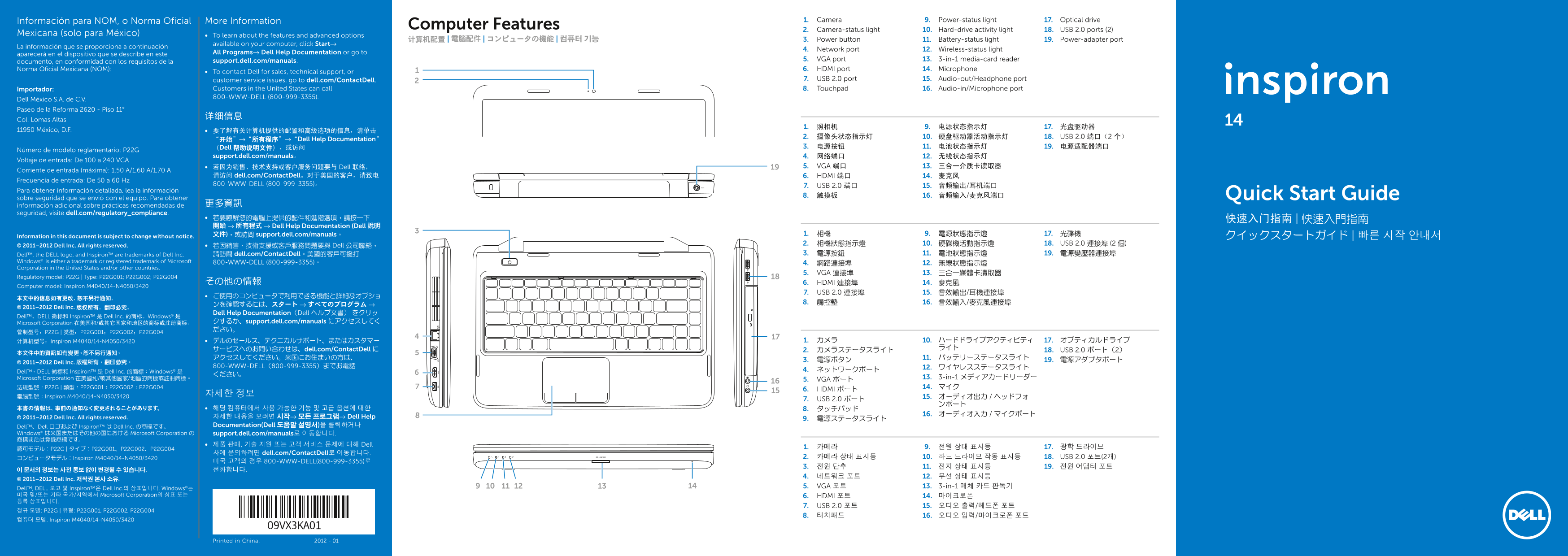
Page 1 Text Content
Información para NOM, o Norma Oficial More Information 1. Camera 9. Power-status light 17. Optical drive
Computer Features
2. Camera-status light 10. Hard-drive activity light 18. USB 2.0 ports (2)
Mexicana (solo para México) To learn about the features and advanced options
计算机配置 | 電腦配件 | コンピュータの機能 | 컴퓨터 기능 3. Power button 11. Battery-status light 19. Power-adapter port
available on your computer, click Start→
La información que se proporciona a continuación
4. Network port 12. Wireless-status light
aparecerá en el dispositivo que se describe en este All Programs→ Dell Help Documentation or go to
support.dell.com/manuals. 5. VGA port 13. 3-in-1 media-card reader
documento, en conformidad con los requisitos de la
Norma Oficial Mexicana (NOM): 6. HDMI port 14. Microphone
To contact Dell for sales, technical support, or
customer service issues, go to dell.com/Contact Dell. 7. USB 2.0 port 15. Audio-out/Headphone port
Importador: Customers in the United States can call 8. Touchpad 16. Audio-in/Microphone port 800-WWW-DELL (800-999-3355).
Dell México S.A. de C.V. Paseo de la Reforma 2620 - Piso 11°
Col. Lomas Altas
11950 México, D.F. 要了解有关计算机提供的配置和高级选项的信息,请单击
2. 摄像头状态指示灯 10. 硬盘驱动器活动指示灯 18. USB 2.0 端口(2 个)
“开始”→“所有程序”→“Dell Help Documentation”
(Dell 帮助说明文件),或访问 3. 电源按钮 11. 电池状态指示灯 19. 电源适配器端口
Número de modelo reglamentario: P22G
support.dell.com/manuals。 4. 网络端口 12. 无线状态指示灯
Voltaje de entrada: De 100 a 240 VCA
若因为销售、技术支持或客户服务问题要与 Dell 联络, 5. VGA 端口 13. 三合一介质卡读取器
Corriente de entrada (máxima): 1,50 A/1,60 A/1,70 A
请访问 dell.com/Contact Dell。对于美国的客户,请致电 6. HDMI 端口 14. 麦克风
Frecuencia de entrada: De 50 a 60 Hz
800-WWW-DELL (800-999-3355)。
7. USB 2.0 端口 15. 音频输出/耳机端口
Para obtener información detallada, lea la información
8. 触摸板 16. 音频输入/麦克风端口 Quick Start Guide
sobre seguridad que se envió con el equipo. Para obtener
información adicional sobre prácticas recomendadas de 更多資訊
seguridad, visite dell.com/regulatory_compliance.
若要瞭解您的電腦上提供的配件和進階選項,請按一下 快速入门指南 | 快速入門指南 開始 → 所有程式 → Dell Help Documentation (Dell 說明
文件),或訪問 support.dell.com/manuals。 1. 相機 9. 電源狀態指示燈 17. 光碟機
Information in this document is subject to change without notice. クイックスタートガイド | 빠른 시작 안내서
2. 相機狀態指示燈 10. 硬碟機活動指示燈 18. USB 2.0 連接埠 (2 個)
© 2011–2012 Dell Inc. All rights reserved. 若因銷售、技術支援或客戶服務問題要與 Dell 公司聯絡,
Dell™, the DELL logo, and Inspiron™ are trademarks of Dell Inc. 請訪問 dell.com/Contact Dell。美國的客戶可撥打 3. 電源按鈕 11. 電池狀態指示燈 19. 電源變壓器連接埠
Windows® is either a trademark or registered trademark of Microsoft 800-WWW-DELL (800-999-3355)。
Corporation in the United States and/or other countries.
5. VGA 連接埠 13. 三合一媒體卡讀取器
Regulatory model: P22G | Type: P22G001; P22G002; P22G004
その他の情報 6. HDMI 連接埠 14. 麥克風
Computer model: Inspiron M4040/14-N4050/3420
7. USB 2.0 連接埠 15. 音效輸出/耳機連接埠
© 2011–2012 Dell Inc. 版权所有,翻印必究。
Dell Help Documentation(Dell ヘルプ文書) をクリッ
Dell™、DELL 徽标和 Inspiron™ 是 Dell Inc. 的商标。Windows® 是
Microsoft Corporation 在美国和/或其它国家和地区的商标或注册商标。 クするか、support.dell.com/manuals にアクセスしてく ださい。
计算机型号:Inspiron M4040/14-N4050/3420 デルのセールス、テクニカルサポート、またはカスタマー 1. カメラ 10. ハードドライブアクティビティ 17. オプティカルドライブ
サービスへのお問い合わせは、dell.com/Contact Dell に ライト
2. カメラステータスライト 18. USB 2.0 ポート(2)
© 2011–2012 Dell Inc. 版權所有,翻印必究。
800-WWW-DELL(800-999-3355)までお電話 12. ワイヤレスステータスライト
Dell™、DELL 徽標和 Inspiron™ 是 Dell Inc. 的商標;Windows® 是 4. ネットワークポート
Microsoft Corporation 在美國和/或其他國家/地區的商標或註冊商標。 13. 3-in-1 メディアカードリーダー
5. VGA ポート
6. HDMI ポート
電腦型號:Inspiron M4040/14-N4050/3420 자세한 정보
7. USB 2.0 ポート
© 2011–2012 Dell Inc. All rights reserved. 자세한 내용을 보려면 시작→ 모든 프로그램→ Dell Help
Dell™、Dell ロゴおよび Inspiron™ は Dell Inc. の商標です。 Documentation(Dell 도움말 설명서)을 클릭하거나
Windows® は米国またはその他の国における Microsoft Corporation の support.dell.com/manuals로 이동합니다. 商標または登録商標です。
제품 판매, 기술 지원 또는 고객 서비스 문제에 대해 Dell
사에 문의하려면 dell.com/Contact Dell로 이동합니다.
コンピュータモデル:Inspiron M4040/14-N4050/3420 2. 카메라 상태 표시등 10. 하드 드라이브 작동 표시등 18. USB 2.0 포트(2개)
미국 고객의 경우 800-WWW-DELL(800-999-3355)로
© 2011–2012 Dell Inc. 저작권 본사 소유.
Dell™, DELL 로고 및 Inspiron™은 Dell Inc.의 상표입니다. Windows®는 5. VGA 포트 13. 3-in-1 매체 카드 판독기
미국 및/또는 기타 국가/지역에서 Microsoft Corporation의 상표 또는 6. HDMI 포트 14. 마이크로폰 등록 상표입니다.
7. USB 2.0 포트 15. 오디오 출력/헤드폰 포트
컴퓨터 모델: Inspiron M4040/14-N4050/3420
Printed in China. 2012 - 01
Page Summary Contents For Dell Quick User Guide - Windows 7
Manual Details
| Brand | Dell |
|---|---|
| Pages | 2 |
| File Size | 1.04 MB |
| Published | June 27, 2026 |
Enter the captcha to get the download link:

Frequently Asked Questions
如何连接外部显示器?
将电源适配器连接到电脑,然后使用相应接口(如HDMI或VGA)切换至外部ディスプレイ。
有哪些主要的输入/输出端口?
该设备拥有网络端口、VGA端口、HDMI端口、USB 2.0端口(x2)、音频输出/耳机端口以及音频输入/麦克风端口。
如果忘记密码,应采取什么措施?
本手册未提供重置密码的特定步骤;请参考Dell官方网站或联系技术支持获取帮助。