Dell Latitude 7480 Quick User Guide - Windows 7
Summary
This Quick Start Guide for the Dell Latitude 7480 notebook (Model P73G, Regulatory Type P73G001) provides setup instructions for Windows 7, covering power adapter connection, operating system setup, password configuration, and computer protection measures. It includes Taiwan RoHS compliance documentation with material substance declarations, RF safety guidelines for maintaining minimum distance from the body, and regulatory model identification. Designed for enterprise IT teams deploying premium business ultrabooks.
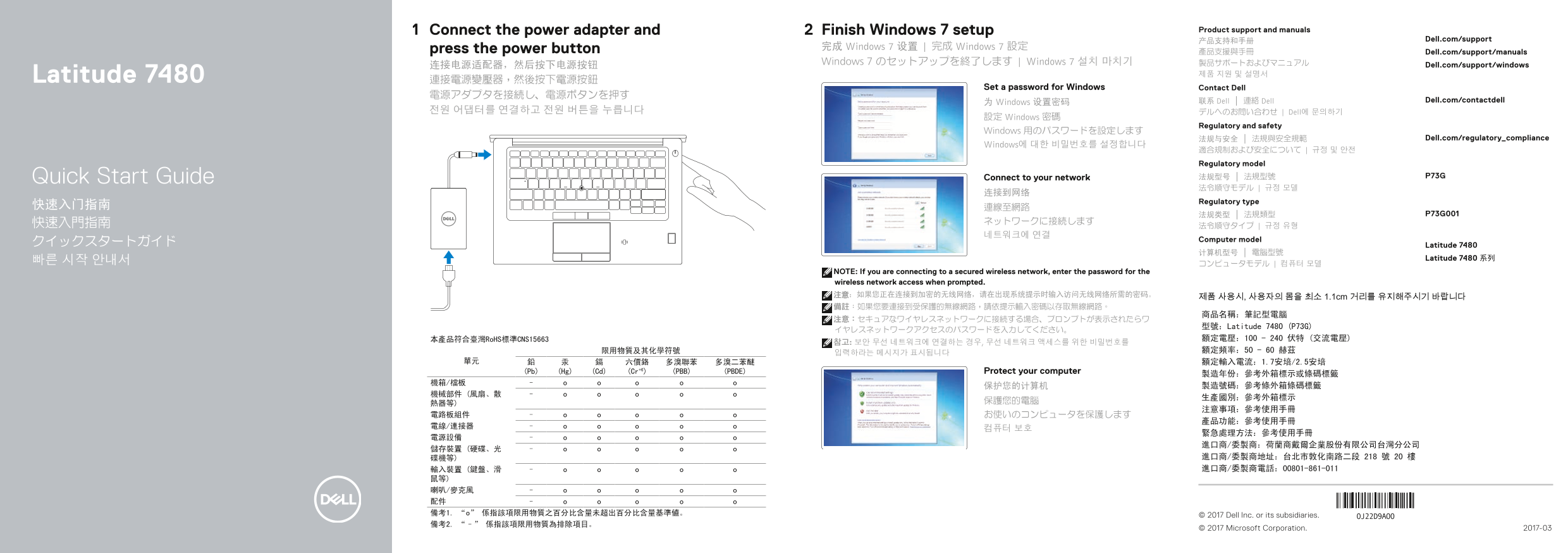
Page 1 Text Content
Connect the power adapter and Finish Windows 7 setup Product support and manuals
产品支持和手册 Dell.com/support
press the power button 完成 Windows 7 设置 | 完成 Windows 7 設定
產品支援與手冊 Dell.com/support/manuals
Windows 7 のセットアップを終了します | Windows 7 설치 마치기 製品サポートおよびマニュアル Dell.com/support/windows
Latitude 7480 제품 지원 및 설명서
Set a password for Windows Contact Dell
为 Windows 设置密码 联系 Dell | 連絡 Dell Dell.com/contactdell
전원 어댑터를 연결하고 전원 버튼을 누릅니다 デルへのお問い合わせ | Dell에 문의하기
設定 Windows 密碼
Regulatory and safety
Windows 用のパスワードを設定します
法规与安全 | 法規與安全規範 Dell.com/regulatory_compliance
Windows에 대한 비밀번호를 설정합니다
適合規制および安全について | 규정 및 안전 Regulatory model
Quick Start Guide Connect to your network 法规型号 | 法規型號 P73G
Regulatory type
Computer model
クイックスタートガイド Latitude 7480
Latitude 7480 系列
NOTE: If you are connecting to a secured wireless network, enter the password for the wireless network access when prompted. 注意:如果您正在连接到加密的无线网络,请在出现系统提示时输入访问无线网络所需的密码。 제품 사용시, 사용자의 몸을 최소 1.1cm 거리를 유지해주시기 바랍니다 備註:如果您要連接到受保護的無線網路,請依提示輸入密碼以存取無線網路。
型號:Latitude 7480 (P73G)
本產品符合臺灣Ro HS標準CNS15663 額定電壓:100 - 240 伏特 (交流電壓)
(Pb) (Hg) (Cd) (Cr+6) (PBB) (PBDE) Protect your computer
鼠等) 喇叭/麥克風 配件 備考1. “o” 係指該項限用物質之百分比含量未超出百分比含量基準値。 © 2017 Dell Inc. or its subsidiaries. 備考2. “–” 係指該項限用物質為排除項目。
© 2017 Microsoft Corporation. 2017-03
Page Summary Contents For Dell Latitude 7480 Quick User Guide - Windows 7
Manual Details
| Brand | Dell |
|---|---|
| Pages | 2 |
| File Size | 535.95 KB |
| Published | July 01, 2026 |
Enter the captcha to get the download link:

Frequently Asked Questions
How do I connect to an external monitor?
You can use the HDMI port, or utilize DisplayPort connectivity via the USB Type-C port.
What is required when connecting to a secure wireless network?
If prompted, you must enter the specific password needed to access the secure wireless network.
Where should I look for the laptop's manufacturing information?
Please reference the outer box label or barcode tag, and consult the service manual for detailed component information.
Does the system support mobile connectivity options?
Yes, it includes a dedicated USIM port and optionally features an NFC sensor.
How are critical components like batteries protected?
It emphasizes general care by stating to 'Protect your computer' and refers users to consult the user manual for specifics.