Dell Latitude 5580 Quick User Guide - Windows 7
Summary
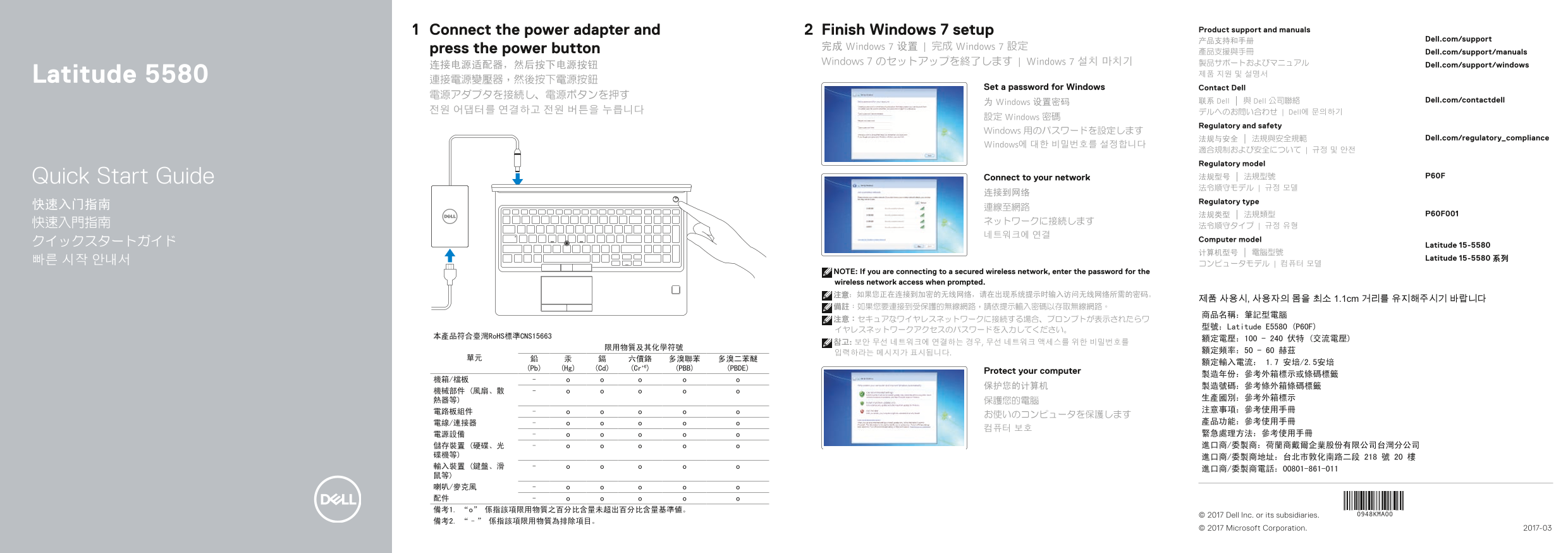
Dell Latitude 5580 Quick Start Guide (Regulatory Model P60F, Regulatory Type P60F001). This multilingual setup guide covers power adapter connection, Windows 7 setup with password configuration, network connectivity, and computer features. Includes Taiwan RoHS compliance table (CNS15663) with restricted substance declarations, Chinese product certification with rated voltage/frequency/current specs, and keyboard shortcut reference.
Page 1 Text Content
Connect the power adapter and Finish Windows 7 setup Product support and manuals
产品支持和手册 Dell.com/support
press the power button 完成 Windows 7 设置 | 完成 Windows 7 設定
產品支援與手冊 Dell.com/support/manuals
Windows 7 のセットアップを終了します | Windows 7 설치 마치기 製品サポートおよびマニュアル Dell.com/support/windows
Latitude 5580 제품 지원 및 설명서
Set a password for Windows Contact Dell
为 Windows 设置密码 联系 Dell | 與 Dell 公司聯絡 Dell.com/contactdell
전원 어댑터를 연결하고 전원 버튼을 누릅니다 デルへのお問い合わせ | Dell에 문의하기
設定 Windows 密碼
Regulatory and safety
Windows 用のパスワードを設定します
法规与安全 | 法規與安全規範 Dell.com/regulatory_compliance
Windows에 대한 비밀번호를 설정합니다
適合規制および安全について | 규정 및 안전 Regulatory model
Quick Start Guide Connect to your network 法规型号 | 法規型號 P60F
Regulatory type
Computer model
クイックスタートガイド Latitude 15-5580
Latitude 15-5580 系列
NOTE: If you are connecting to a secured wireless network, enter the password for the wireless network access when prompted. 注意:如果您正在连接到加密的无线网络,请在出现系统提示时输入访问无线网络所需的密码。
제품 사용시, 사용자의 몸을 최소 1.1cm 거리를 유지해주시기 바랍니다
型號:Latitude E5580 (P60F)
本產品符合臺灣Ro HS標準CNS15663
(Pb) (Hg) (Cd) (Cr+6) (PBB) (PBDE)
Protect your computer
© 2017 Dell Inc. or its subsidiaries.
© 2017 Microsoft Corporation. 2017-03
Page Summary Contents For Dell Latitude 5580 Quick User Guide - Windows 7
Manual Details
| Brand | Dell |
|---|---|
| Pages | 2 |
| File Size | 551.61 KB |
| Published | July 02, 2026 |
Enter the captcha to get the download link:
