Dell Latitude 14 3480 3488 Quick User Guide - Windows 7, 8.1
Summary
Dell Latitude 14 3488 Quick Start Guide. This multilingual guide provides initial setup instructions for the Latitude 14 3000 Series laptop, including Windows setup, security configuration, Dell app location, and feature overview. Target users: business users and enterprise customers deploying Dell Latitude laptops.
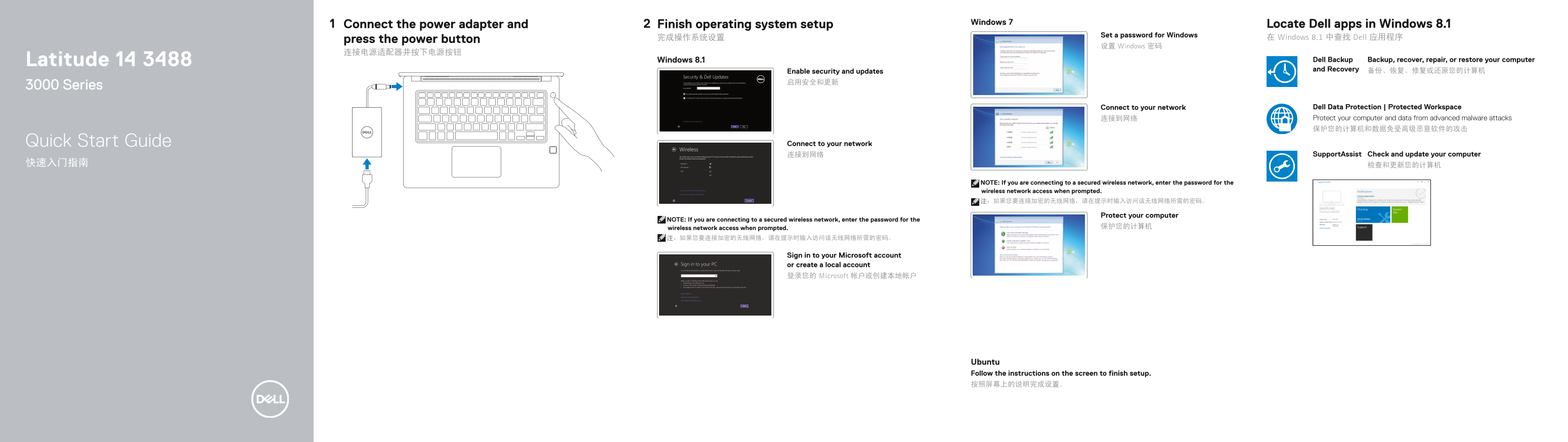
Page 1 Text Content
Windows 7 Locate Dell apps in Windows 8.1
Connect the power adapter and Finish operating system setup
Set a password for Windows
press the power button 完成操作系统设置 在 Windows 8.1 中查找 Dell 应用程序
设置 Windows 密码
Latitude 14 3488 Windows 8.1 Dell Backup Backup, recover, repair, or restore your computer and Recovery 备份、恢复、修复或还原您的计算机
Enable security and updates 启用安全和更新
3000 Series
Connect to your network Dell Data Protection | Protected Workspace 连接到网络 Protect your computer and data from advanced malware attacks 保护您的计算机和数据免受高级恶意软件的攻击
Quick Start Guide Connect to your network
连接到网络 Support Assist Check and update your computer
NOTE: If you are connecting to a secured wireless network, enter the password for the wireless network access when prompted. 注:如果您要连接加密的无线网络,请在提示时输入访问该无线网络所需的密码。
Protect your computer
NOTE: If you are connecting to a secured wireless network, enter the password for the
wireless network access when prompted. 保护您的计算机
Sign in to your Microsoft account or create a local account 登录您的 Microsoft 帐户或创建本地帐户
Ubuntu Follow the instructions on the screen to finish setup. 按照屏幕上的说明完成设置。
Page Summary Contents For Dell Latitude 14 3480 3488 Quick User Guide - Windows 7, 8.1
Manual Details
| Brand | Dell |
|---|---|
| Pages | 2 |
| File Size | 1.13 MB |
| Published | June 24, 2026 |
Enter the captcha to get the download link:

Frequently Asked Questions
What should I do when connecting to a secure wireless network?
When prompted, you must enter the specific password required for wireless network access.
How can I recover or restore data if needed?
You can use Dell Backup to assist with backing up, recovering, repairing, or restoring your computer.
What types of ports and connectivity options are available on the laptop?
It offers USB 3.0, VGA, HDMI, a memory card reader, USB 2.0, optional SIM slot, and network ports.
Are all camera features available on standard models?
Some items, such as infrared cameras and microphones, are marked 'Touch version only,' indicating feature limitations based on the model variant.