Dell Latitude 14 3480 3488 Quick User Guide - Windows 10
Summary
Quick Start Guide for the Dell Latitude 14 3480 3000 Series business laptop (Regulatory Model P79G). Multi-language document covering power adapter connection, Windows 10 setup completion, and network connectivity. Details hardware features including camera, infrared camera option for touch versions, fingerprint scanner option, Noble wedge security slot, USB 3.0 with PowerShare, HDMI, and VGA ports.
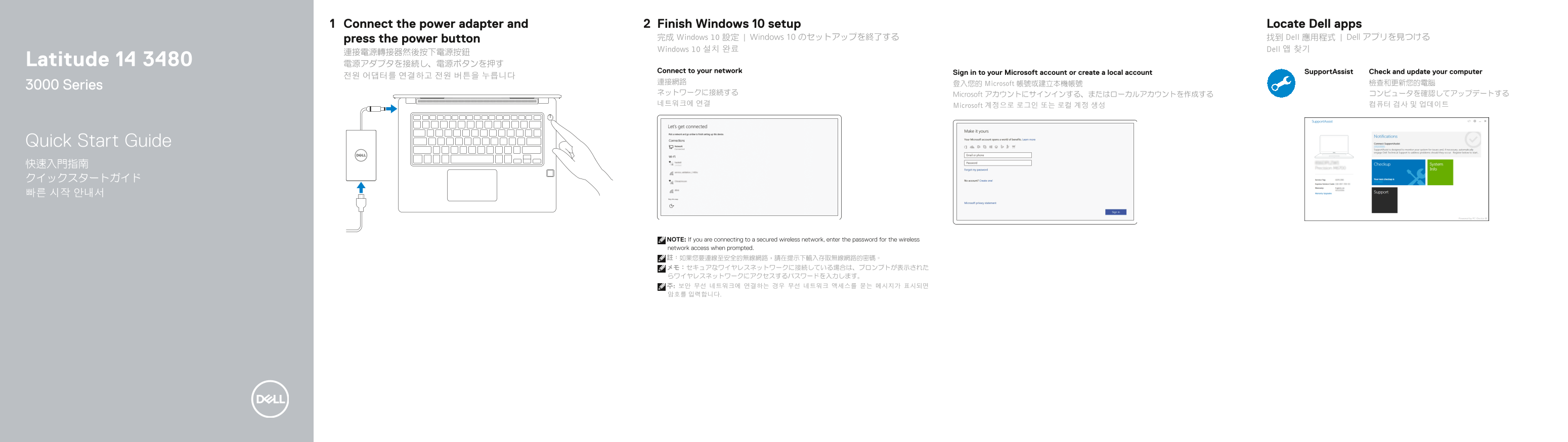
Page 1 Text Content
Connect the power adapter and Finish Windows 10 setup Locate Dell apps press the power button 完成 Windows 10 設定 | Windows 10 のセットアップを終了する 找到 Dell 應用程式 | Dell アプリを見つける Windows 10 설치 완료 Dell 앱 찾기
Latitude 14 3480 電源アダプタを接続し、電源ボタンを押す
Connect to your network Sign in to your Microsoft account or create a local account Support Assist Check and update your computer
連接網路 登入您的 Microsoft 帳號或建立本機帳號 檢查和更新您的電腦
3000 Series
ネットワークに接続する Microsoft アカウントにサインインする、またはローカルアカウントを作成する コンピュータを確認してアップデートする 네트워크에 연결 Microsoft 계정으로 로그인 또는 로컬 계정 생성 컴퓨터 검사 및 업데이트
Quick Start Guide 快速入門指南 クイックスタートガイド 빠른 시작 안내서
NOTE: If you are connecting to a secured wireless network, enter the password for the wireless network access when prompted. 註:如果您要連線至安全的無線網路,請在提示下輸入存取無線網路的密碼。 メモ:セキュアなワイヤレスネットワークに接続している場合は、プロンプトが表示された らワイヤレスネットワークにアクセスするパスワードを入力します。 주: 보안 무선 네트워크에 연결하는 경우 무선 네트워크 액세스를 묻는 메시지가 표시되면 암호를 입력합니다.
Page Summary Contents For Dell Latitude 14 3480 3488 Quick User Guide - Windows 10
Manual Details
| Brand | Dell |
|---|---|
| Pages | 2 |
| File Size | 657.53 KB |
| Published | July 02, 2026 |
Enter the captcha to get the download link:

Frequently Asked Questions
How do I connect if my wireless network is secured?
You must enter the specific password for the wireless network access when prompted during setup.
Which USB 3.0 port supports extra power functionality?
There is a dedicated USB 3.0 connection port equipped with PowerShare capability.
What model information or support documentation should I check?
You can find product support and manuals at Dell.com/support and specialized feature guides at Dell.com/support/manuals.