Dell Latitude 3470 Quick User Guide - Windows 10
Summary
This Quick Start Guide for the Dell Latitude 14 3000 Series notebook provides multilingual setup instructions covering power adapter connection, Windows 10 setup, network connectivity, and support and protection enablement. It includes Dell Product Registration, SupportAssist for system health monitoring, and a comprehensive hardware features diagram identifying 22 components including camera, microphone, VGA and HDMI connectors, USB ports, memory card reader, fingerprint reader, and battery release latch. Designed for business and education users.
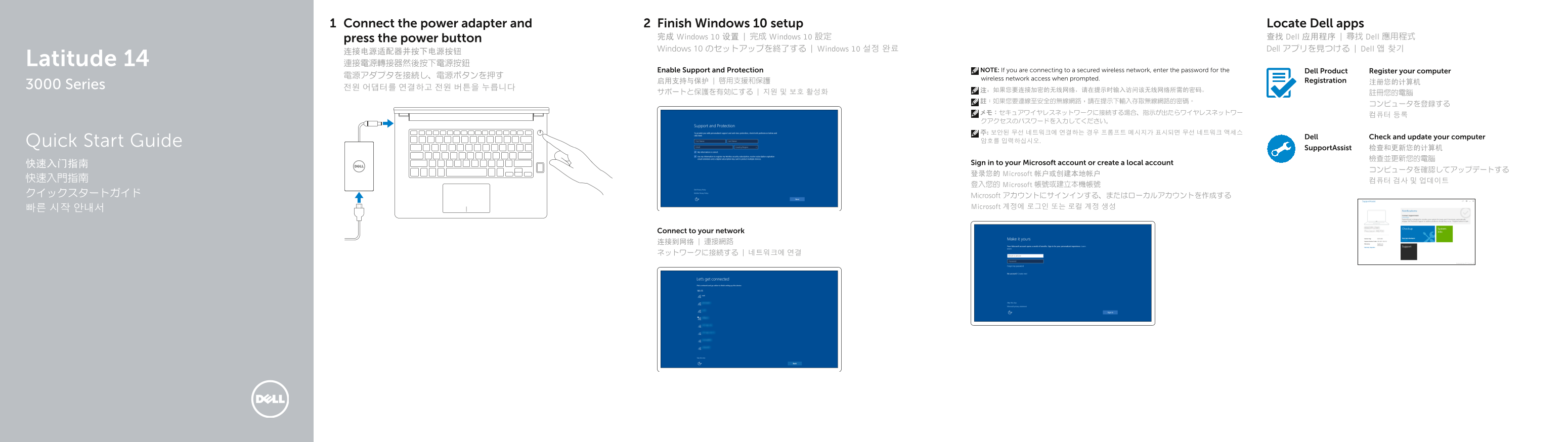
Page 1 Text Content
Connect the power adapter and Finish Windows 10 setup Locate Dell apps
press the power button 完成 Windows 10 设置 | 完成 Windows 10 設定 查找 Dell 应用程序 | 尋找 Dell 應用程式 Windows 10 のセットアップを終了する | Windows 10 설정 완료 Dell アプリを見つける | Dell 앱 찾기
Latitude 14 連接電源轉接器然後按下電源按鈕
Enable Support and Protection NOTE: If you are connecting to a secured wireless network, enter the password for the Dell Product Register your computer
wireless network access when prompted.
启用支持与保护 | 啟用支援和保護 Registration 注册您的计算机
3000 Series 전원 어댑터를 연결하고 전원 버튼을 누릅니다
Dell Check and update your computer
Quick Start Guide 암호를 입력하십시오.
Support Assist 检查和更新您的计算机
快速入门指南 Sign in to your Microsoft account or create a local account
登录您的 Microsoft 帐户或创建本地帐户
登入您的 Microsoft 帳號或建立本機帳號
クイックスタートガイド Microsoft アカウントにサインインする、またはローカルアカウントを作成する
빠른 시작 안내서 Microsoft 계정에 로그인 또는 로컬 계정 생성
Connect to your network 连接到网络 | 連接網路 ネットワークに接続する | 네트워크에 연결
Page Summary Contents For Dell Latitude 3470 Quick User Guide - Windows 10
Manual Details
| Brand | Dell |
|---|---|
| Pages | 2 |
| File Size | 560.44 KB |
| Published | July 01, 2026 |
Enter the captcha to get the download link:

Frequently Asked Questions
无线网络连接需要输入密码吗?
是的,如果连接到安全无线网络,在提示时需要输入相应的密码。
更换电池后如何操作?
请留意电源和电池的接口,并熟悉电池释放闩锁的位置。
哪些端口支持视频输出?
该设备具备HDMI连接器和VGA连接器两个视频输出端口。
如何查找电脑的型号信息?
可以在设备的底部或通过服务标签(Service-tag label)获取。